
Search and filter requests
The ApiTraffic search language: every field, operator and value format, exclusions, body search, limits, the filter builder and ready-made queries.
Every request ApiTraffic captures can be found with a short query such as status_code >= 500 AND url_path like "/v1/payments/*". The same language (the criteria language) is used everywhere you pick out requests: the request log, stream views, workflows, exclusions, embeds, the REST API and the MCP server. Learn it once and use it in all of them.
Build a filter in the request log
Open any request log view (All Traffic, Inbound Traffic, Outbound Traffic, Errors or Captures). The filter bar sits above the status code chart.
Start a filter
Select Click to add filter…. A Field menu opens, grouped into Request, Response, Performance, Firewall and Metadata. Type in Search fields to narrow it.
Pick the field and, for keyed fields, the key
For Request Header, Response Header, Query Param and Tag, a Context menu follows with the keys seen in the current results. Choose Other to type a key that isn’t listed.
Pick an operator and enter a value
Choose an Operator, then type a Value. Fields with known values, such as Method or Status Code, also offer Suggestions; you can still type anything. For like, the placeholder reminds you that * matches anything.
Add it
Select Add or press Enter. The condition becomes a chip and the log reloads. Add more filters with the + after the last chip; every chip is joined with AND.
Building a second filter with the filter builder.
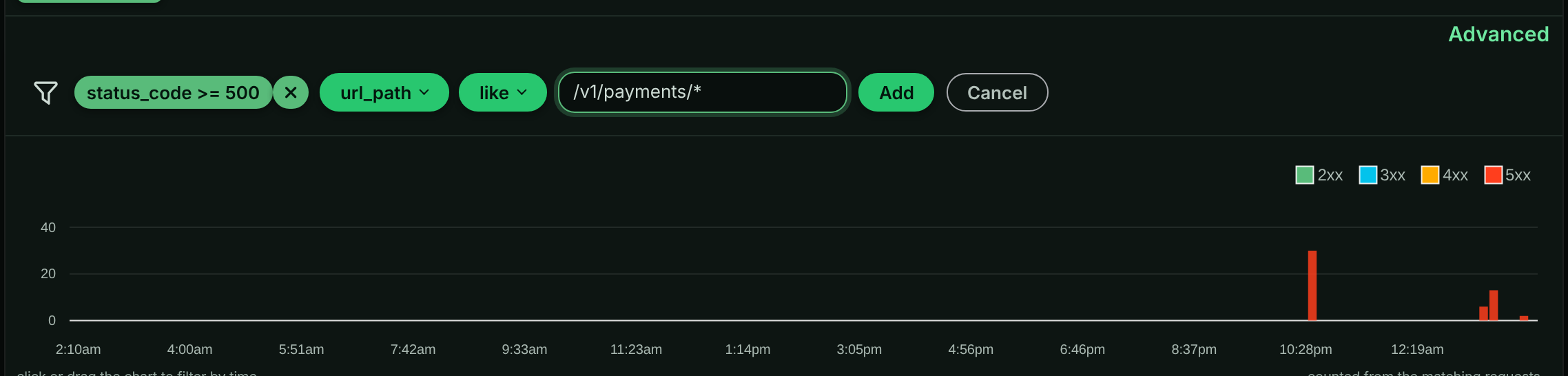
Select a chip to edit it (Update saves the change), or the × on a chip to remove it. Removing the last chip shows the view’s full log again.
Type a query in Advanced mode
Select Advanced above the filter bar to edit the query as text. Press Enter (or move focus out of the box) to run it; Shift+Enter adds a line break. Select Filter builder to go back to chips.
The same kind of filter typed in Advanced mode.

Advanced mode accepts every field in this page, including the ones the builder doesn’t list (received, capture, sid, context_sid, body search and the AI traffic fields).
Link to a filtered log
The request log reads a criteria query parameter, so you can bookmark or send a pre-filtered view. URL-encode the query:
https://app.apitraffic.io/buckets/<bucketSid>/errors?criteria=url_path%20like%20%22%2Fv1%2Fpayments%2F*%22
To keep a filter for the whole team, save it as a stream view instead.
Query syntax
A query is one or more conditions joined with AND:
field operator value
field:key operator value
field operator value AND field operator value
- Join with uppercase
AND, with a space on each side. Lowercaseandis not a separator, and neither isANDinside a word:tag:db == ORACLEandtag:os == ANDROIDare one condition each. To match the wordANDorORon its own, quote it (tag:op == "OR"). - Put string values in double quotes:
method == "POST". A quoted value can contain spaces and operators. Inside quotes, write\"for a literal double quote and\\for a backslash. - Write numbers without quotes:
status_code >= 500,duration > 1000. - Keyed fields name the key after a colon:
request_header:content-type == "application/json",tag:tenant == "acme". - Field names are checked. An unknown field is rejected with
Invalid Condition: The keyword ... is not valid., so a typo shows an error instead of quietly returning the wrong requests. - A query can have at most 50 conditions when it is saved (stream views, workflows), and each value at most 1,024 characters.
Warning: Conditions can only be combined with AND, and parentheses aren’t supported. A query with
ORbetween conditions is refused withInvalid Syntax: OR is not supported. To see two alternatives, run two searches, or uselikewith a wildcard where the values share a pattern (url_path like "/v1/cart/*").
ORused to be accepted and silently treated like AND. Stream views, workflows, exclusion rules and firewall criteria rules saved that way keep running as they always have, as AND (every condition must match), but can’t be saved again until OR is replaced: writeANDto keep what they do, or make one per alternative. A saved view with OR shows the error when you open it.
Operators
| Operator | Meaning | Works on |
|---|---|---|
== |
Equals | Every field |
!= |
Does not equal | Every field |
> >= < <= |
Greater than, at least, less than, at most | Numbers and received; also tags and headers whose values are numbers |
like |
Matches a wildcard pattern | Text fields |
How like works. The pattern must match the whole value. * matches any run of characters (including none) and is the only wildcard; every other character, including %, _, ? and ., is literal. Matching is case-sensitive.
| Pattern | Matches | Doesn’t match |
|---|---|---|
url_path like "/v1/orders*" |
/v1/orders, /v1/orders/ord_9f… |
/V1/orders, /api/v1/orders |
url_path like "*/capture" |
/v1/payments/pi_3f…/capture |
/v1/payments/pi_3f…/capture/retry |
request_header:user-agent like "*curl*" |
curl/8.4.0 |
Curl/8.4.0 |
Note: Exclusion rules and firewall criteria rules run inside your SDK, where a
likevalue is a regular expression rather than a wildcard pattern. Everywhere else (search, stream views, workflows),likeis the wildcard match above.A firewall criteria rule decides before your API responds, so it can only use request fields:
method,url,url_path,host,request_header,query_param,request_size(theContent-Lengthheader) anddirection. Your SDK also reads a firewall criteria rule more simply than search does: a leading-or!is ignored by SDK releases before the current one, header names must be lower case, escapes, quotes or operators inside a value aren’t read the same way, and>,>=,<and<=comparerequest_sizeas text, and headers and query parameters as text in SDK releases before the current one ("999"is greater than"1000"), so only==and!=work on them. From the current release on, a firewall criteria rule onquery_param:also sees the bracketed forms of the parameter:?debug[]=1,?debug[0]=1,?debug[a]=1and?[debug]=1count as values ofdebug, as Express 4 (the qs query parser) hands them to your app. With a parser that keepsdebug[]as its own key (Express 5’s default, Fastify), the rule can match requests your app does not read asdebug. Saving a policy whose criteria rule uses another field, an unknown field, any of those, or criteria that can’t be parsed is refused. To match the opposite, use!=or set the rule’snegatefield.Exclusion rules are read the same way, so an exclusion with a leading
-or!, with>,>=,<or<=on a header, query parameter, tag,request_size,response_size,waf_scoreor a text field, or with a condition onreceived(SDK releases before the current one never read it), is refused too, and one saved before is sent to your servers turned off. See Exclusions.
Exclude matching requests
Put - (or !) in front of a field to keep only the requests a condition does not match (not in exclusion or firewall criteria rules; use != there):
-url_path like "/v1/products*"
status_code >= 400 AND -status_code == 404
Missing values
A condition on a value a request doesn’t carry, such as a tag or header it doesn’t have, never matches. That includes !=: tag:tenant != "acme" matches requests that have a tenant tag with another value, not requests without the tag. An exclusion is the opposite, so -tag:tenant == "acme" keeps requests without the tag too.
When a tag or header repeats, the condition matches if any of its values does (for !=, if none equals).
Fields
Request fields
| Field | Type | Operators | Description |
|---|---|---|---|
method |
text | == != |
HTTP method, uppercase: GET, POST, PUT, PATCH, DELETE, OPTIONS, HEAD, CONNECT, TRACE. |
endpoint |
text | == != like |
The normalized endpoint template, without the method, for example /v1/orders/{order_id}. |
endpoint_kind |
text | == != |
rest, graphql, mcp or jsonrpc. |
url_path |
text | == != like |
The path only, without host or query string. Best with like. |
url |
text | == != like |
The full URL, including the query string. |
host |
text | == != like |
The host the request was sent to. For outbound traffic, the upstream API’s host. |
request_size |
number | all numeric | Request body size in bytes. |
request_header: |
text | == != like, numeric |
A request header. Write the name in lowercase, for example request_header:user-agent. |
query_param: |
text | == != like |
A query string parameter. See the note below. |
Warning:
query_paramis evaluated by stream view workflows and by exclusion rules, but the request log can’t search on it yet. To find a query parameter in the log, match the full URL instead:url like "*page=7*".
Response fields
| Field | Type | Operators | Description |
|---|---|---|---|
status_code |
number | all numeric | HTTP status code. |
duration |
number | all numeric | Total duration in milliseconds. |
response_size |
number | all numeric | Response body size in bytes. |
response_header: |
text | == != like, numeric |
A response header, for example response_header:x-cache == "MISS". |
Metadata fields
| Field | Type | Operators | Description |
|---|---|---|---|
direction |
text | == != |
in for requests your API received, out for calls your application made. |
tag: |
text | == != like, numeric |
A tag your code attached to the request. |
instance |
text | == != |
The server process that handled the request, by id (ins_…). |
machine |
text | == != |
The host the request was served from. Stable across restarts and redeploys. |
received |
date and time | all numeric | When your server received the request, as your SDK reported it (for traffic sent through the relay, when the relay received it). A reported time more than 1 minute ahead of or 5 minutes behind ApiTraffic’s clock is replaced by the time ApiTraffic received the request, as it is for requests captured before this behavior was introduced (late 2026). Use ISO 8601 in quotes: received >= "2026-10-19T14:00:00Z". A date alone is midnight UTC, a time without Z or an offset is UTC, and times compare to the millisecond. Not available in exclusions or firewall criteria rules. Advanced mode only. |
capture |
true or false | == != |
true for captures. Every view except Captures already adds capture == false. Not available in exclusions or firewall criteria rules: they run in your SDK, and a capture never comes from an SDK. Advanced mode only. |
sid |
text | == != |
One request’s id, such as sid == "req_2Yq…". This is what Open in the traffic log on a drift finding or firewall match uses. Not available in exclusions or firewall criteria rules. Advanced mode only. |
context_sid |
text | == != |
The correlation id shared by an inbound request and the outbound calls it made. Advanced mode only. |
country |
text | == != |
The two-letter, upper-case ISO 3166-1 code of the country the client’s IP address was located in when the request was received, for example country == "DE". Requests without a located address match only !=. Not available in exclusions: they run in your SDK, before the country is known. Firewall criteria rules can use it with == and !=: your servers look the client up in the IP ranges the policy carries (see Criteria rules on country). Advanced mode only. |
Performance fields
Performance fields come from APM. They are filled in only for traffic from SDKs with APM enabled; elsewhere they read as 0.
| Field | Description |
|---|---|
db_time_ms, db_query_count |
Time spent in database queries, and how many ran. |
http_out_time_ms, http_out_count |
Time spent on outbound HTTP calls, and how many were made. |
redis_time_ms, redis_op_count |
Time and operations in Redis. |
cache_time_ms, cache_op_count |
Time and operations in caches. |
queue_time_ms, queue_op_count |
Time and operations in queues. |
rpc_time_ms, rpc_op_count |
Time and calls over RPC. |
span_count |
Spans recorded for the request. |
spans_dropped |
Spans the SDK dropped for the request, for example over its span budget. |
concurrency |
Requests in flight: other requests already running on the same server when this one arrived. |
event_loop_delay_ms |
How far behind the server’s event loop was when the request arrived. |
All performance fields are numbers and take every numeric operator.
Firewall fields
The web application firewall records its decision on each inbound request it matches. These fields read that decision. They are shorthand for the waf.* tags, so waf_action == "block" and tag:waf.action == "block" are the same query.
| Field | Operators | Description |
|---|---|---|
waf_matched |
== != |
"1" when the firewall matched the request. |
waf_action |
== != |
The decision: tag, would-block or block. |
waf_score |
all numeric | The anomaly score the request accumulated. |
waf_rule |
== != |
Id of the rule that decided the request. |
waf_policy |
== != |
Id of the policy that made the decision. |
waf_reason |
== != |
Why the decision was made, as shown in the request’s WAF tab. |
waf_mode |
== != |
The policy’s mode when the request ran: detect or block. |
AI traffic fields
For MCP, JSON-RPC and LLM API calls, ApiTraffic records a short summary you can search in Advanced mode:
| Field | Type | Description |
|---|---|---|
ai_kind |
text | mcp, jsonrpc or llm. |
ai_provider |
text | The LLM provider. |
ai_model |
text | The model requested or reported. |
rpc_method |
text | The JSON-RPC or MCP method, for example tools/call. |
mcp_tool |
text | The tool named by an MCP tools/call. |
ai_message_count, ai_tool_count |
number | Messages sent, and tools offered or listed. |
ai_input_tokens, ai_output_tokens, ai_cached_input_tokens |
number | Token counts reported by the provider. |
These fields are not available in exclusions or firewall criteria rules. Both run in your SDK, and ApiTraffic works out the summary only after the SDK has sent the request, so saving an exclusion or a policy that uses one of these fields is refused.
Search request and response bodies
Two more fields search the bodies themselves, in Advanced mode:
| Field | Operators | Description |
|---|---|---|
request_body |
== != like |
The request body as text. |
response_body |
== != like |
The response body as text. |
Body fields search what ApiTraffic stored, so they are not available in exclusions or firewall criteria rules. like matches the whole body, so wrap the text you are looking for in *:
response_body like "*out_of_stock*"
method == "POST" AND request_body like "*shippingAddress*"
Body search needs all of the following:
- A plan that includes Body search. Without it, a body condition is refused with
Body search criteria requires body-search entitlement. - Body logging turned on for the bucket. Bodies are indexed for search only when the bucket’s
searchBodyLoggingsetting isrequest,responseorboth. It isnoneby default and is set through the buckets API. Changing it affects newly captured traffic only. - Bodies within your plan’s body retention. Older bodies are no longer stored and can’t match.
Bodies are indexed after redaction, so redacted values can’t be found by searching for them.
Warning: A body search finds at most the 2,000 newest matching requests per lookup. The request log keeps paging back through older matches as you scroll, but the status code chart and other counts can’t, and fail with
the body condition matches more than 2000 requests in this window; narrow the time range or add filters. Add other conditions (an endpoint, a status code) and a shorter time range to keep body searches fast.
Cookbook
Ready-made queries, using the endpoints and providers in the sample bucket. Paste any of them into Advanced mode.
Errors
| Goal | Query |
|---|---|
| All server errors | status_code >= 500 |
| Failed payment calls (the sample’s Payment failures view) | status_code >= 500 AND url_path like "/v1/payments/*" |
| 502s from the payment-capture endpoint | endpoint == "/v1/payments/{payment_id}/capture" AND status_code == 502 |
| Checkout failures | method == "POST" AND url_path == "/v1/checkout" AND status_code >= 500 |
| Client errors on the cart (the sample’s Cart validation errors view) | url_path like "/v1/cart/*" AND status_code >= 400 AND status_code < 500 |
| Failed sign-ins | url_path == "/v1/auth/login" AND status_code == 401 |
| Rate-limited requests | status_code == 429 |
| Search timeouts | url_path == "/v1/search" AND status_code == 504 |
| Errors, but not 404s | status_code >= 400 AND -status_code == 404 |
Latency
| Goal | Query |
|---|---|
| Slow checkouts (the sample’s Slow checkouts view) | url_path == "/v1/checkout" AND duration >= 1000 |
| Slow requests that still succeeded | duration >= 2000 AND status_code == 200 |
| Requests slowed down by outbound calls | http_out_time_ms > 1000 |
| The N+1 query on order details | endpoint == "/v1/orders/{order_id}" AND db_query_count >= 10 |
| Requests spending a lot of time in the database | db_time_ms > 200 |
| Requests that arrived on a busy server | concurrency >= 20 AND event_loop_delay_ms > 40 |
Outbound calls
| Goal | Query |
|---|---|
| Every call to the payment provider | direction == "out" AND host == "payments.acme-pay.example" |
| Failing outbound calls | direction == "out" AND status_code >= 500 |
| Slow calls to the shipping provider | direction == "out" AND host == "api.acme-freight.example" AND duration > 500 |
Firewall
| Goal | Query |
|---|---|
| Requests the firewall blocked (the sample’s Blocked by firewall view) | waf_action == "block" |
| Requests a policy in Monitor mode would have blocked | waf_action == "would-block" |
| Blocked sign-in attempts | waf_action == "block" AND url_path == "/v1/auth/login" |
| High anomaly scores | waf_score >= 10 |
Time windows, headers and bodies
| Goal | Query |
|---|---|
| Payment traffic during the daily incident window | url_path like "/v1/payments/*" AND received >= "2026-10-19T14:00:00Z" AND received <= "2026-10-19T14:40:00Z" |
| JSON requests | request_header:content-type == "application/json" |
| Responses with a JSON body | response_header:content-type like "application/json*" |
| Everything except product browsing | -url_path like "/v1/products*" |
| Out-of-stock checkout errors (needs body search) | url_path == "/v1/checkout" AND response_body like "*out_of_stock*" |
| One customer’s traffic, by tag (your own buckets) | tag:tenant == "acme" AND status_code != 200 |
The sample bucket doesn’t attach custom tags, so the last query returns nothing there. In your own app, add tags with the SDK’s tag() function; see Tags.
Search from the API and MCP
The same queries work outside the app:
- REST API.
GET /v1/accounts/{accountSid}/buckets/{bucketSid}/requeststakes the query in thecriteriaparameter (URL-encoded), along withstartTime,endTime,environmentSidandlimit(default 25, at most 100). Results page with the opaquefromtoken. See Requests API. - MCP. The
search_requeststool takes the query asquery. Prefer its dedicated arguments where they fit (window,method,statusCode,statusMin,statusMax,pathLike,minDurationMs,direction); they are combined withqueryusing AND. The current grammar, generated from the query engine itself, is the MCP resourceapitraffic://criteria-dsl. - Saved views. An MCP client can list the team’s stream views with
list_saved_viewsand pass a view’s criteria tosearch_requests.
Troubleshooting
That search could not be run
The message under the filter bar names the problem. Common causes: an unknown field (Invalid Condition: The keyword ... is not valid.), a condition with no operator or two operators (Invalid Syntax: ... is not allowed.), or a value with an unescaped double quote. Quote values that contain spaces or operators, and escape a literal quote as \".
My like pattern finds nothing
like must match the whole value and is case-sensitive. Add * at the start or end (url_path like "*/capture"), and check the case. % and _ are not wildcards.
A != or numeric condition skips some requests
Requests that don’t carry the value at all never match a condition on it, including !=. Use an exclusion (-tag:tenant == "acme") to keep requests without the tag. A header or tag compared with > or < only matches when its value is a number.
An endpoint filter returns nothing
endpoint holds the template without the method, for example /v1/orders/{order_id}, not GET /v1/orders/{order_id}. Copy the exact name from the Endpoints page, or use Find Similar on a request and pick Endpoint.
Body search is refused or finds nothing
Check that your plan includes Body search, that body logging is on for the bucket, and that the bodies are within your plan’s body retention. Only traffic captured after body logging was turned on can match.
Related
-
Stream views: Save a query and share it with your team.
-
Request details: Use Find Similar to turn a request into a query.
-
MCP tools: Search requests from your AI coding agent.
-
Workflows: Act on every new request that matches a query.