
Embed the request log in your app
Embed an ApiTraffic request log directly into your application, with per-token control over which requests and request details it can show.
Give your customers or internal teams a real-time view of API traffic without leaving your app. To embed a saved report or dashboard instead (usage, errors and latency per customer), see Embedded Reports and Dashboards. The embed SDK renders a fully styled, CSS-isolated request log using Web Components (Shadow DOM) - no iFrames, no style conflicts.
Note: The embed feature requires an Administrator API token on your server to generate signed embed tokens. The ingest token your SDK sends traffic with can’t mint them. The client-side SDK never sees your API token.
Warning: The token that mints embed tokens is a read credential to your captured traffic. An Administrator API token can mint embed tokens for any bucket in its account, with any filters or none, so whoever holds it can read all of the account’s captured traffic through an embed. Store it as a secret (never in browser code, container images or a repository), and rotate it immediately if it may have been exposed. Deleting it stops it minting embed tokens; embed tokens it already minted stay valid until they expire (
ttl, at most 24 hours).
Before you begin
- Plan. Embeds need a plan that includes Embeds. If your plan stops including them, new embed tokens are refused and embeds already on your pages stop loading.
- Credentials. Your server needs an API token with the Administrator role to mint embed tokens. Ingest and User tokens are refused with
403and code2010. With the Node SDK, set it asAPI_TRAFFIC_EMBED_TOKEN. - Role. Only account owners and admins can create that token, and only they can generate a preview in the app.
Try it in the app
Embed Setup builds an embed token from the options you pick, shows the embed live, and gives you code to copy. Generating the preview mints a real embed token, so it needs an owner or admin. Members can open the page and see the options, but Generate Token & Preview is turned off for them, with the notice “Only account owners and admins can change this.”
Open Embed Setup
Open the account menu, choose Account, then select Embed under Integration.
Configure the embed
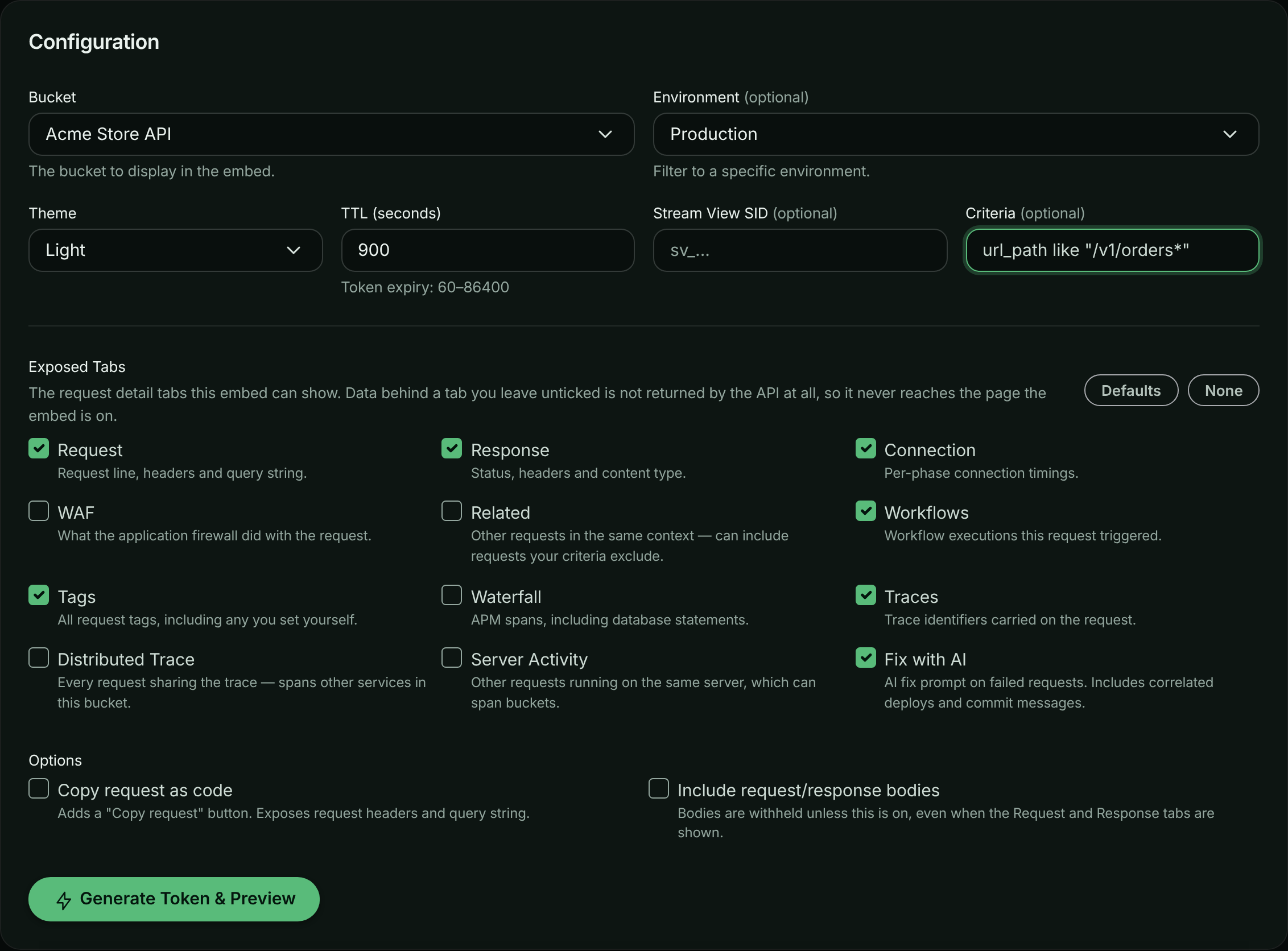
Under Configuration, choose the Bucket, and optionally an Environment. Pick a Theme (Light, Dark or Auto) and a TTL (seconds) between 60 and 86400. To narrow the requests, enter a Stream View SID or Criteria, such as method == "GET". Choose the Exposed Tabs and Options (Copy request as code, Include request/response bodies).
Choosing what the embed shows.
Preview it
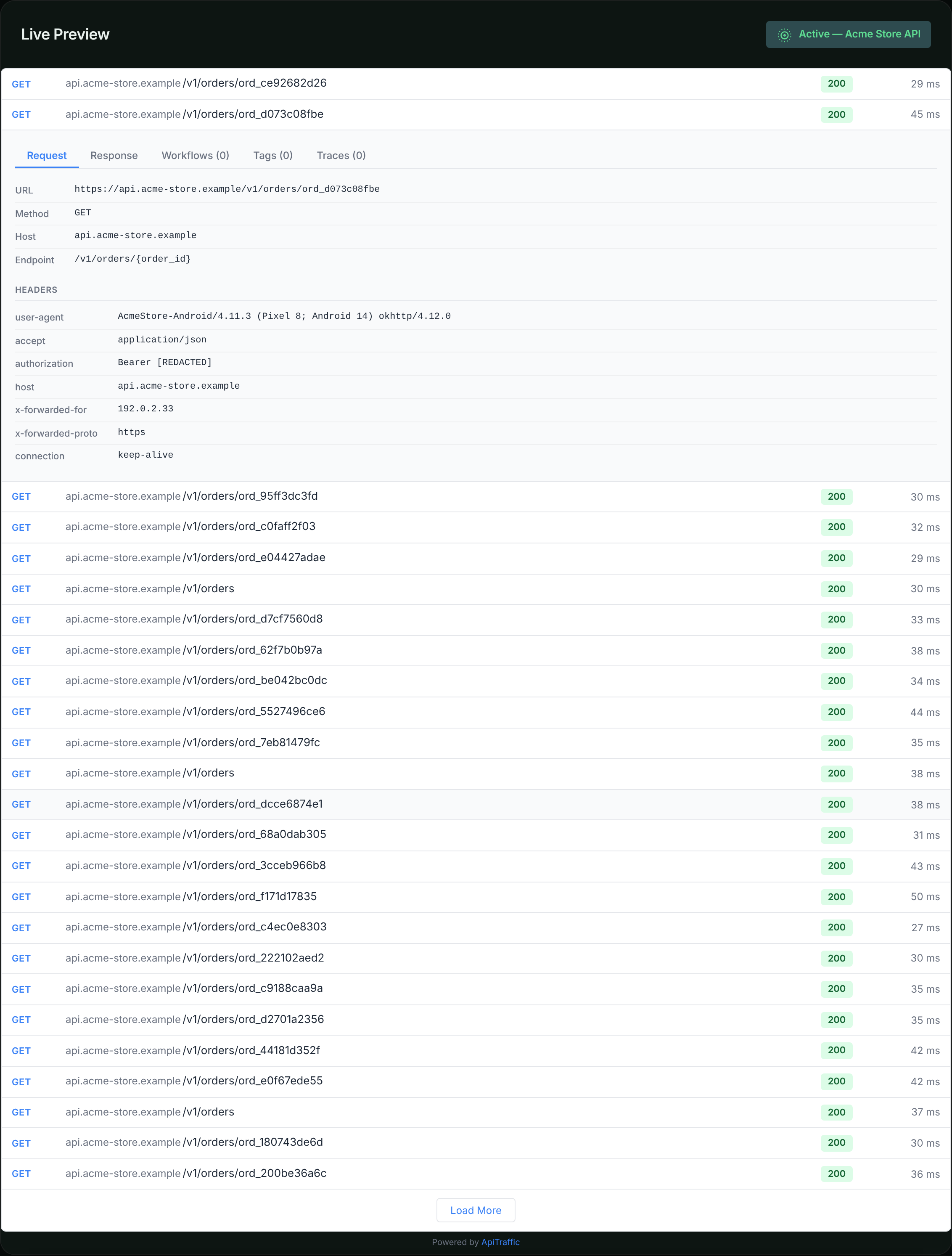
Select Generate Token & Preview. The Live Preview shows the request log exactly as your users would see it.
The embed, previewed with a real token.
Copy the code
Quick Start Code has snippets on the HTML / Vanilla JS, React and Server-Side (Node.js) tabs. In production, mint tokens on your server as shown below; never put an API token in browser code.
How it works
sequenceDiagram
    participant Browser as Client Browser
    participant Server as Your Server
    participant AT as ApiTraffic API

    Browser->>Server: GET /api/embed-token
    Server->>AT: POST /v1/accounts/{id}/embeds/token
    AT-->>Server: { token, expiresAt }
    Server-->>Browser: { token }
    Browser->>AT: GET /v1/embed/requests (Bearer token)
    AT-->>Browser: Request log data
- Your backend calls the ApiTraffic API with an Administrator API token to generate a signed embed JWT - one call,
apitraffic.embedToken(), if you already run the Node SDK. - The JWT locks in the bucket, filters, theme, and which request detail tabs the embed may show - the client SDK cannot tamper with any of it.
- Your frontend passes the JWT to the
<apitraffic-request-log>Web Component. - The component fetches data directly from ApiTraffic’s embed endpoints using the JWT.
The tab list is not a display setting. Every field of a request belongs to the tab that needs it, and the embed endpoints rebuild each response from that list - so a tab you do not grant contributes no data to the payload at all, rather than being hidden in the browser.
Generate an embed token on your server
If you already run an ApiTraffic Node SDK, it mints the token for you. Set an Administrator API token as API_TRAFFIC_EMBED_TOKEN; the host, bucket and account come from the SDK you configured, so the call names only what is specific to this embed. The raw HTTP call is unchanged and still fully supported; use it from any language, or from a service that does not run the SDK.
ApiTraffic SDK
const apitraffic = require('@apitraffic/node');

// Serve this from your own authenticated route (requireUser is your app's
// auth middleware). The browser gets the embed JWT; your API token never
// leaves the server.
app.get('/api/embed-token', requireUser, async (req, res) => {
  try {
    const { token, expiresAt } = await apitraffic.embedToken({
      filters: {
        // Scope the embed to this customer's traffic. Signed into the token,
        // so the browser cannot widen it.
        // Written into the criteria as tag:customerId == "…", with the id escaped:
        // a value such as `x" OR method == "GET` cannot add a condition. If you
        // build a criteria string yourself, use apitraffic.escapeCriteriaValue().
        tags: { customerId: req.user.id }
      },
      ttl: 900,                                  // seconds (min 60, max 86400)
      theme: 'light',                            // 'light' | 'dark' | 'auto'

      // Which request detail tabs this embed may show.
      // Omit for the default set; data behind any tab left out is never returned.
      tabs: ['request', 'response', 'connection', 'tags', 'ai'],

      features: {
        copyRequest: true,                       // offer "Copy request" as code
        includeBodies: false                     // withhold request/response bodies
      }
    });

    res.json({ token, expiresAt });
  } catch (error) {
    // This call rejects rather than going quiet - a token has one useful
    // outcome, so a failure is a 500 on your route, not a blank embed.
    res.status(502).json({ error: error.message });
  }
});
The same function is exported by every ApiTraffic Node package - @apitraffic/node, @apitraffic/express, @apitraffic/fastify, @apitraffic/koa and @apitraffic/hapi - so whichever one you already installed can mint tokens.
Node.js (HTTP)
const axios = require('axios');

async function getEmbedToken(accountSid, apiToken) {
  const response = await axios.post(
    `https://api.apitraffic.io/v1/accounts/${accountSid}/embeds/token`,
    {
      bucketSid: 'your-bucket-sid',
      view: 'request-log',
      filters: {
        environmentSid: 'abc123',              // optional
        criteria: 'method == "GET"',           // optional - same filter syntax as the dashboard
        streamViewSid: 'sv_...'                // optional - use a stream view
      },
      ttl: 3600,                               // seconds (min 60, max 86400)
      theme: 'light',                          // 'light' | 'dark' | 'auto'

      // Which request detail tabs this embed may show.
      // Omit for the default set; data behind any tab left out is never returned.
      tabs: ['request', 'response', 'connection', 'tags', 'ai'],

      features: {
        copyRequest: true,                     // offer "Copy request" as code
        includeBodies: false                   // withhold request/response bodies
      }
    },
    {
      headers: { Authorization: `Bearer ${apiToken}` }
    }
  );

  return response.data; // { token, expiresAt, tabs, features }
}
Python
import requests

def get_embed_token(account_sid, api_token):
    response = requests.post(
        f"https://api.apitraffic.io/v1/accounts/{account_sid}/embeds/token",
        json={
            "bucketSid": "your-bucket-sid",
            "view": "request-log",
            "filters": {
                "environmentSid": "abc123",
                "criteria": 'method == "GET"'
            },
            "ttl": 3600,
            "theme": "light",

            # Which request detail tabs this embed may show. Omit for the
            # default set; data behind any tab left out is never returned.
            "tabs": ["request", "response", "connection", "tags", "ai"],
            "features": {
                "copyRequest": True,
                "includeBodies": False
            }
        },
        headers={"Authorization": f"Bearer {api_token}"}
    )
    return response.json()  # { "token": ..., "expiresAt": ..., "tabs": [...], "features": {...} }
cURL
curl -X POST "https://api.apitraffic.io/v1/accounts/acc_.../embeds/token" \
  -H "Authorization: Bearer YOUR_ADMINISTRATOR_API_TOKEN" \
  -H "Content-Type: application/json" \
  -d '{
    "bucketSid": "your-bucket-sid",
    "filters": { "criteria": "method == \"GET\"" },
    "ttl": 3600,
    "theme": "light",
    "tabs": ["request", "response", "connection", "tags", "ai"],
    "features": { "copyRequest": true, "includeBodies": false }
  }'
What the SDK fills in
embedToken() takes the same parameters as the HTTP endpoint, but only asks for the ones the SDK cannot already answer:
| Parameter | Where it comes from when you omit it |
|---|---|
bucketSid |
The bucket this process reports to (bucket / API_TRAFFIC_BUCKET). |
accountSid |
The SDK settings, which name the account the API token belongs to. |
| API token | API_TRAFFIC_EMBED_TOKEN, then the SDK’s own token (token / API_TRAFFIC_TOKEN). The SDK’s own token is normally an ingest token, which is refused. |
| API host | The SDK’s own host - set this only if you are self-hosting. |
Each can still be passed per call (bucketSid, accountSid, token, apiHost) to mint a token for a bucket or account other than the one this process reports to. A token passed to the call takes precedence over API_TRAFFIC_EMBED_TOKEN.
Warning: If
API_TRAFFIC_EMBED_TOKENisn’t set and you don’t passtoken,embedToken()falls back to the SDK’s own token. That is normally an ingest token, so the API answers403, and the error tells you to setAPI_TRAFFIC_EMBED_TOKEN. Create an Administrator API token and set it asAPI_TRAFFIC_EMBED_TOKENon the servers that mint embed tokens.
Note: The account is learned from the SDK settings, which load shortly after the middleware mounts. In a process that generates tokens but does not run the ApiTraffic middleware, set
API_TRAFFIC_ACCOUNT_SIDor passaccountSidto the call.
Token parameters
| Parameter | Type | Required | Default | Description |
|---|---|---|---|---|
bucketSid |
string |
Yes¹ | - | The bucket to scope the embed to. |
view |
string |
No | 'request-log' |
The embed view type. |
filters |
object |
No | {} |
Filters locked into the token (see below). |
ttl |
number |
No | 3600 |
Token lifetime in seconds (60–86400). |
theme |
string |
No | 'light' |
Theme preference: 'light', 'dark', or 'auto'. |
tabs |
array |
No | See below | The request detail tabs this embed may show. |
features |
object |
No | {} |
Optional behaviors that are not tabs (see below). |
¹ Required on the HTTP endpoint. embedToken() defaults it to the bucket the SDK reports to.
Filter options
| Filter | Type | Description |
|---|---|---|
environmentSid |
string |
Filter to a specific environment. |
criteria |
string |
Search criteria string (same syntax as the API). Conditions are joined with AND; a token with OR between conditions is refused. |
streamViewSid |
string |
Use a stream view’s filter criteria. |
Warning: Filters are server-side only. They are cryptographically locked into the JWT - the client SDK cannot modify, add, or remove filters. This prevents data leakage.
Warning: Protect the route that mints tokens. An embed token is a read credential for the traffic it is scoped to, so the endpoint on your server that creates one is as sensitive as that data:
- Require your user’s sign-in on it. Never mint a token for an anonymous caller.
- Decide
filters,tabs,featuresandttlon the server, from the signed-in user. Never copy them from the request body or query string.- Keep
ttlshort (minutes, not hours); the component asks for a fresh token before expiry.The embed SDK’s sample app (
examples/sample-app/server.js) shows all three.
Request detail tabs
Clicking a row expands the same request detail you see in the ApiTraffic dashboard. The tabs array on the token decides which of those tabs the embed can show - and, just as importantly, which data the API will return for it.
| Tab | Shows |
|---|---|
request |
Request line, headers and query string. |
response |
Status, headers and content type. |
connection |
Per-phase connection timings. |
waf |
What the application firewall did with the request. |
related |
Other requests sharing this request’s context. |
workflows |
Workflow executions the request triggered. |
tags |
The request’s tags. |
waterfall |
APM spans, drawn as a waterfall. |
traces |
Trace identifiers carried on the request. |
trace |
Every request sharing this request’s distributed trace. |
concurrency |
What else the request’s server was doing at the time. |
ai |
An AI fix prompt for the failure, with correlated deploys. |
The default set - used when you omit tabs entirely - is the group that describes the request itself:
["request", "response", "connection", "workflows", "tags", "traces", "ai"]
Pass tabs: [] to hide the request detail completely, leaving a read-only list of rows.
Note: Some tabs only appear when they apply to the request in front of the reader, exactly as in the dashboard.
connectionneeds per-phase timings on the request,aiis offered only on failures (4xx/5xx), and captures - requests with no response - show only therequesttab.
Tabs that reach beyond the request
Four tabs answer with data from outside the single request being viewed. related, trace and concurrency are off by default; ai is in the default set. Think about each before you grant it to an audience that is not your own team:
Warning: -
relatedandtracefollow the request into other traffic in the same bucket - including requests your token’scriteriafilter would otherwise exclude.
concurrencylists requests that ran on the same server, which can include traffic from your other buckets.aiincludes the deploys correlated with the failure: repository names, branches and commit messages from your Git integration.
Features
Behaviors that are not tabs, passed as features on the token:
| Feature | Default | Description |
|---|---|---|
copyRequest |
false |
Adds a Copy request button that generates the request as ready-to-run code: cURL, JavaScript (fetch and axios), Python, PHP, Go, Ruby, Java and C#. Exposes the request headers and query string even when the request tab is not shown. |
includeBodies |
false |
Returns request and response bodies for the request and response tabs. |
Note: Bodies are withheld even when the
requestandresponsetabs are granted, unlessincludeBodiesis set. They are the likeliest place for something an embed’s audience should not see, so showing them is a separate, deliberate decision.
When bodies are shown, JSON renders as a collapsible tree - the first two levels open, everything below a click away - with a Raw toggle for selecting and copying the payload as text. Bodies that are not JSON render as plain text.
Vanilla JavaScript
Installation
npm
npm install @apitraffic/embed
yarn
yarn add @apitraffic/embed
CDN (no build step)
<script src="https://unpkg.com/@apitraffic/[email protected]/dist/apitraffic-embed.iife.js" integrity="sha384-<hash of that exact file>" crossorigin="anonymous"></script>
Basic usage
<!-- CDN approach -->
<script src="https://unpkg.com/@apitraffic/[email protected]/dist/apitraffic-embed.iife.js" integrity="sha384-<hash of that exact file>" crossorigin="anonymous"></script>

<apitraffic-request-log id="log" theme="light"></apitraffic-request-log>

<script>
  // Fetch a token from your backend
  fetch('/api/embed-token')
    .then(res => res.json())
    .then(({ token }) => {
      // A property, not an attribute: the component keeps the token
      // privately and it never appears in the DOM.
      document.getElementById('log').token = token;
    });
</script>
Or with ES module imports:
import '@apitraffic/embed';

const el = document.querySelector('apitraffic-request-log');
el.token = await getTokenFromYourBackend();
Attributes
| Attribute | Type | Default | Description |
|---|---|---|---|
token |
string |
- | Required. The signed embed JWT. Set it as the token property; the attribute still works but exposes the token to every script on the page. el.token = null clears the log. |
theme |
string |
'light' |
'light', 'dark', or 'auto'. |
api-url |
string |
'https://api.apitraffic.io/v1' |
Override the API base URL (self-hosted). |
page-size |
number |
25 |
Requests per page (1–100). |
show-detail |
string |
'true' |
Set to 'false' to disable row expansion. |
Note: There is deliberately no attribute for the tabs: the token decides, so a viewer editing the DOM cannot reveal one. Once data has loaded, the resolved list is readable at
element.tabsandelement.features.
Events
const el = document.querySelector('apitraffic-request-log');

// Fires after the first successful data load, reporting what the token exposes
el.addEventListener('apitraffic:ready', (e) => {
  console.log('Tabs:', e.detail.tabs);         // e.g. ['request', 'response', 'ai']
  console.log('Features:', e.detail.features); // { copyRequest: true, includeBodies: false }
});

// Fires on any API error
el.addEventListener('apitraffic:error', (e) => {
  console.error('Error:', e.detail.message);
});

// Fires ~30 seconds before the token expires, or when the API rejects it.
// e.detail.reason is 'expiring', 'expired' or 'unauthorized'.
el.addEventListener('apitraffic:token-expired', async () => {
  const { token } = await fetch('/api/embed-token').then(r => r.json());
  el.token = token; // component re-fetches automatically
});

// Fires when a request row is clicked
el.addEventListener('apitraffic:request-click', (e) => {
  console.log('Clicked request:', e.detail.requestSid);
});
Server-side rendering
Importing @apitraffic/embed during a server render (Next.js, Remix, Nuxt, plain Node) is safe: outside a browser it registers nothing and touches no global. The element is registered when the module loads in the browser, and nothing is fetched until it is on the page with a token.
Rendering your own UI instead? @apitraffic/embed/headless exports EmbedApi and the token helpers without the Web Component, so importing it registers no custom element at all.
Content Security Policy
The component runs under a strict policy with no 'unsafe-inline'. Its styles are a constructed stylesheet adopted by its shadow root, and its geometry is set through the CSSOM, so it needs only:
connect-src https://api.apitraffic.io
(or the origin of your api-url), plus script-src for wherever the script itself comes from - for the CDN build, https://unpkg.com. Browsers without constructable stylesheets (Safari before 16.4) fall back to a `` element; under a strict policy, give it a nonce by setting nonce="..." on <apitraffic-request-log>.
Accessibility
Rows are keyboard-operable (Enter / Space) and report aria-expanded; the detail tabs are a WAI-ARIA tablist (arrow keys, Home, End); loads and errors are announced through a polite live region; focus rings are kept for keyboard users and can be recolored with --at-focus-color.
React
Installation
npm install @apitraffic/embed-react @apitraffic/embed
Both exports are client components ('use client') with ESM, CommonJS and TypeScript builds, and both are safe to import during server rendering: `` renders the bare element on the server and loads the Web Component in the browser, and the token is never rendered into the HTML.
Drop-in component
import { RequestLog } from '@apitraffic/embed-react';

function ApiLog({ token }) {
  return (
    <RequestLog
      token={token}
      theme="light"
      pageSize={25}
      onTokenExpired={async () => {
        const res = await fetch('/api/embed-token');
        const { token } = await res.json();
        return token; // returning the token auto-refreshes
      }}
      onReady={() => console.log('Loaded')}
      onError={(e) => console.error(e.detail)}
      onRequestClick={(e) => console.log(e.detail.requestSid)}
    />
  );
}
Props
| Prop | Type | Default | Description |
|---|---|---|---|
token |
string |
- | Required. The signed embed JWT. |
theme |
string |
'light' |
'light', 'dark', or 'auto'. |
apiUrl |
string |
- | Override the API base URL. |
pageSize |
number |
25 |
Requests per page. |
showDetail |
boolean |
true |
Enable/disable expandable row detail. |
onTokenExpired |
function |
- | Return a new token string to auto-refresh. Never called concurrently. |
onReady |
function |
- | Fires after the first successful load. |
onError |
function |
- | Fires on API errors, and with detail.code: 'TOKEN_REFRESH_FAILED' when onTokenExpired throws. |
onRequestClick |
function |
- | Fires when a row is clicked. |
Note: There is no
tabsprop - tabs come from the token, for the same reason filters do.onReadyreceives the resolved list ase.detail.tabsande.detail.features.
Headless hook
Use useApiTrafficEmbed when you want full control over rendering. It registers no custom element, cancels its requests on unmount or when token, apiUrl or pageSize change, and drops late answers for an old token:
import { useApiTrafficEmbed } from '@apitraffic/embed-react';

function CustomLog({ token }) {
  const {
    requests,
    config,        // { view, theme, tabs, features } - what the token exposes
    loading,
    loadingMore,
    error,
    hasMore,
    loadMore,
    refresh
  } = useApiTrafficEmbed({
    token,
    pageSize: 50,
    onTokenExpired: async () => {
      const res = await fetch('/api/embed-token');
      return (await res.json()).token;
    }
  });

  if (loading) return <p>Loading...</p>;
  if (error) return <p>Error: {error}</p>;

  // Records only carry the fields the token's tabs allow, so check `config`
  // before rendering anything beyond the row itself.
  return (
    <div>
      <button onClick={refresh}>Refresh</button>
      {requests.map(req => (
        <div key={req.sid}>
          {req.request?.method} {req.request?.path} - {req.response?.statusCode}
        </div>
      ))}
      {hasMore && (
        <button onClick={loadMore} disabled={loadingMore}>
          {loadingMore ? 'Loading...' : 'Load More'}
        </button>
      )}
    </div>
  );
}
Theming
The Web Component uses CSS custom properties for theming. Override them on the host element:
apitraffic-request-log {
  /* Typography */
  --at-font-family: 'Inter', sans-serif;
  --at-font-size: 13px;

  /* Colors */
  --at-bg-color: #ffffff;
  --at-text-color: #1f2937;
  --at-text-muted: #6b7280;
  --at-accent-color: #3b82f6;
  --at-danger-color: #ef4444;

  /* Layout */
  --at-border-color: #e5e7eb;
  --at-border-radius: 6px;
  --at-row-hover-bg: #f9fafb;
  --at-max-height: 600px;
}
Available CSS custom properties
| Property | Default | Description |
|---|---|---|
--at-font-family |
System font stack | Font family |
--at-font-size |
13px |
Base font size |
--at-bg-color |
#ffffff |
Container background |
--at-text-color |
#1f2937 |
Primary text color |
--at-text-muted |
#6b7280 |
Secondary/muted text |
--at-accent-color |
#3b82f6 |
Links, buttons, GET method |
--at-danger-color |
#ef4444 |
Errors, DELETE method |
--at-border-color |
#e5e7eb |
Border color |
--at-border-radius |
6px |
Container border radius |
--at-row-hover-bg |
#f9fafb |
Row hover background |
--at-max-height |
none |
Max height (set for scrolling) |
Dark mode
Set theme="dark" for a built-in dark theme, or theme="auto" to follow the user’s OS preference via prefers-color-scheme.
Token refresh flow
Embed tokens are short-lived by design. The SDK fires a token-expired event approximately 30 seconds before expiry, giving your app time to fetch a fresh token seamlessly. It also fires when the API answers 401, which is the authoritative signal that a token is done.
The SDK never turns a token problem into a loop against your token endpoint:
- Clock skew. Expiry is measured against the server’s clock, taken from the token’s
iat. A visitor whose computer clock is hours fast still gets the token’s full lifetime, instead of every new token looking expired on arrival. - Backoff. While no load succeeds, each further
token-expiredwaits twice as long as the previous one (1 s, 2 s, 4 s … up to 5 minutes).
sequenceDiagram
    participant Component as Embed Component
    participant App as Your App
    participant Server as Your Server
    participant AT as ApiTraffic API

    Note over Component: Token expires in 30s
    Component->>App: apitraffic:token-expired event
    App->>Server: GET /api/embed-token
    Server->>AT: POST .../embeds/token
    AT-->>Server: { token, expiresAt }
    Server-->>App: { token }
    App->>Component: el.token = newToken
    Note over Component: Re-fetches data with new token
Security
How are filters protected?
All filters (bucket, environment, criteria, stream view) are cryptographically signed into the JWT using HMAC-SHA256. The client SDK reads the token to display data but cannot modify the filters. Any tampering invalidates the signature.
Can the client access data outside the filter scope?
No. The embed data endpoints extract the accountSid, bucketSid, and all filters directly from the verified JWT payload. Query parameters from the client are ignored for filtering - only pagination cursors (from, limit) are accepted.
Reading a single request re-checks that scope rather than trusting the listing it came from: a request sid from another bucket, or from an environment the token is locked out of, reads as “not found” even though the sid is all the endpoint is given.
How do tabs limit what the embed can see?
The tab list is signed into the JWT alongside the filters, and enforced server-side in two places.
Every request the embed receives - both list rows and the expanded detail - is rebuilt field by field from the granted tabs. Without the request tab there are no request headers in the payload; without tags there are no tags; without waterfall there are no spans. The browser is never sent data it has been told not to display.
The four tabs backed by their own endpoints (related, trace, concurrency, ai) refuse outright unless their tab is granted, and answer as “not found” rather than “forbidden” - an embed’s viewer cannot probe for which tabs exist behind the ones they were given.
Are request and response bodies included?
Only if you ask for them. features.includeBodies defaults to false, so bodies are withheld even when the request and response tabs are shown. Redaction rules configured on your account still apply on top - bodies reach the embed already redacted.
What happens if a token is stolen?
Tokens are short-lived (default 1 hour, max 24 hours) and scoped to a specific bucket and filter set. An attacker can only see the same data the embed was designed to show, and only until the token expires. You can also rotate the signing secret by calling the token endpoint - a new secret is auto-generated if the existing one is cleared.
Is my API token exposed to the browser?
No. Your API token is only used server-side to generate embed JWTs. The browser only ever sees the embed JWT, which cannot be used to access any other ApiTraffic API endpoints.
API reference
Create embed token
POST /v1/accounts/{accountSid}/embeds/token
Authentication: Bearer token (an Administrator API token, or a signed-in owner or admin). Ingest and User tokens, and members, are refused with 403 and code 2010.
Request Body:
{
  "bucketSid": "string (required)",
  "view": "request-log",
  "filters": {
    "environmentSid": "string",
    "criteria": "string",
    "streamViewSid": "string"
  },
  "ttl": 3600,
  "theme": "light",
  "tabs": ["request", "response", "connection", "workflows", "tags", "traces", "ai"],
  "features": {
    "copyRequest": false,
    "includeBodies": false
  }
}
Response:
{
  "token": "eyJhbGciOiJIUzI1NiJ9...",
  "expiresAt": "2025-03-17T05:27:00.000Z",
  "tabs": ["request", "response", "connection", "workflows", "tags", "traces", "ai"],
  "features": { "copyRequest": false, "includeBodies": false }
}
view also takes report and dashboard, with their own parameters: see Embedded reports and dashboards. A token works only on the endpoints of its own view (403 EMBED_VIEW_MISMATCH otherwise).
The returned tabs and features are the resolved values: unknown tabs are dropped, the order is normalized, and omitting tabs reports the defaults. Store or log these if you need a record of what a given embed was allowed to show.
Get embed requests
GET /v1/embed/requests?from={cursor}&limit={25}
Authentication: Bearer token (embed JWT)
Rows carry only the fields the granted tabs need, alongside the resolved config:
{
  "hasMore": false,
  "from": null,
  "config": {
    "view": "request-log",
    "theme": "light",
    "tabs": ["request", "response", "ai"],
    "features": { "copyRequest": false, "includeBodies": false }
  },
  "records": [ ... ]
}
Get embed request detail
GET /v1/embed/requests/{requestSid}
Authentication: Bearer token (embed JWT)
Returns the request filtered to the granted tabs, with the same config object attached.
Get related requests
GET /v1/embed/requests/{requestSid}/related
Authentication: Bearer token (embed JWT) · Requires: the related tab
Summary rows for the other requests sharing this request’s context.
Get distributed trace
GET /v1/embed/requests/{requestSid}/trace
Authentication: Bearer token (embed JWT) · Requires: the trace tab
Every request in this request’s distributed trace, in time order. traceId is null when the request is not part of one.
Get server activity
GET /v1/embed/requests/{requestSid}/concurrent?limit={25}&lookbackMinutes={5}
Authentication: Bearer token (embed JWT) · Requires: the concurrency tab
What else the request’s server was running at the time, summarized by endpoint and listed per request. Answers with available: false for traffic captured before server attribution.
Get AI fix prompt
GET /v1/embed/requests/{requestSid}/fix-prompt?lookbackMinutes={180}
Authentication: Bearer token (embed JWT) · Requires: the ai tab
A paste-ready prompt for an AI coding agent, with the deploys correlated to the failure.
Note: An endpoint whose tab is not granted responds as though the request does not exist. That is deliberate: it keeps an embed’s viewer from discovering which views were withheld.
Troubleshooting
Component shows ‘No requests found’
Verify the bucketSid in your token request matches a bucket that has traffic. Check that any filters aren’t too restrictive.
The token request is refused with 403
The token your server uses isn’t allowed to mint embed tokens. Only Administrator API tokens can; ingest tokens (the one your SDK sends traffic with) and User tokens get 403 with code 2010. With the Node SDK, the error says “Embed tokens need an Administrator API token: set API_TRAFFIC_EMBED_TOKEN, or pass token to embedToken().” Create an Administrator token under Account → API Tokens and set it as API_TRAFFIC_EMBED_TOKEN. A 403 with code 2221 means your plan doesn’t include Embeds.
A tab I expected is missing
Three things decide whether a tab appears. Check them in order:
- Is it on the token? Only tabs listed in
tabsare rendered; omitting the array gives the default set, which excludeswaf,related,trace,concurrencyandwaterfall. Readelement.tabs(ore.detail.tabsfromapitraffic:ready) to see what the token actually granted. - Does it apply to this request?
connectionneeds per-phase timings,aiappears only on 4xx/5xx responses, and captures show only therequesttab. - Is there data behind it? A granted tab with nothing to show says so - “No tags on this request”, “No spans were captured” - rather than disappearing.
Bodies show as empty on the Request or Response tab
Set features.includeBodies: true when generating the token. Bodies are withheld by default even when those tabs are granted. If they are still empty, check your account’s redaction rules and that body capture is enabled for the bucket.
401 errors in the browser console
The embed token has expired or was rejected. The component fires apitraffic:token-expired with detail.reason: 'unauthorized'; implement that handler (or the onTokenExpired prop in React) to auto-refresh. If the 401s continue, the tokens your endpoint returns are being rejected - check that it mints a new token each time rather than serving a cached one.
Styles are blocked by our Content Security Policy
Current browsers need no style-src allowance at all: the component adopts a constructed stylesheet. Only browsers without constructable stylesheets (Safari before 16.4) fall back to a `` element - set nonce="..." on <apitraffic-request-log> to the nonce your policy allows.
Styles look wrong or are overridden
The component uses Shadow DOM, so your page styles should not affect it. If you see issues, ensure you’re setting CSS custom properties on the apitraffic-request-log element itself, not inside its shadow root.
Component doesn’t render
Ensure the SDK script or import is loaded before the element appears in the DOM. With the CDN approach, place the `` tag before the component. With bundlers, ensure import '@apitraffic/embed' is called.
Related
-
API tokens: Create the server-side token that mints embed tokens.
-
Search and filter requests: The criteria syntax for filtering an embed.
-
Stream views: Use a stream view as an embed’s filter.
-
Share requests and collections: Share one request or collection instead of a live log.