
Embedded Reports and Dashboards
Show your customers their own usage, errors and latency inside your app: a saved report or dashboard, filtered to each customer by a token your server signs.
Put a saved report or a dashboard inside your own product, so each of your customers sees their slice of it: “your API calls this month”, “your error rate”, “your slowest endpoints”. Your server signs a short-lived embed token that locks a filter, typically your customer’s id. The viewer can pick a time range and nothing else.
Note: Embedding needs the Embeds and Custom reports plan features. Your plan may also limit how many reports and dashboards allow embedding at once (Embedded reports and dashboards).
How it works
sequenceDiagram
    participant Browser as Your customer's browser
    participant Server as Your server
    participant AT as ApiTraffic

    Browser->>Server: GET /api/usage-embed-token (signed in)
    Server->>AT: POST /v1/accounts/{id}/embeds/token
    AT-->>Server: { token, expiresAt }
    Server-->>Browser: { token }
    Browser->>AT: The embed loads the dashboard with the token
    AT-->>Browser: Only this customer's numbers
- In ApiTraffic, turn on Allow embedding for the report or dashboard.
- Your backend mints an embed token naming it, with a filter for the signed-in customer (
tag:customerId == "org_8f2a"). - Your frontend places
<apitraffic-dashboard>(or<apitraffic-report>) and hands it the token. - The embed draws the report with the token’s filter ANDed onto the report’s own, every time. A viewer cannot remove it, change it or read the report’s own filter.
1. Allow embedding
Open the report or dashboard and click Embed. Turn on Allow embedding.
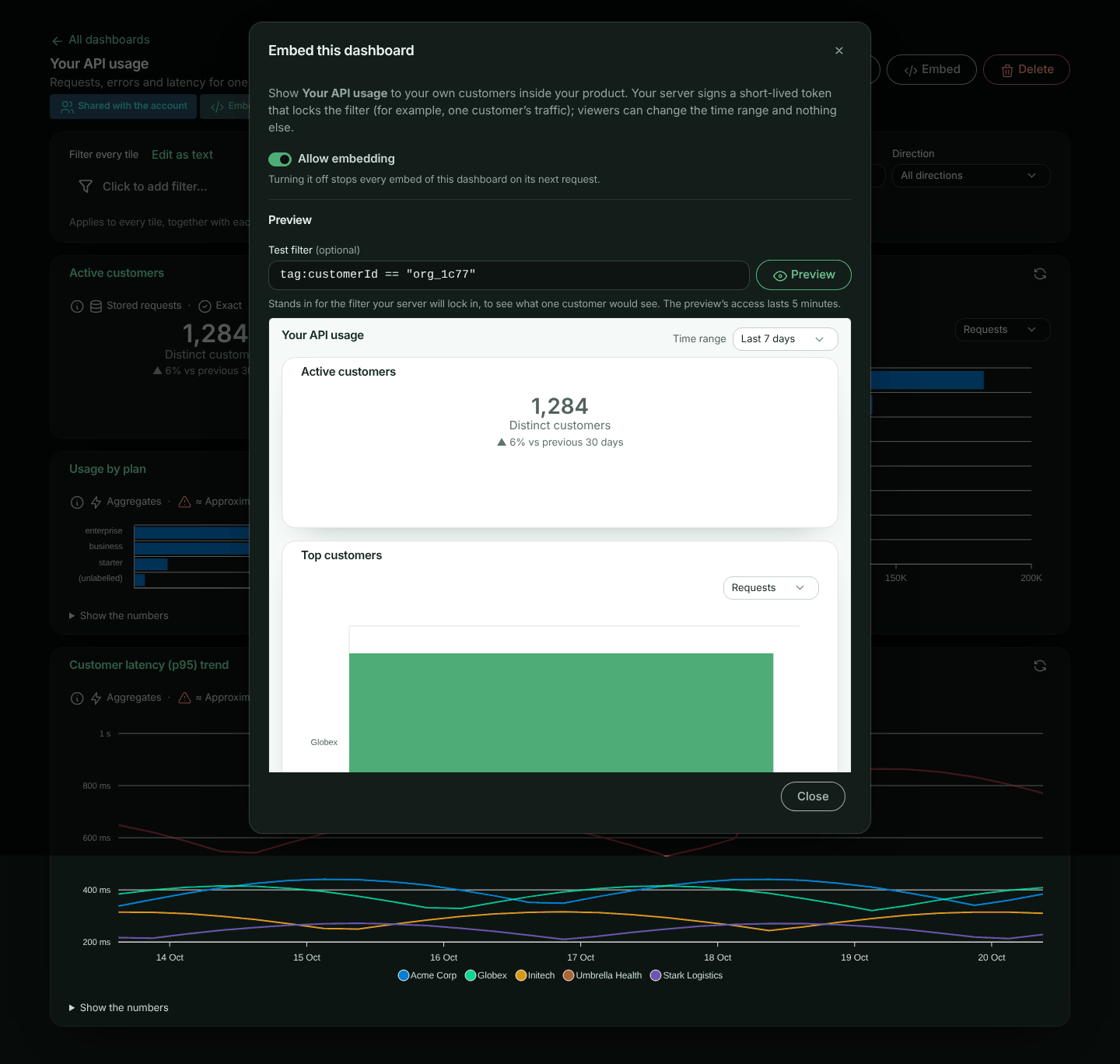
- Only an account owner or admin can turn it on, and only for a report or dashboard shared with Everyone in the account.
- Anyone who can edit it can turn it off, also after a plan downgrade. Turning it off stops every embed of it at once, on its next request; so does making it private or deleting it. Tokens already handed out stop working with it; turning embedding back on makes the ones that have not expired yet (at most 24 hours old) work again. Deleting an embedded report or dashboard is recorded in the account’s activity as Embedding was turned off.
- While a report or dashboard is embedded, only owners and admins can change what it shows: a report’s definition, or a dashboard’s filter, scope and tiles. That includes a report shown on an embedded dashboard. Anyone else who can edit it can still rename it or turn embedding off; the report builder and the dashboard tell them so up front.
- A report that groups by a catalogue attribute of a tag classified Personal (or whose filter uses one) can’t be embedded, because embeds mask personal values: Allow embedding is refused with the reason, shown next to the switch. The same goes for a dashboard whose tiles or filter do so.
- A report that groups by Firewall policy or Deciding rule (
waf_policy,waf_rule, or the tagstag:waf.policy,tag:waf.rule), or by any other firewall tag except the action, matched marker and score (such astag:waf.reasonortag:waf.match.1), or whose filter uses any of them, can’t be embedded either: policy and rule IDs, descriptions and messages are your firewall configuration, and a reason or match quotes the input that matched, not something your customers should see. The same goes for a dashboard whose tiles or filter do so. Firewall action, Firewall matched and the firewall counts and scores can be embedded. - A report that groups by IP address (
ip_address) can’t be embedded: a client’s IP address is personal data. The same goes for a dashboard with such a tile. Country, and a distinct count of IP addresses, can be embedded. An embed showing countries shows the geo data’s credit under the report, as the data’s licence asks. - An embeddable dashboard embeds its tiles: their reports do not need Allow embedding themselves.
- Reports and dashboards that allow embedding are marked Embeddable in their lists, and listed on the Embed Setup page (in the account settings menu, under Integration → Embed).
The Embed dialog also shows the report’s or dashboard’s ID (Report ID or Dashboard ID, with a copy button) and has a Preview: type a Test filter (for example tag:customerId == "org_8f2a") and click Preview, or press Enter, to see exactly what that customer would see. The preview uses a five-minute token; when it runs out, click Refresh preview.
Warning: An embeddable report shows its data to anyone holding a token for it, so think of Allow embedding like sharing. Check the report’s own filter and grouping first: the token’s filter narrows it, but a report grouped by a tag shows that tag’s values (masked when the tag is classified Personal).
2. Mint a token on your server
Serve the token from a route behind your own sign-in, and take the filter value from the signed-in user, never from the request.
Note: Minting an embed token takes an Administrator API token, set on your server as
API_TRAFFIC_EMBED_TOKENfor the SDK helper. The ingest token your SDK sends traffic with can’t mint them. See Embed tokens.
ApiTraffic SDK
const apitraffic = require('@apitraffic/node');

app.get('/api/usage-embed-token', requireUser, async (req, res) => {
  const { token, expiresAt } = await apitraffic.embedToken({
    view: 'dashboard',                       // or 'report' with reportSid
    dashboardSid: 'dash_8VtW2kq0',
    filters: {
      // Written as tag:customerId == "…", with the value escaped.
      tags: { customerId: req.user.customerId }
    },
    timeRanges: ['last_24h', 'last_7d', 'last_30d'],
    timeRange: { relative: 'last_30d' },
    ttl: 900
  });
  res.json({ token, expiresAt });
});
HTTP
curl -X POST https://api.apitraffic.io/v1/accounts/$ACCOUNT_SID/embeds/token \
  -H "Authorization: Bearer $APITRAFFIC_API_TOKEN" \
  -H "Content-Type: application/json" \
  -d '{
    "view": "dashboard",
    "dashboardSid": "dash_8VtW2kq0",
    "filters": { "filter": "tag:customerId == \"org_8f2a\"" },
    "timeRanges": ["last_24h", "last_7d", "last_30d"],
    "timeRange": { "relative": "last_30d" },
    "ttl": 900
  }'
Inside a double-quoted value, escape " as \" and \ as \\. A value with an unescaped quote is refused, so an id such as x" OR method == "GET cannot add a condition of its own.
Token parameters
| Parameter | Description |
|---|---|
view |
report or dashboard. |
reportSid / dashboardSid |
What the embed shows. It must allow embedding. The Embed dialog shows it as Report ID or Dashboard ID, with a copy button (it is also in the address bar). |
filters.filter |
A filter in the report filter language, ANDed with the report’s (and dashboard’s) own. It may use a tag classified Personal: your server chose the value. A tag classified Secret is refused. A filter on the firewall’s decisions (such as waf_action == "block") needs the firewall in your plan (403 FEATURE_NOT_IN_PLAN otherwise). |
filters.environmentSid |
Only count this environment. |
bucketSid |
Only count this bucket. Without it the report keeps its own scope. |
timeRanges |
The ranges the viewer may pick: last_1h, last_24h, last_7d, last_30d, last_90d, today, yesterday, this_month, previous_month. Default: all of them. |
timeRange |
The range the embed opens with, one of timeRanges. Default: the report’s or dashboard’s own range when allowed, else Last 24 hours, else the first allowed. |
ttl |
Lifetime in seconds, 60 to 86,400 (default 3,600). |
theme |
light, dark or auto. |
The request log’s criteria, streamViewSid, tabs and features do not apply to reports and are refused.
3. Place the embed
<script
  src="https://unpkg.com/@apitraffic/[email protected]/dist/apitraffic-embed.iife.js"
  integrity="sha384-<base64 SHA-384 of that exact file>"
  crossorigin="anonymous"></script>

<apitraffic-dashboard id="usage" frame-title="Your API usage"></apitraffic-dashboard>

<script>
  const el = document.getElementById('usage');
  const refresh = () => fetch('/api/usage-embed-token')
    .then((r) => { if (!r.ok) throw new Error(`token route answered ${r.status}`); return r.json(); })
    .then(({ token }) => { el.token = token; })
    .catch((error) => console.warn('Could not refresh the embed token', error));

  refresh();
  // Fires about 30 seconds before the token expires, and when it has expired or ApiTraffic refuses it.
  el.addEventListener('apitraffic:token-expired', refresh);
  el.addEventListener('apitraffic:error', (e) => console.warn(e.detail.code, e.detail.message));
</script>
Version 1.1.0 is the first with <apitraffic-report> and <apitraffic-dashboard>. Pin the exact version with its integrity hash, so a changed file is refused, and compute the hash of the file you pin. Replace the placeholder before shipping: depending on the browser, a placeholder hash makes it refuse the script (Firefox) or ignore the check (Chrome):
curl -fsSL https://unpkg.com/@apitraffic/[email protected]/dist/apitraffic-embed.iife.js \
  | openssl dgst -sha384 -binary | openssl base64 -A
Or, with a bundler: import '@apitraffic/embed';. Use <apitraffic-report> for a single report.
The element draws the report in an iframe served by ApiTraffic and sizes it to its content, so your page’s styles never reach it and it never reads your page. The token is handed over with postMessage, never in a URL.
| Attribute / property | Description |
|---|---|
token |
Required. The embed token. Set it as a property (el.token = …) so it does not appear in the DOM. Setting a new one reloads the embed. |
frame-title |
The iframe’s accessible name (default “ApiTraffic dashboard” or “ApiTraffic report”): say what it shows. A title on the element is moved here, so the name is not announced twice. |
app-url |
The ApiTraffic app the embed is served from (default https://app.apitraffic.io). Only its origin and path are used: the frame loads /embed. |
| Event | When |
|---|---|
apitraffic:ready |
The embed has loaded. |
apitraffic:token-expired |
Set a new token. detail.reason is expiring about 30 seconds before the token’s expiry (read against ApiTraffic’s clock where the token shows the viewer’s clock is off, and in any case a wrong clock cannot make it loop), and expired once it has expired or ApiTraffic refused it as expired (an invalid token arrives as apitraffic:error instead). Repeated notices back off (1 s, 2 s, 4 s …), so a token problem never turns into a loop against your server. |
apitraffic:error |
Something else went wrong. detail.code is the error, for example EMBED_NOT_AVAILABLE, INVALID_REPORT (the report could not run), or TOKEN_EXPIRED (your page handed back the same token after apitraffic:token-expired, and it has expired). |
Without the element
Any page can frame the embed page directly. Its path is exactly /embed on the app: https://app.apitraffic.io/embed. Give it the token in one of two ways:
- In the URL fragment:
https://app.apitraffic.io/embed#token=. The fragment (after#) is never sent to a server, and the page removes it from its address before anything else runs. To refresh, set a new#token=on the frame’s address; the page reads it and removes it again. - By
postMessage, once the frame has loaded and again whenever you have a new token:
frame.contentWindow.postMessage(
  { type: 'apitraffic:token', token },
  'https://app.apitraffic.io'   // the app's origin only, never '*'
);
Only messages from the frame’s parent window are read.
The page posts these messages to its parent (with '*' as the target origin, since it cannot know who frames it; they carry nothing but these fields). Check event.source === frame.contentWindow and event.origin === 'https://app.apitraffic.io' before acting on one:
Message type |
Fields | When |
|---|---|---|
apitraffic:embed-ready |
- | The report or dashboard has loaded. |
apitraffic:embed-resize |
height (pixels) |
Its content changed height: size the frame to it. |
apitraffic:embed-token-expired |
reason (expired) |
ApiTraffic refused the token as expired: send a new one. The page keeps showing what it had while it waits. |
apitraffic:embed-error |
code, message |
Something else failed. message is the plain text the viewer sees. |
Without the element nothing warns you before the token expires: refresh it yourself ahead of its expiresAt.
Content Security Policy
Allow the frame: frame-src https://app.apitraffic.io. The element’s script needs script-src for wherever it comes from (https://unpkg.com for the CDN build).
Your page must be served from an http(s) origin. A page opened from file: or from an app-specific scheme (app://, capacitor:// and the like) cannot frame the embed.
What your customer sees
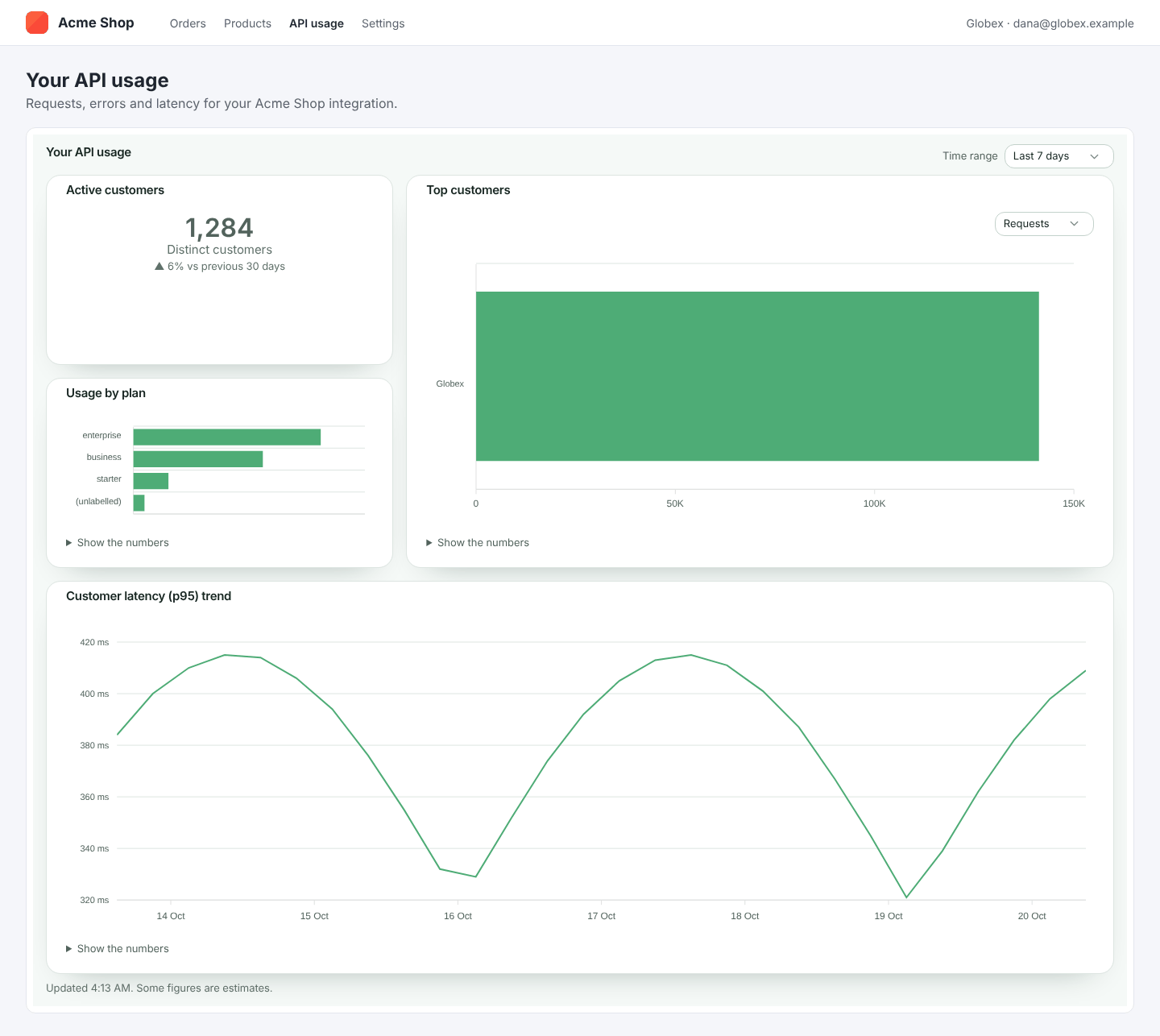
On a phone the tiles stack in one column:

- The report or dashboard, drawn as in ApiTraffic, with a time range menu showing only the ranges you allowed. Today, Yesterday and the month ranges are UTC days, and the embed says so.
- No links into ApiTraffic, no filters, and no way to change what is counted.
- Under a chart, the numbers follow the report’s Table setting: behind Show the numbers (the default), open under the chart, or hidden so only the chart shows (screen readers still get the numbers). Change it on the report and the embed follows on its next load.
- Values of tags classified Personal are masked (
d***@acme.com), as for a member who may not view personal tags. - If you turn off Allow embedding, they see This report is no longer available. (or This dashboard is no longer available.).
- When a renewed token arrives, what is shown stays on screen, with a quiet Refreshing…, until the new numbers are in. A token for another customer or report starts afresh, so one customer’s numbers never show under another’s. While waiting for a new token after one expired, they see a quiet Access has expired. Waiting for new access… line, not an error.
- If a dashboard tile fails, that tile alone says so in plain words (This tile couldn’t load., or This tile can’t be shown right now. when the report itself can’t run), with Try again; the reason is logged on ApiTraffic’s side, never shown to the viewer.
Security
Can a viewer see another customer’s data?
No. The filter is signed into the token, and every run ANDs it onto the report’s own filter on ApiTraffic’s side. A run accepts only a time range, and only one of the ranges the token allows.
Does the embed reveal how the report is built?
It shows the report’s name, description, chart type, groupings and metrics: what it needs to draw the chart. The report’s own filter and scope, and which data sources answered, are never sent.
How do I stop an embed?
Turn off Allow embedding, make the report or dashboard private, or delete it: every token for it stops at once. Tokens also expire on their own (at most 24 hours).
Who can mint tokens?
Any API token that can send traffic, as for the request log embed: keep it on your server. A token can only name a report or dashboard that allows embedding, which only an owner or admin can turn on. Turning embedding on or off is recorded in the account’s activity.
API reference
The element calls these for you. They take the embed token as Authorization: Bearer and answer CORS from any origin. A request log token is refused (403 EMBED_VIEW_MISMATCH), and a report or dashboard that no longer allows embedding answers 404 EMBED_NOT_AVAILABLE.
Get the embed
GET /v1/embed/view
{
  "view": "dashboard",
  "theme": "light",
  "timeRange": { "relative": "last_30d" },
  "timeRanges": ["last_24h", "last_7d", "last_30d"],
  "dashboard": {
    "name": "Your API usage",
    "description": null,
    "tiles": [
      { "id": "t1", "x": 0, "y": 0, "w": 6, "h": 3, "title": "Your requests",
        "report": { "name": "Requests", "description": null, "visualization": "line", "display": { "table": "hidden" },
                    "definition": { "metrics": ["count"], "interval": "auto" } } }
    ]
  },
  "tagNames": { "customerId": "Customer" }
}
A report token gets report (name, description, visualization, display, definition) in place of dashboard. display.table says whether the table under a chart is hidden, collapsed or shown. A definition here holds only groupBy, metrics, interval, compareTo, orderBy, limit, secondaryLimit and includeOther. A tile’s title is present when it was renamed on the dashboard. tagNames maps the tag keys the reports read to their display names, where one is set.
Run a report
POST /v1/embed/report/run
{ "timeRange": { "relative": "last_7d" } }
Run a dashboard tile
POST /v1/embed/dashboard/tiles/{tileId}/run
{ "timeRange": { "relative": "last_7d" } }
Both return a report result (rows, totals, and points for a time series), with a shorter meta: window, compareWindow, intervalSeconds, masked, otherShare, missingValueShare, approximations, exact, clamped and report (name, visualization). Bucket and environment values in rows are their names, never their sids. timeRange may be left out (the range the embed opens with); any other range, or any other field, is 400. Each account’s embeds share a rate limit, and each of your customers (everyone viewing the same report or dashboard with the same filter and scope) has a share of its own, a quarter of it (or the per-address limit, if that is larger) (429 with Retry-After).
Troubleshooting
The token request says the report “could not be located, or it does not allow embedding”. Turn on Allow embedding in its Embed dialog, and check it is shared with Everyone in the account.
The embed says This report (or dashboard) is no longer available. Embedding was turned off, or the report or dashboard was made private or deleted.
Allow embedding is refused: “This report can’t be embedded. It groups by a catalogue attribute of …”. The report groups by (or filters on) a catalogue attribute of a tag classified Personal, which an embed would have to mask. Group by something else, or change the tag’s classification.
Allow embedding is refused: “This report can’t be embedded. It groups by waf_policy …” (or waf_rule, waf.reason, waf.match.1, or “Its filter uses waf_policy …”). Embeds never show firewall policies, rules, reasons or match evidence. Group by Firewall action or Firewall matched instead, or remove the filter.
Allow embedding is refused: “This report can’t be embedded. It groups by ip_address …”. Embeds never show client IP addresses, which are personal data. Group by Country instead.
Saving a report or dashboard is refused: “… is embedded in your app, so only account owners and admins can change what it shows”. Ask an owner or admin to make the change, or turn embedding off first.
A filter is refused. It uses a tag classified Secret, a request or response body, or a value with an unescaped quote. Use filters.tags in the SDK, which escapes values for you.
The embed stays on “Waiting for access…”. No token reached it. Check your token route, and that the token is set on the element (el.token = …).
A tile says “This tile couldn’t load. Try a shorter time range.” Very long ranges over stored requests can time out. Offer shorter ranges in timeRanges, or, for fast long ranges, promote the tag you filter on.
A tile or report says it “can’t be shown right now”. ApiTraffic could not run the report for this embed; the reason is logged on ApiTraffic’s side. Open the report in ApiTraffic and run it: the builder says what is wrong.
For the request log embed, see Embeddable Request Log.