
Install the Node SDK
Add @apitraffic/node to an Express, Fastify, Koa or hapi app: one package with request capture, the firewall and APM, enabled from your account.
@apitraffic/node is the whole ApiTraffic SDK behind one install: the framework adapter for Express, Fastify, Koa or hapi, the web application firewall and the APM bridge, mounted with a single call. Use it for any Node.js API on those frameworks; it is what the setup page in ApiTraffic installs.
Nothing is switched on in code. What runs - the firewall, redaction, exclusions, span capture and server health - is decided in your ApiTraffic account and pushed to every connected server, so turning a feature on is a dashboard change, not a deploy. The one exception is APM, which needs a startup flag (see Performance monitoring).
Before you begin
- Node.js 20 or later. Version 2.x of the SDK requires Node 20; the 1.x packages still run on Node 18.
- A supported framework, installed in your app: Express 4.17+ or 5, Fastify 4 or 5, Koa 2.13+ or 3, or
@hapi/hapi21. The SDK does not install your framework for you. - An ingest token and a bucket ID. The setup page in ApiTraffic creates the token for you if you are an owner or admin. See API tokens.
- Outbound HTTPS from your servers to
ingest.apitraffic.ioandapi.apitraffic.io.
Install the package
npm install @apitraffic/node
pnpm add @apitraffic/node
yarn add @apitraffic/node
bun add @apitraffic/node
Register ApiTraffic in your app
Register ApiTraffic before your routes. Middleware added after a route never sees the requests that route answers.
Express
const express = require('express');
const apitraffic = require('@apitraffic/node');

const app = express();

app.use(express.json());          // body parsers first, so the firewall can inspect bodies
app.use(apitraffic.express());    // then ApiTraffic, before your routes

app.get('/health', (req, res) => res.json({ ok: true }));

app.listen(3000);
apitraffic.express() returns an array of middleware, which app.use() accepts directly. See Express.
Fastify
const fastify = require('fastify')();
const apitraffic = require('@apitraffic/node');

// No `await` needed: Fastify loads plugins before listen(),
// and CommonJS has no top-level await.
fastify.register(apitraffic.fastify());

fastify.get('/health', async () => ({ ok: true }));

fastify.listen({ port: 3000 });
The plugin applies to the whole server, not only to the scope you register it in. See Fastify.
Koa
const Koa = require('koa');
const { bodyParser } = require('@koa/bodyparser');
const apitraffic = require('@apitraffic/node');

const app = new Koa();

app.use(bodyParser());            // body parser first, so the firewall can inspect bodies
app.use(apitraffic.koa());        // then ApiTraffic, before your router

app.listen(3000);
See Koa.
hapi
const Hapi = require('@hapi/hapi');
const apitraffic = require('@apitraffic/node');

const init = async () => {
  const server = Hapi.server({ port: 3000 });

  // Register before server.start(), inside an async function.
  await server.register(apitraffic.hapi());

  server.route({ method: 'GET', path: '/health', handler: () => ({ ok: true }) });
  await server.start();
};

init();
See hapi.
NestJS
Use @apitraffic/nestjs, this package as a Nest module: import it once, in your root module, on the Express or the Fastify platform.
import { Module } from '@nestjs/common';
import { ApiTrafficModule } from '@apitraffic/nestjs';

@Module({ imports: [ApiTrafficModule.forRoot()] })
export class AppModule {}
Meteor
Use @apitraffic/meteor, this package mounted on Meteor’s WebApp: call it once, from your server’s main module.
import { mount } from '@apitraffic/meteor';

mount();
LoopBack
Use @apitraffic/loopback, this package as a LoopBack 4 component: register it in your application’s constructor.
import { ApiTrafficComponent } from '@apitraffic/loopback';

// in your RestApplication's constructor
this.component(ApiTrafficComponent);
AdonisJS
Use @apitraffic/adonisjs, this package as an AdonisJS provider and middleware: one command installs it and registers them.
node ace add @apitraffic/adonisjs
Sails
Use @apitraffic/sails, this package as a Sails hook: install it and Sails loads it when it lifts. Options go in config/apitraffic.js.
module.exports.apitraffic = {
  token: process.env.API_TRAFFIC_TOKEN,
  bucket: process.env.API_TRAFFIC_BUCKET,
};
ES modules and TypeScript
The package is CommonJS and works from ES modules and TypeScript as well. From an ES module, import apitraffic from '@apitraffic/node' and named imports such as import { express } from '@apitraffic/node' both work. In TypeScript:
import express from 'express';
import * as apitraffic from '@apitraffic/node';
import type { ApiTrafficOptions } from '@apitraffic/node';

const options: ApiTrafficOptions = { debug: process.env.NODE_ENV !== 'production' };

const app = express();
app.use(express.json());
app.use(apitraffic.express(options));
ApiTrafficOptions types every option, including waf. A value of the wrong type, or a misspelled key in an object literal, is a compile error. Unknown keys are still passed through at runtime.
Provide your credentials
The SDK needs two values: your ingest token and your bucket ID. Every framework call reads them from the environment when you pass no options, which keeps the token out of source control:
API_TRAFFIC_TOKEN=your-ingest-token
API_TRAFFIC_BUCKET=your-bucket-id
Node does not read .env files on its own. Start your app with node --env-file=.env server.js (Node 20.6 or later), or install dotenv and make require('dotenv/config'); the first line of your entry file.
You can pass them in code instead. An option you pass always wins over the environment variable of the same setting:
app.use(apitraffic.express({
  token: process.env.API_TRAFFIC_TOKEN,
  bucket: process.env.API_TRAFFIC_BUCKET
}));
Warning: Treat the ingest token as a secret. It can’t read captured traffic or mint embed tokens, but whoever holds it can send traffic into your bucket and read the SDK’s settings, which include your redaction rules and firewall policy. Keep it in a secret store, never in client-side code, images or a repository, and rotate it if it may have been exposed.
Every option and environment variable is listed in SDK configuration.
Verify the connection
Restart your app
The token and bucket are read at startup, so restart the process after setting them.
Make a request your app serves
Call any route registered after ApiTraffic. A health check answered before ApiTraffic is not captured.
Check ApiTraffic
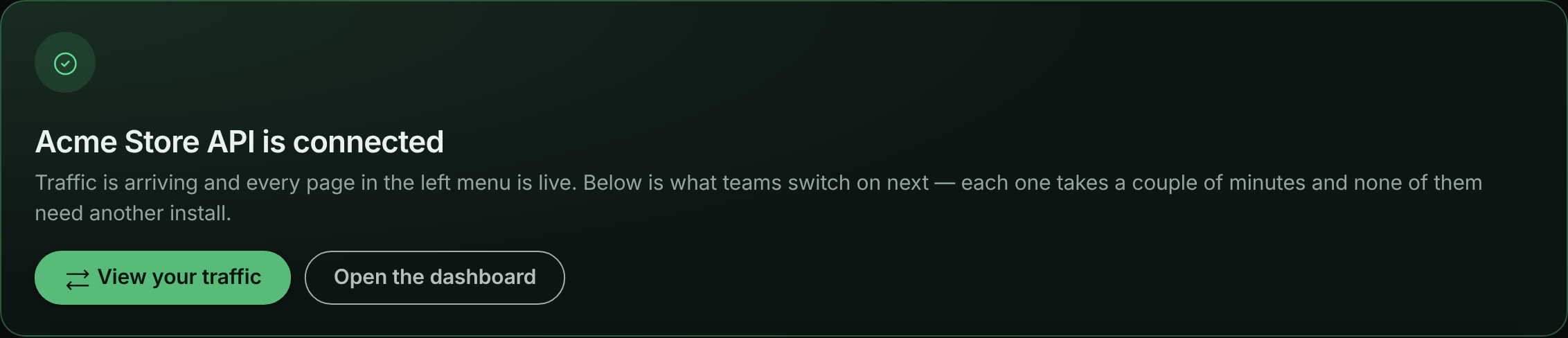
The setup page changes from Listening for your application to SDK connected - waiting for a request as soon as the SDK connects, and to Traffic is flowing when the first request arrives. Choose View your traffic to open the request log. The server icon in the top bar shows how many SDK processes are connected to the bucket.
The setup page confirms when the first request arrives.
If nothing arrives, set API_TRAFFIC_DEBUG=true and restart: the SDK explains what it is doing on the console. See Troubleshooting.
Turn on features
Everything below is already mounted by the call you added. You turn each one on in ApiTraffic, and running servers pick up the change within seconds.
| Feature | Where to turn it on | Needs a code change |
|---|---|---|
| Redaction and exclusions | Account → Redactions and Account → Exclusions | No |
| Firewall | Account → Firewall (WAF) | No |
| Server health (host telemetry) | Bucket Settings → Host Telemetry | No |
| APM capture switches | Bucket Settings → APM Capture | No |
| Performance monitoring (APM spans) | Your start command | Yes: a preload flag, once |
Firewall
The firewall is mounted but not loaded until your account has a policy that is switched on, so an app that never uses it pays one check per request and nothing more. Create a policy under Firewall (WAF), start it in Monitor mode to see what it would block, then switch to enforcing. See Set up the firewall.
Mount your body parsers before ApiTraffic (Express and Koa) so the firewall’s body rules can inspect the parsed body. On Fastify and hapi the firewall runs after the body is parsed automatically.
Two local switches override the dashboard. Both turn the firewall off; neither can turn it on:
app.use(apitraffic.express({ waf: false })); // refuse the firewall in code
API_TRAFFIC_WAF_ENABLED=false # kill switch, no code change
Use waf: false when your change process requires that anything able to reject production traffic ships through a deploy. Use the environment variable during an incident: it works even when ApiTraffic is unreachable. To pass firewall settings such as offlineWafMode or an onEvent callback, give waf an object instead; see SDK configuration.
Performance monitoring
APM records the database, cache, queue and outbound work inside each request. It is the one feature that needs a change to how you start your app, because OpenTelemetry instruments libraries as they are loaded and has to start before your app loads pg, redis and the rest.
Install the OpenTelemetry packages
npm install @opentelemetry/api @opentelemetry/sdk-trace-node @opentelemetry/instrumentation @opentelemetry/auto-instrumentations-node
Preload the SDK when you start the app
node -r @apitraffic/node/register ./server.js
With credentials in a .env file: node --env-file=.env -r @apitraffic/node/register ./server.js. The preload reads its configuration from API_TRAFFIC_* environment variables.
If you cannot change the start command, make require('@apitraffic/node').register(); the very first line of your entry file, above every other require. If the OpenTelemetry packages are missing or fail to start, APM is skipped with a one-line reason on the console and your app boots normally.
The preload is for apps with no other tracing. If your app already runs OpenTelemetry, add ApiTrafficSpanProcessor from @apitraffic/apm to your own tracer provider instead; with Datadog or New Relic loaded, the preload steps aside on its own. ES-module apps start with node --import and a loader hook. All three cases are covered in Set up APM.
Add context to requests
Call these from anywhere in your request-handling code. Outside a request they do nothing, and they never throw:
const apitraffic = require('@apitraffic/node');

app.post('/v1/checkout', async (req, res) => {
  apitraffic.tag('customerId', String(req.user.id));      // searchable in the request log
  apitraffic.trace('applied the loyalty discount');         // a timestamped note on this request

  const order = await apitraffic.span('custom', 'price cart', () => priceCart(req.body));
  res.json(order);
});
Keys and values follow the tag rules: numbers and booleans are stored as text, long values are cut to 255 characters, and a tag that breaks a rule is dropped and counted in Settings → Dimensions, never thrown into your handler. tag, trace, span, startSpan and the rest are described, with their limits, in SDK configuration.
Embed tokens
The embeddable request log authenticates with a short-lived token that can only be minted on your server, with an Administrator API token. The ingest token the SDK reports with can’t mint embed tokens. Set the Administrator token as API_TRAFFIC_EMBED_TOKEN (or pass it as token); the host, bucket and account come from the SDK you already configured:
app.get('/api/embed-token', async (req, res) => {
  const { token, expiresAt } = await apitraffic.embedToken({
    filters: { tags: { customerId: String(req.user.id) } },   // escaped for you
    ttl: 900
  });
  res.json({ token, expiresAt });
});
embedToken() uses token first, then API_TRAFFIC_EMBED_TOKEN, then the SDK’s own token. If it falls back to the SDK’s ingest token, the API answers 403 and the error tells you to set API_TRAFFIC_EMBED_TOKEN.
Warning:
API_TRAFFIC_EMBED_TOKENis a read credential: an Administrator token can mint embed tokens for any bucket in the account, with any filters or none. Keep it in a secret store, never in client-side code, images or a repository, and rotate it immediately if it may have been exposed.
Unlike the rest of the SDK, embedToken() rejects on failure, so a problem is a 500 on your route instead of a broken embed. All options are on the embed page.
Check delivery from your own monitoring
apitraffic.stats() returns live delivery counters: payloads in flight and queued, delivered, recovered after a retry, dropped by cause, and whether the circuit breaker is open. Use it to assert that telemetry is leaving the process:
console.log(apitraffic.stats());
// { pending, queued, delivered, recovered, dropped, droppedRejected, breakerOpen, ... }
Shut down cleanly
The SDK keeps a realtime connection open for live configuration. That is right for a server and wrong for a script, worker or test run that should exit. Call shutdown() from your own shutdown path; the SDK installs no signal handlers:
process.once('SIGTERM', async () => {
  await apitraffic.shutdown({ flushTimeoutMs: 2000 });
  server.close();
});
shutdown() also stops APM tracing that register() started. To deliver what was captured without stopping, for example before a serverless function is frozen, use await apitraffic.flush({ timeoutMs: 1000 }). See Shutting down.
How the SDK fails
The SDK is built so that it is never the reason your application fails:
- A missing or rejected token disables telemetry and logs one clear message. Your application still boots and serves.
- If ApiTraffic is unreachable, requests are served normally; a short outage is absorbed by a small retry queue, and a longer one sheds data rather than using more memory. See If ApiTraffic is unreachable.
- If the realtime connection is blocked, you lose live configuration updates and nothing else.
- Nothing is sent before your account’s redaction rules have loaded.
tag(),trace()and the span helpers never throw into your handlers.
Pass strict: true if you would rather a misconfigured SDK stopped the process at startup than ran unmonitored.
Use the individual packages instead
@apitraffic/node delegates to packages that are also published on their own: @apitraffic/express, @apitraffic/fastify, @apitraffic/koa, @apitraffic/hapi, @apitraffic/waf and @apitraffic/apm. Each framework page shows the standalone setup. Choose them for the smallest possible install; you then mount the firewall and APM yourself if you need them. Mounting both a standalone package and @apitraffic/node is safe: each request is still reported once.
Troubleshooting
The setup page never leaves Listening for your application
The SDK has not connected. Check, in order:
- The process was restarted after you set
API_TRAFFIC_TOKENandAPI_TRAFFIC_BUCKET. - The variables actually reach the process. Node does not load
.envby itself. - The console. Without debug mode the SDK still prints
ApiTraffic: An APITraffic API Token must be set…for a missing token, andApiTraffic: token rejected (HTTP 401)…or(HTTP 403)for a token that is invalid or cannot access the bucket. - Outbound HTTPS to
api.apitraffic.ioandingest.apitraffic.iois allowed from where the app runs.
SDK connected, but no requests appear
The SDK is talking to ApiTraffic, so the token and bucket are right. Usually:
- ApiTraffic is registered after the route you are calling. Move it above your routes.
- The request is answered by middleware mounted before ApiTraffic, such as a health check or a static file handler.
- An exclusion matches the request.
APM shows no spans
APM needs the preload (node -r @apitraffic/node/register) or register() as the first line of your entry file, and the OpenTelemetry packages installed. If register() ran after your database client was loaded, that client produces no spans; the console says which modules were already loaded. See Set up APM.
The firewall does not inspect request bodies
On Express and Koa, mount your body parser before apitraffic.express() or apitraffic.koa(). If a router has its own body parser mounted after ApiTraffic, the firewall evaluates the request again once the body is parsed, without counting it twice against rate limits.
My script or test run never exits
The realtime connection keeps the event loop alive. Call await apitraffic.shutdown() when the work is done.
Related
-
SDK configuration: Every option, environment variable and per-request API.
-
Outbound requests: How calls your app makes to other APIs are captured.
-
Set up the firewall: Create a policy, monitor it, then enforce it.
-
Set up APM: Spans for database, cache and queue work inside each request.