
Set up APM
Start the ApiTraffic OpenTelemetry bridge in your Node application to capture database, cache, queue and outbound spans for every request.
ApiTraffic already captures requests, responses and outbound HTTP. APM adds the work that happens inside a request - queries, cache calls, queues and RPC - from OpenTelemetry spans, so you can see where each request’s time went. This page takes you from an instrumented app to your first waterfall.
Before you begin
- Your app sends traffic to ApiTraffic with
@apitraffic/nodeor one of the framework packages. APM attaches spans to the requests the SDK already captures. - Your plan includes APM. Without it, the Performance pages show an upgrade prompt.
- You can change how your app is started (a preload flag or the first line of your entry file).
The APM bridge ships as @apitraffic/apm, which @apitraffic/node already depends on. All OpenTelemetry packages are optional peer dependencies, so nothing OpenTelemetry is installed into your app unless you add it.
Choose a setup
| Your application… | Use |
|---|---|
| already runs OpenTelemetry, or might later | Option 1: add the span processor (recommended) |
| has no tracing of any kind | Option 2: the bundled setup |
runs Datadog (dd-trace) or New Relic |
Request capture works as usual. The bundled setup steps aside rather than instrument every driver a second time; use Option 1 if you also run OpenTelemetry. |
Warning: The bundled setup claims the process-wide OpenTelemetry tracer provider, and OpenTelemetry accepts only one. An OpenTelemetry setup your app starts afterwards is refused, with nothing more than a diagnostic message. The span processor cannot cause this, because your app keeps owning its provider.
Option 1: Add the span processor to your OpenTelemetry setup
Add the ApiTraffic span processor to the provider you already have. ApiTraffic receives the spans your instrumentations already produce; your exporters, propagators, sampling and instrumentations are untouched.
Add the package to your app
@apitraffic/node depends on @apitraffic/apm. Add it to your own package.json too so you can import it directly:
npm install @apitraffic/apm
Register the processor
Add ApiTrafficSpanProcessor to spanProcessors:
import { NodeSDK } from '@opentelemetry/sdk-node';
import { ApiTrafficSpanProcessor } from '@apitraffic/apm';

const sdk = new NodeSDK({
  spanProcessors: [
    new ApiTrafficSpanProcessor(),
    // ...your existing processors
  ],
  instrumentations: [/* your existing instrumentations */],
});

sdk.start();
Verify
Restart your app and follow Verify that spans arrive.
The processor attributes each span to its request when the span starts, which is why it has to be a span processor. ApiTrafficSpanExporter is deprecated: behind a BatchSpanProcessor an exporter sees spans long after their request has finished, and drops them.
Flushing your provider (forceFlush()) also asks ApiTraffic to deliver the request data it has queued, waiting at most flushTimeoutMs (5 seconds by default). Shutting the provider down flushes the same way but does not stop ApiTraffic’s request capture.
Option 2: The bundled setup
Use this when nothing else in your app does tracing. OpenTelemetry instruments libraries by patching them as they are loaded, so it must start before your app loads pg, redis and the rest. That makes this a one-time change to how you start the process.
Install the OpenTelemetry packages
npm install @opentelemetry/api @opentelemetry/sdk-trace-node @opentelemetry/instrumentation @opentelemetry/auto-instrumentations-node
yarn add @opentelemetry/api @opentelemetry/sdk-trace-node @opentelemetry/instrumentation @opentelemetry/auto-instrumentations-node
pnpm add @opentelemetry/api @opentelemetry/sdk-trace-node @opentelemetry/instrumentation @opentelemetry/auto-instrumentations-node
Start APM before your app loads its drivers
Pick the form that matches your module system (see CommonJS and ES modules below).
Verify
Restart your app and follow Verify that spans arrive. Check the start-up output too: if the bundled setup did not start, it prints why.
CommonJS
Preload the bridge from the command line:
node -r @apitraffic/node/register ./server.js
Or make it the very first line of your entry file:
require('@apitraffic/node').register();

const express = require('express');
const apitraffic = require('@apitraffic/node');

const app = express();
app.use(apitraffic.express({ token: process.env.API_TRAFFIC_TOKEN, bucket: process.env.API_TRAFFIC_BUCKET }));
ES modules
An ES-module app ("type": "module", .mjs, or TypeScript compiled to ESM) starts APM with --import, after OpenTelemetry’s loader hook, which lets it patch packages your code loads with import:
import { register } from 'node:module';

register('@opentelemetry/instrumentation/hook.mjs', import.meta.url);
node --import ./otel-hook.mjs --import @apitraffic/node/register ./server.mjs
The hook comes from @opentelemetry/instrumentation, which is in the install command above.
What the bundled setup installs
Only what ApiTraffic uses:
- A curated set of instrumentations: pg, mysql, mysql2, mongodb, tedious, oracledb, cassandra-driver, redis, ioredis, memcached, undici (
fetch), amqplib, kafkajs and the AWS SDK. Anything else in OpenTelemetry’s catalog (graphql, grpc, mongoose, knex and so on) is opt-in withenabledInstrumentations. - No log correlation. The pino, winston and bunyan instrumentations, which rewrite every log line with trace ids, stay off unless you enable them.
- Tracing only. A tracer provider whose only consumer is ApiTraffic: no OpenTelemetry logs or metrics setup, no exporters of any kind (
OTEL_*_EXPORTERandOTEL_EXPORTER_OTLP_ENDPOINTare not read, so nothing is sent to an OTLP collector), no propagators (notraceparentorbaggageheaders are added to your outbound calls), and no resource detection at boot.
When the bundled setup does not start
register() is idempotent and fail-open: your app always starts. When the bundled setup cannot or should not run, it prints the reason once, whether or not debug is on:
| Reason | Cause |
|---|---|
otel-sdk-disabled |
OTEL_SDK_DISABLED=true is set (OpenTelemetry’s own off switch). |
other-apm-detected |
dd-trace or New Relic is running in the process, or installed and configured to start. |
provider-already-active |
An OpenTelemetry tracer provider is already registered. Use Option 1. |
otel-peers-missing |
The OpenTelemetry packages above are not installed. |
Another agent counts as running when it is loaded (global._ddtrace, or dd-trace / newrelic already required), or when its package is installed and its configuration is in the environment (DD_SERVICE, DD_ENV, DD_AGENT_HOST, DD_TRACE_AGENT_URL or DD_TRACE_ENABLED=true for Datadog; NEW_RELIC_LICENSE_KEY or NEW_RELIC_APP_NAME for New Relic). The agent’s own off switch always wins: DD_TRACE_ENABLED=false, NEW_RELIC_ENABLED=false or NEW_RELIC_AGENT_ENABLED=false.
If the detection is wrong for your app, start the bundled setup anyway with register({ force: true }) or API_TRAFFIC_APM_FORCE=true. That never overrides OTEL_SDK_DISABLED or an existing OpenTelemetry provider.
Warning: If
register()runs after your database or cache client has been loaded, those modules are never patched and their operations produce no spans.register()prints which ones it found already loaded. This is the most common reason a request has no waterfall.
Configuration
Pass options to register() (or new ApiTrafficSpanProcessor({...})), or set the matching API_TRAFFIC_* environment variable. An explicit option wins over the environment variable, which wins over the default.
- What spans carry:
captureSpans,captureStatements,captureStatementParams,captureRedisKeys,captureCallSite,captureStackDepthandmaxSpanMetaBytes(when a span’s metadata is over the cap, values are dropped first, then the statement). - What the bundled setup instruments:
enabledInstrumentations,disabledInstrumentations,instrumentHttp,synthesizeOutboundRecords,flushTimeoutMs,serviceNameandforce. - Logging:
debug.
Every option, with its environment variable and default, is listed once in SDK configuration, including the options for the APM preload. Environment variables that take a list are comma-separated, for example API_TRAFFIC_ENABLED_INSTRUMENTATIONS=graphql,grpc.
require('@apitraffic/node').register({
  serviceName: 'orders-api',
  enabledInstrumentations: ['graphql'],
  disabledInstrumentations: ['@opentelemetry/instrumentation-mongodb']
});
The per-request span cap (maxSpansPerRequest, default 500), span sampling (spanSampleRate, default 1.0) and redisKeyPatterns are options of the ApiTraffic middleware rather than of APM. Pass them to apitraffic.express({...}) (or your framework’s equivalent), or set API_TRAFFIC_MAX_SPANS_PER_REQUEST / API_TRAFFIC_SPAN_SAMPLE_RATE. See SDK configuration.
captureStatementParams and captureRedisKeys can also be turned on for a bucket from the dashboard, without a redeploy and with an automatic expiry. captureCallSite and captureStackDepth follow the bucket’s settings unless you set them here. See Capture settings.
Outbound HTTP
Outbound calls made with http/https (including axios, got and request) and the global fetch are captured by the base SDK, with full request and response bodies. Calls made through undici directly (undici.request, Pool, Client) are captured by the APM bridge as metadata-only spans. You do not need to configure anything for this. Leaving instrumentHttp off is what keeps a call from being recorded twice.
Verify that spans arrive
Exercise an endpoint that does real work
Start your app and call an endpoint that queries a database or calls another API.
Open the request’s waterfall
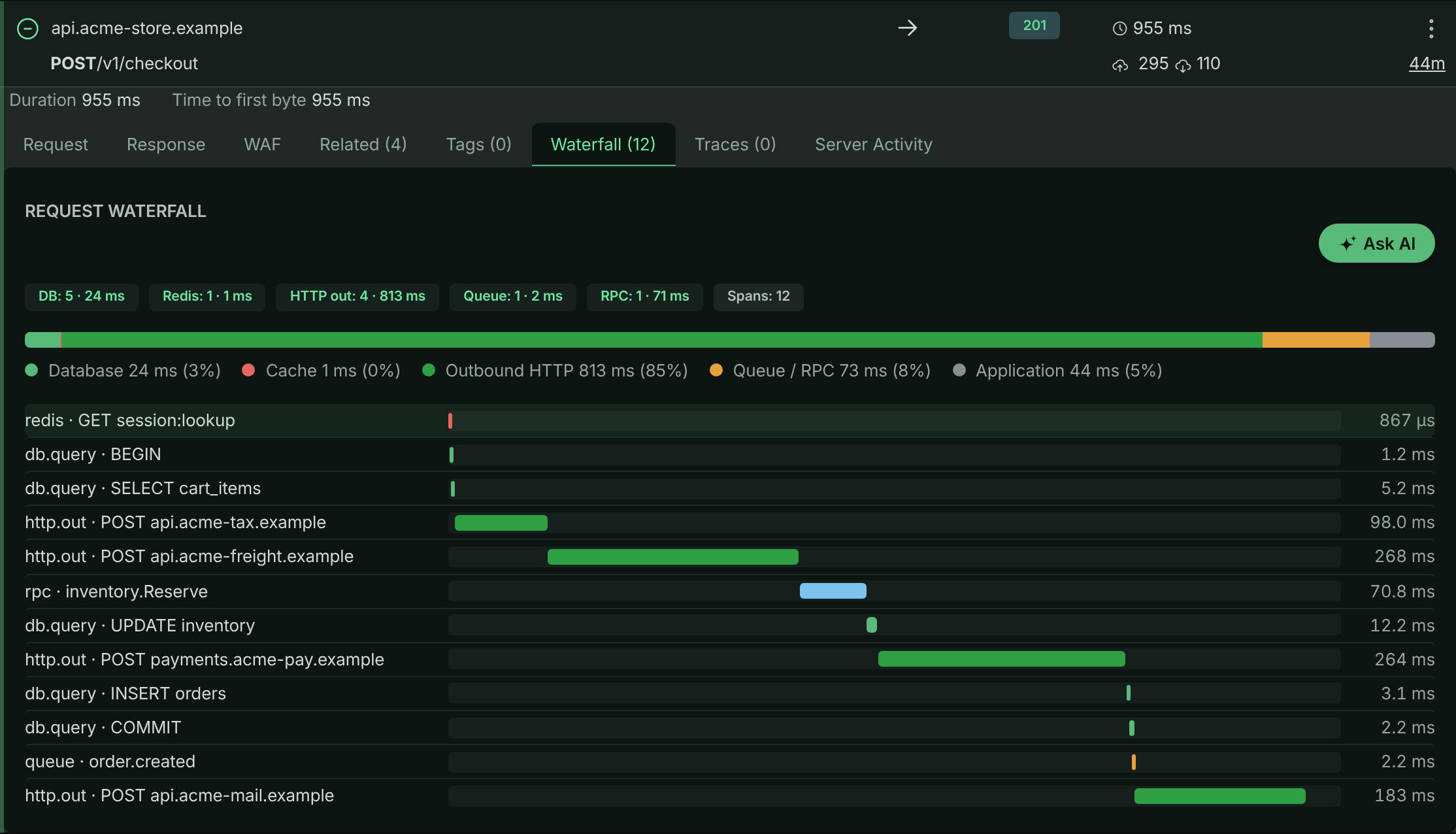
In the bucket, open All Traffic, expand the request, and select the Waterfall tab. Each query, cache call and outbound request appears on the timeline with its duration, and the bar above it splits the request’s time into Database, Cache, Outbound HTTP, Queue / RPC and Application.
A checkout request’s waterfall: queries, cache calls and outbound calls on one timeline.
Open Performance
Select Performance in the left navigation. The Overview tab shows the same work aggregated across requests. See Performance analytics.
Troubleshooting
A request has no waterfall at all
APM was probably not started in that process, or was started too late. Check the start-up output: the bundled setup prints why it did not start, and which drivers were already loaded when it ran. register() must run before your database and cache modules are loaded - use node -r @apitraffic/node/register (or --import for ES modules) to be sure. With your own OpenTelemetry setup, check that ApiTrafficSpanProcessor is in its spanProcessors.
Only outbound HTTP appears, no queries
The driver’s instrumentation was not applied. Check that the driver is in the curated set (or listed in enabledInstrumentations), that it is loaded after register(), and that it is not listed in disabledInstrumentations. For an ES-module app, check that the OpenTelemetry loader hook is registered.
The waterfall stops partway through the request
The per-request span cap (maxSpansPerRequest, default 500) was reached - typically by an N+1 query loop. The number of dropped spans is kept on the request (search for spans_dropped > 0), and the rollups still include the dropped work.
Queries show where id = ? instead of the values
That is the default: values are removed inside your process before anything is sent. Turn them on deliberately, and for a limited time, from Capture settings.
My own OpenTelemetry setup stopped exporting
The bundled setup owns the process’s tracer provider, so a provider your app registers afterwards is refused. Remove the register() preload and add ApiTrafficSpanProcessor to your own setup (Option 1).
Outbound calls appear twice
OpenTelemetry’s http instrumentation is enabled alongside the SDK’s own outbound capture. Leave instrumentHttp off (the default).
Performance shows the setup guide instead of data
The bucket has not received traffic from a connected app yet. Finish connecting your app first; APM data appears with the first requests that carry spans.
Related
-
How APM works: Spans, attribution, fingerprints and overhead.
-
Performance analytics: Rank operations, endpoints and dependencies by the time they cost.
-
APM capture settings: Control query parameters, Redis keys and code location.
-
Node SDK: Install and configure
@apitraffic/node.