
How APM works
What ApiTraffic APM records inside each request, how spans are attributed and grouped, and what it costs your application.
A request log tells you that GET /v1/orders/{order_id} took 900 ms. APM tells you where those 900 ms went. Alongside the request and response it already captures, the ApiTraffic SDK records the work your application did while handling the request - database queries, cache calls, outbound HTTP, queue publishes, RPC and GraphQL - as spans, and stores them with the request.
Use APM when you need to answer questions such as “which query makes checkout slow”, “which line of our code issues the most database work” or “did this deploy make anything slower”.
Info: APM is part of the APM plan feature. On a plan without it, the Performance pages show an upgrade prompt and APM data is not returned by the API. The read-only sample bucket always shows APM, whatever your plan. See Sample data.
Spans
A span is one unit of work inside a request: a SELECT, a Redis GET, a call to a payment provider. Every span records the kind of work, a name, when it started relative to the request, how long it took, whether it succeeded, and metadata from the instrumentation that produced it (database, table, host, status and so on).
| Type | Shown as | What it covers |
|---|---|---|
db.query |
Database | SQL databases, MongoDB, DynamoDB |
redis |
Redis | Redis and ioredis commands |
cache |
Cache | Memcached and other caches |
http.out |
Outbound HTTP | Outbound HTTP calls, including fetch and undici (see Outbound requests) |
queue |
Queue | Messaging systems such as Kafka, RabbitMQ, SQS and SNS |
rpc |
RPC | gRPC and other RPC |
graphql |
GraphQL | GraphQL operations and resolvers |
custom |
Custom | Spans you record yourself |
Spans come from OpenTelemetry instrumentation, so you do not annotate your code. Outbound HTTP made with http, https or the global fetch is recorded by the base SDK instead - that path also records full request and response bodies. See Outbound requests for what it covers.
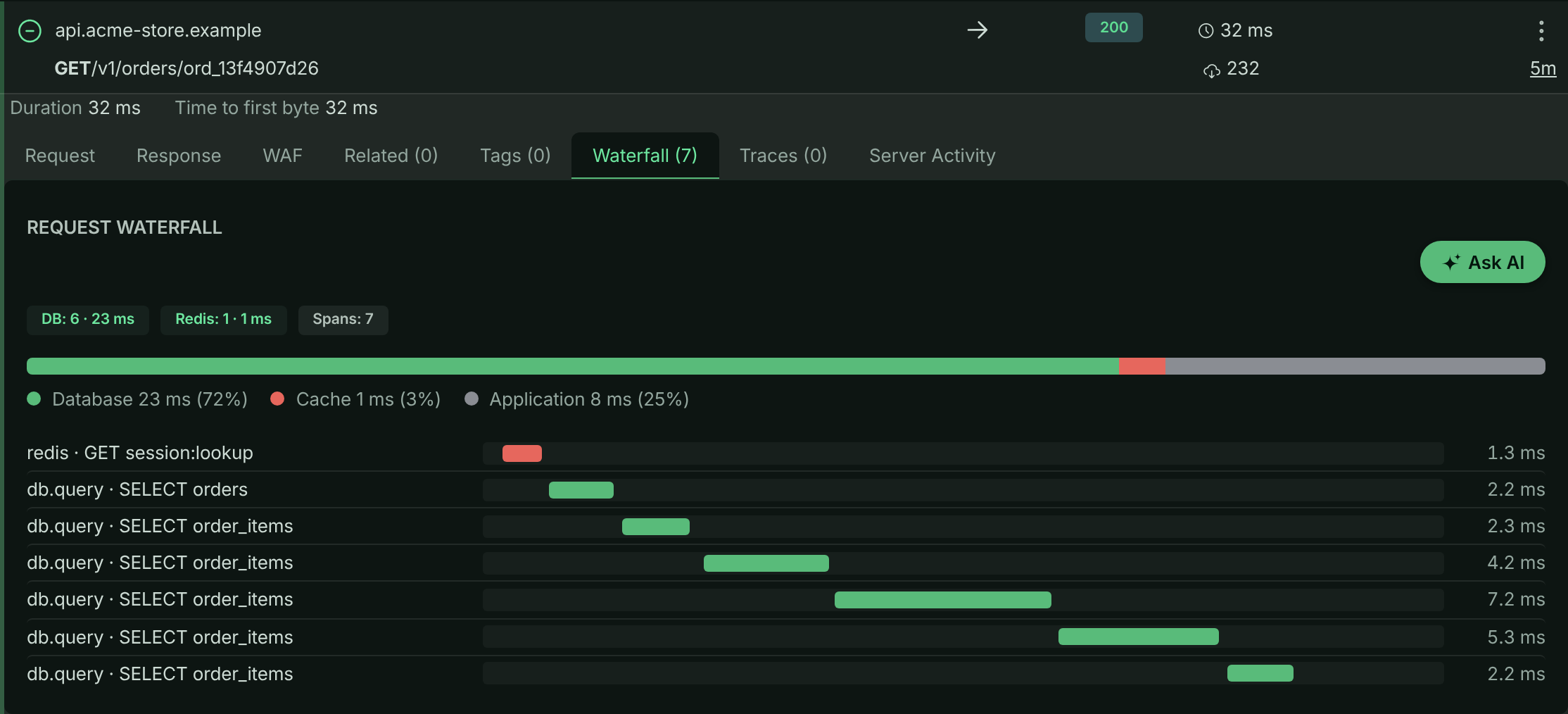
In the sample data, opening any GET /v1/orders/{order_id} request shows one SELECT orders query followed by one SELECT order_items query per line item - the N+1 pattern the Performance analytics flag.
The waterfall of a GET /v1/orders/{order_id} request in the sample data: one order query, then one query per line item.
How spans are attributed to requests
The hard part of APM in Node.js is deciding which request a span belongs to. A database query finishes inside a connection pool callback, and an outbound response can arrive on a keep-alive socket shared with a different request, so by the time an operation ends, Node’s async context is often no longer the caller’s.
ApiTraffic captures the owning request when the operation starts and holds it until the operation completes. This applies to OpenTelemetry spans, to the SDK’s own outbound hook (the context is taken synchronously when http.request() is called), and to the framework middlewares, which keep their request rather than looking it up again when the response is sent.
Operations that fail are recorded too: a refused connection or a timeout produces a failed span, not a gap in the timeline.
Note: If a request that clearly runs queries shows no waterfall, APM was most likely never started in that process, or was started after the database driver was loaded. See Troubleshooting.
Fingerprints: how operations are grouped
Every span is fingerprinted so the same logical operation collapses to one identity whatever values it ran with. SELECT * FROM users WHERE id = 42 and SELECT * FROM users WHERE id = 91 normalize to the same statement (... WHERE id = ?) and the same fingerprint. Redis keys are masked to their shape (user:12345:profile becomes user:{}:profile) before fingerprinting.
Fingerprints are always computed from the normalized form, so turning value capture on or off never splits an operation’s history in the analytics.
Code location
Each span also carries the place in your code that started it: the file and line (for example src/repositories/orderRepository.js), the function (findItems), and the chain of callers above it (src/routes/orders.js getOrder). Frames from Node internals, node_modules and the ApiTraffic SDK are skipped, so you see your route handler rather than the driver. Code location is on by default; see Code location to change its depth or turn it off.
Per-request rollups and application time
As spans are recorded, the SDK also adds up per-request totals - time and count for database, Redis, cache, outbound HTTP, queue and RPC work - and sends them on the request itself. The dashboards read these rollups, which is why they stay fast however many spans you produce. They are also searchable: for example db_time_ms > 500 or db_query_count > 20 in request search.
Time not spent in any instrumented dependency is reported as Application time: the request duration minus the instrumented work, never below zero. Because dependency work can overlap (for example, parallel queries), a heavily parallel request can show 0 ms of application time.
Distributed traces
When a request arrives with a W3C traceparent header, ApiTraffic records its trace id on the request. When it does not, the trace id of its first span is used. Requests that share a trace id are listed in the request’s Distributed Trace tab, so a call that crosses several of your services reads as one timeline.
The trace id is taken from the original headers, before redaction, so a redaction rule on traceparent does not break trace grouping.
Overhead and limits
APM is designed to stay on in production.
- Fail-open. The APM bridge never throws into your code, never changes a wrapped call and never blocks the request path. If something goes wrong internally, the span is dropped.
- Bounded per request. At most
maxSpansPerRequestspans (default500) are kept per request; work beyond that is counted in the rollups but its span details are dropped. Span metadata is capped atmaxSpanMetaBytes(default2048bytes) per span. - Sampling.
spanSampleRate(default1.0) keeps span details for a fraction of requests. Rollups are still counted for every request, so dashboard totals stay accurate while fewer spans are stored. - No values by default. Statements are normalized and bind values discarded inside your process, before anything is sent. See Capture settings.
Related
-
Set up APM: Start the OpenTelemetry bridge and capture your first spans.
-
Performance analytics: Find the endpoint, query or dependency that costs the most time.
-
APM capture settings: Query parameters, Redis keys, code location and query text.
-
APM API: Query the same data programmatically.