
APM capture settings
Control what APM spans carry: query parameters and Redis keys for a limited time, code location and stack depth, and whether query text is stored.
APM is conservative about what it collects. Some detail is useful while you investigate a problem but risky to keep forever, so it is off by default and can be turned on for a limited window. Code location is about your code rather than your data, so it is on by default. This page explains each setting and how to change it.
| Setting | Where | Default | What it adds |
|---|---|---|---|
| Database query text | Account (Profile page) | off | The normalized query text and the caller stack, stored with each database span |
| Query Parameters | Bucket | off, time-limited | The statement exactly as issued, with its bind values |
| Redis Keys | Bucket | off, time-limited | The concrete key instead of its masked shape |
| Code Location | Bucket | on | The file, line and function that started each operation, and its callers |
| Stack trace depth | Bucket | 10 frames | How many of your own frames travel with each span |
What is collected by default
With none of these settings changed:
- SQL is normalized before it leaves your server.
where id = 42is captured aswhere id = ?, and bind values are discarded inside your process; they are never sent or stored. Even the normalized text is only stored when the account has Database query text turned on. - Redis and cache keys are masked to their shape:
user:12345:profilebecomesuser:{}:profile. - Spans carry the code that started them (see Code location).
Operations are grouped by their normalized shape either way, so changing a setting never splits an operation’s history in Performance analytics.
Turn on query parameters or Redis keys for a bucket
Use this while you reproduce a problem that depends on specific values, then let it expire.
Before you begin
- Turning on Collect SQL statements with their parameters or Collect concrete Redis and cache keys needs the account owner or an admin, because both put personal data into spans. Members can turn either switch off and save the other settings on the tab; while a switch is off, members see it locked, with the notice Only account owners and admins can change this. Ask one of them if you need it updated. The read-only sample bucket has no settings.
- Decide how long you need: the switches turn themselves off when the window ends.
Open the APM Capture tab
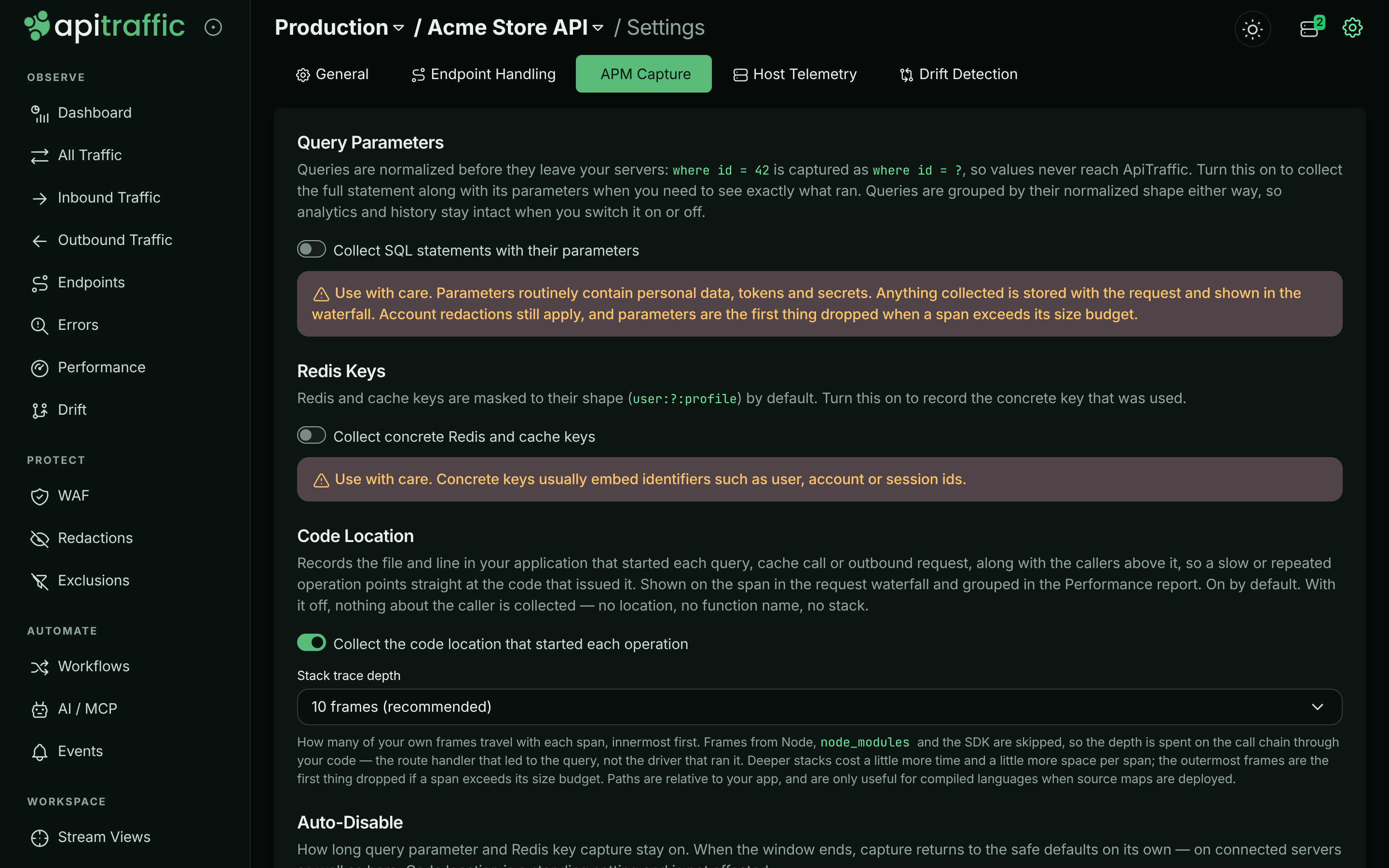
In the bucket, select Bucket Settings in the left navigation, then the APM Capture tab.
The APM Capture tab with its default settings.
Turn on what you need
Under Query Parameters, turn on Collect SQL statements with their parameters. Under Redis Keys, turn on Collect concrete Redis and cache keys. Turn on only what the investigation needs.
Choose an auto-disable window
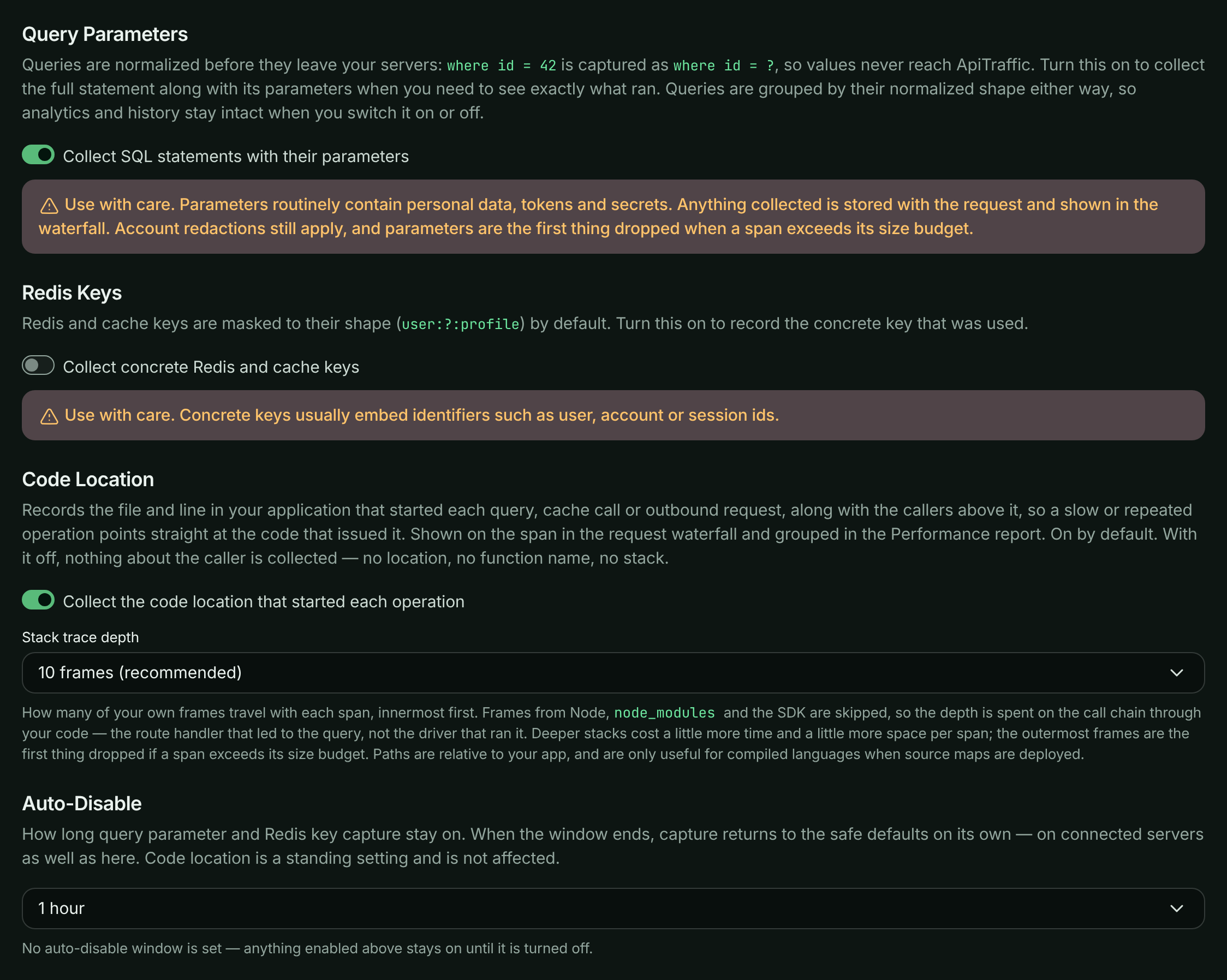
Under Auto-Disable, pick 15 minutes, 1 hour, 4 hours, 24 hours or Until I turn it off. The window applies to the parameter and key switches only, never to code location, and it restarts each time you save.
Query parameters turned on for one hour.
Save
Select Save Changes. Connected servers pick up the change immediately over their realtime connection, with no restart and no deploy. The page then shows when capture stops: Capturing until …, then capture turns itself off.
Warning: Use these with care. Parameters and concrete keys routinely contain personal data, identifiers, tokens and secrets, and whatever is collected is stored with the request and shown in the waterfall. Your redaction rules still apply, and captured values are the first thing dropped when a span exceeds its size budget, but the safest approach is a short window, deliberately opened.
How the window is enforced
The expiry is applied in two independent places, so capture stops on time even if a server never reloads its settings and nobody returns to the dashboard:
- ApiTraffic stops reporting the switches as on to your servers once the window passes, and
- each SDK sets its own timer and returns capture to the defaults at that moment.
Turning capture on in the SDK instead
The same switches exist as SDK options: captureStatementParams, captureRedisKeys, captureCallSite and captureStackDepth, or their API_TRAFFIC_* environment variables.
For the two value switches, the effective setting is your app’s setting OR the bucket’s: the bucket can turn capture on for servers that have not enabled it locally, and a switch your app turned on is not turned off when a bucket window expires.
Code location and its depth follow the bucket unless your app sets them. Set captureCallSite: false (or captureStackDepth: 1) in code or the environment and that wins everywhere; leave them unset and the dashboard is in charge. Prefer the bucket settings in production: they are reversible and need no deploy.
Database query text
An account-wide setting decides whether database spans keep their normalized query text (for example select id, email from users where email = ?) and the caller stack, the chain of calls in your code that led to the query. It is off by default.
With it off, every database operation is still captured, timed and grouped by its normalized shape, and labeled by operation and table (for example SELECT users). It keeps its call site - the file, line and function that ran it - so you can still find it in your code. Only the query text and the caller stack are left out, and Performance shows Query text not stored for this account where the text would be. With it on, Performance lays out stored SQL one clause per line.
Before you begin
Only account owners and admins can change this setting. Everyone else sees whether it is on.
Open your profile
Open the account menu at the top right and select Profile. Scroll to the Database query text card.
Turn it on
Switch on Store query text in performance data. The change saves immediately.
The Database query text card on the Profile page.

What to expect:
- It applies to new queries within about a minute. Queries recorded while it was off never gain their text.
- If your SDK sends query text only once per operation (
sendStatementTextOnce), an operation whose text was already sent while the setting was off shows its text once the SDK sends it again, up tostatementTextResendSecondslater (an hour by default). - Turning it off hides query text already stored straight away, and that text stays hidden even if you turn the setting back on. Only queries recorded after it is back on show text.
- Each change is recorded in the account history as Query text storage turned on or off (
account.query_text_toggled), with who made it.
This is separate from Query Parameters above, which adds the statement exactly as issued, with its bind values, for a limited window.
To change it over the API, send apmStatementTextEnabled to the account settings endpoint. It needs the session token of a signed-in owner or admin; API tokens are refused, because this is a decision a person makes for the account:
curl -X PATCH "https://api.apitraffic.io/v1/account/settings" \
  -H "Authorization: Bearer your-session-token" \
  -H "Content-Type: application/json" \
  -d '{ "apmStatementTextEnabled": true }'
Code location
A span carries callSite (for example src/repositories/orderRepository.js:42:9), callSiteFn and callStack - the callers above the call site, innermost first - shown in the span details as Code location, Function and Stack trace. The stack is taken when the operation is started, because a driver callback runs far from the caller.
Frames in Node internals, node_modules and the ApiTraffic packages are skipped, so the depth is spent on the chain through your own code: the route handler that led to the query, not the driver that ran it. Paths are relative to your application root, and transpiled projects report the built file unless source maps are deployed.
To change it, open Bucket Settings → APM Capture → Code Location: switch Collect the code location that started each operation off, or pick a Stack trace depth (Call site only, 5 frames, 10 frames (recommended), 20 frames or 30 frames), then select Save Changes. Code location is a standing setting; Auto-Disable does not affect it.
The cost per span is small (roughly 12 µs for ten frames, nearer 30 µs for an operation issued through an ORM with many library frames to skip) and follows how deep the stack actually is, not the depth you ask for. Lower the depth on a very hot path, or switch it off, in which case no stack is walked at all. Once a request reaches its span cap (or is sampled out of span detail), further spans skip the stack walk too. If a span exceeds its metadata budget, the outermost frames are dropped first, so the call site always survives.
The call site and function are always stored. The caller stack is stored only while the account has Database query text turned on.
The location is also stored on the span, so Code Location is a grouping in Performance → Operations, not just a detail of one request. Where a Git integration has linked a deploy to the request, the location links to the file at the exact commit that was running - a permalink, so it still points at the right line after the code moves on.
Manage capture over the API
The switches are fields on the bucket, so you can drive them from CI or a script. See Buckets API.
Setting apmCaptureStatementParams or apmCaptureRedisKeys to true when it is currently off needs a signed-in owner or admin, or an Administrator API token; anyone else gets 403 with code 2010. Turning either off, or sending the value the bucket already has, needs no extra role, so a script that resends the bucket’s current settings keeps working.
curl -X PUT "https://api.apitraffic.io/v1/accounts/{accountSid}/buckets/{bucketSid}" \
  -H "Authorization: Bearer your-administrator-api-token" \
  -H "Content-Type: application/json" \
  -d '{
    "name": "Production API",
    "verifySslCerts": true,
    "apmCaptureStatementParams": true,
    "apmCaptureExpiresAt": "2026-10-20T18:42:00Z"
  }'
-
apmCaptureStatementParams (body, boolean): Allow spans to carry full SQL statements and their bind parameters.
-
apmCaptureRedisKeys (body, boolean): Allow spans to carry concrete Redis and cache keys.
-
apmCaptureCallSite (body, boolean, default true): Whether spans carry the file, line, function and caller chain that started the operation.
falsecollects none of it. -
apmCaptureStackDepth (body, number, default 10): How many application frames to keep per span, innermost first (1–50).
1keeps the call site alone. -
apmCaptureExpiresAt (body, string): ISO 8601 time (UTC) at which the parameter and Redis key switches stop applying.
nullkeeps them on until turned off. Code location is unaffected.
Your servers receive the effective values, after expiry has been applied:
{
  "apm": {
    "captureStatementParams": true,
    "captureRedisKeys": false,
    "captureCallSite": true,
    "captureStackDepth": 10,
    "expiresAt": "2026-10-20T18:42:00.000Z"
  }
}
Troubleshooting
I turned on Query Parameters but spans still show where id = ?
The normalized statement stays on every span; the statement as issued and its values are added beside it. Check that the window has not expired (the APM Capture tab says when it ends) and that the request was recorded after you saved.
The Query Parameters or Redis Keys switch is locked
Only owners and admins can turn these on. Members see the switches locked while they’re off, and can still turn them off and save the rest of the tab. Ask an owner or admin, or see Team and roles.
Code location is missing on some spans
The bucket had code location off when those spans were recorded, or the app sets captureCallSite: false, which overrides the bucket. A request past its span cap also stops recording stacks.
Query text is still hidden after turning the setting back on
Text stored before the setting was last turned off stays hidden. Only queries recorded after it is back on show text.
The Database query text switch is disabled
Only owners and admins can change it. Ask one of them, or see Team and roles.
Related
-
Set up APM: SDK options and environment variables.
-
Performance analytics: Group operations by code location and find N+1 queries.
-
Redactions: Mask sensitive data before it is stored.
-
Buckets API: Manage bucket settings programmatically.