
Redact sensitive data
Create redaction rules that mask card numbers, emails, tokens and your own fields in your API or before storage, and see what the SDK masks by default.
Redaction rules replace sensitive values in captured requests and responses before they are stored, so card numbers, personal data and secrets never sit in your request log. You choose where a rule runs - in your API, so the value never leaves your server, or on the ApiTraffic servers just before the request is saved - what it matches, and how much of the value it hides.
What is masked without any rule
Before you write a rule, know what the SDK already does. These defaults apply from the very first request, whatever rules your account has:
- Credential headers are never captured.
Authorization,Proxy-Authorization,Cookie,Set-Cookie,X-Api-Key,X-Auth-Token,X-Csrf-Tokenand any header whose name looks like a credential are masked, in your API and again before storage. For authorization headers the scheme is kept (Bearer [REDACTED]) because it helps debugging and is not a secret. - Credential-shaped keys are masked in JSON and form bodies and in query strings: names containing
password,secret,apikey,accesskey,privatekey,credential,signatureorjwt; names ending intoken(but not pagination cursors such aspageTokenornextToken);auth,pass,pwd,otpormfaas a whole word; session ids; and keys such asapi_keyorclient_secret. Separators and case are ignored, soapi_key,x-api-keyandapiKeyare the same name. Booleans and empty values are never masked. In query strings only,key,codeandpinare masked too.
To turn off the key masking (not the credential headers), set redactSensitiveKeys: false in the SDK options or API_TRAFFIC_REDACT_SENSITIVE_KEYS=false. See SDK configuration.
Where a rule runs
| Location | In the app | Use it when |
|---|---|---|
Redact at API (redactAt: client) |
Redacts on your API before sending to ApiTraffic. | The value must never leave your servers. |
Redact at server (redactAt: server) |
Lets the data reach ApiTraffic, but redacts it before saving. | The value may reach ApiTraffic but must never be stored. Also covers traffic captured without the SDK. |
Wherever a rule runs, the stored request is redacted, so the request log, share links, the API and the MCP server only ever see the redacted value.
Workflows are different, because they deliver to your own destination. A workflow receives the request as captured, before Redact at server rules run: those rules govern only what ApiTraffic stores and shows. A value redacted by a Redact at API rule (or by the SDK’s default key masking) never leaves your app, so a workflow can’t receive it either. Credential headers such as Authorization are always masked, in workflows too.
Rules at the API are pushed to connected servers when you save them, with no deploy. Rules at the server apply to newly processed requests within about a minute.
Account rules and bucket views
Redaction rules belong to the account, and each rule targets buckets and environments (or all of them). The bucket’s Redactions page (Protect → Redactions in the bucket’s left navigation) is a read-only view of the rules that apply to that bucket in the selected environment, with their location, type, level, scopes and status. Select Edit Redactions there to manage them at the account level.
The sample bucket shows the sample’s own rules instead: it masks card numbers and the Authorization header - open any checkout or login request to see it. Those rules cannot be changed.
Before you begin
- You are an account owner or admin. Members can view rules but not change them.
- Your plan may limit the number of redaction rules you can create. Existing rules always keep applying, whatever your plan.
Create a redaction rule
Open Redactions
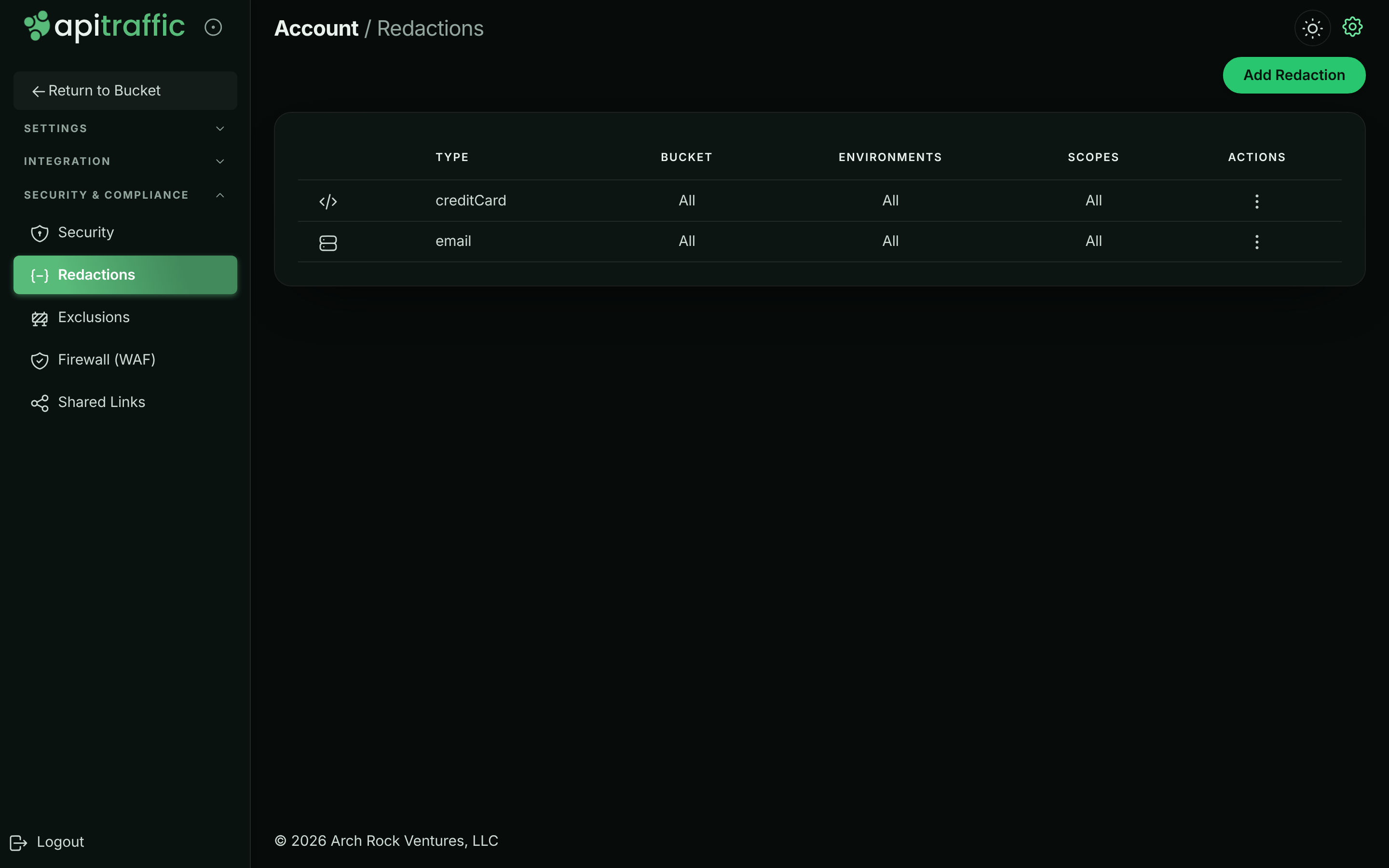
Open the account menu at the top right and select Redactions (or, in the account area, Security & Compliance → Redactions). Select Add Redaction.
The account’s redaction rules.
Select the location
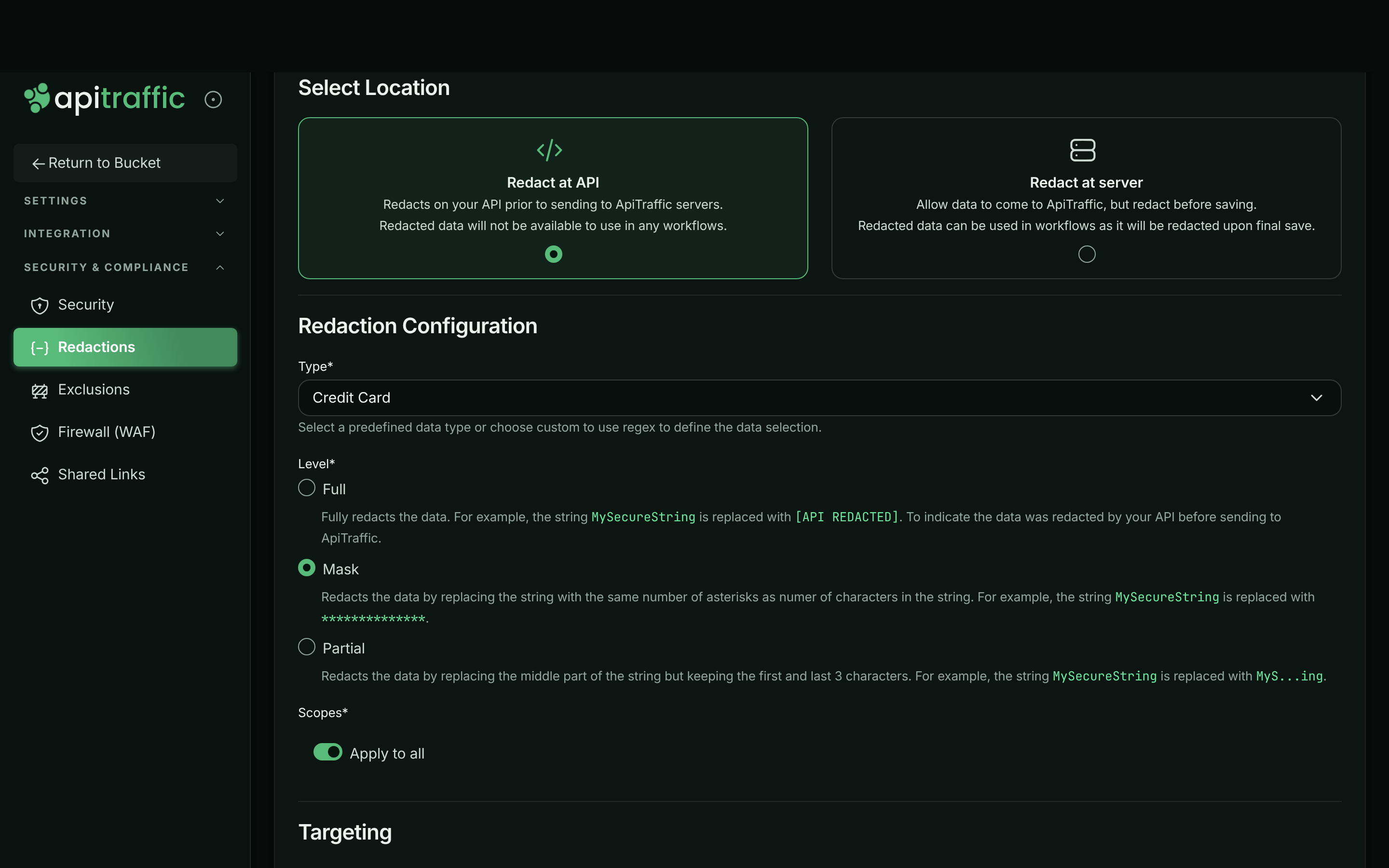
Under Select Location, choose Redact at API or Redact at server. See Where a rule runs.
Configure what to redact
Under Redaction Configuration, pick a Type: one of the built-in data types (see Built-in types), or Custom to write your own rule (see Custom rules: key or value). Then pick a Level and the Scopes to apply it to.
A rule that masks card numbers everywhere in the payload.
Choose the targeting
Under Targeting, leave Apply to all for Buckets and Environments, or switch it off and pick specific ones.
Describe and save
Under General, add a Description so others know what the rule is for. Leave Enabled on (a disabled rule is saved but does not redact), and select Create. The message Redaction created and any online servers have been pushed the update! confirms it.
To change a rule, select Edit in its menu (⋮); to remove it, select Delete, then Delete Redaction. Redaction only applies to requests captured after the change: requests already stored are not rewritten.
Levels
| Level | MySecureString becomes |
Use it when |
|---|---|---|
| Full | [*** API REDACTED ***] |
Nothing about the value is useful. |
| Mask | ************** (one * per character) |
The length is useful, the content is not. |
| Partial | MyS...ing (first and last 3 characters) |
You need to tell values apart, such as the last digits of an id. Values of 6 characters or fewer keep only their first and last character, and 2 or fewer are masked. |
When a rule matches part of a longer value (a card number inside a sentence), only the match is replaced.
Scopes
A rule applies to the parts of the request you pick, or to all of them with Apply to all:
- Request Header, Request Body, Request Query String
- Response Header, Response Body
Note: Pick the specific parts you need. The Request and Response entries in the list are not accepted when you save; use the header, body and query string entries instead, or Apply to all.
Built-in types
Each built-in type is a tested, linear-time pattern applied to values anywhere in the selected scopes: Credit Card, Email, Phone Number, Social Security Number, US Drivers License, Birthday, IP4V (IPv4 addresses), Geographic Coordinates, Vehicle Identification Number, Aadhar Number, Brazil CPF Number and JWT. A value only matches when it is not glued to other letters or digits, so a number inside free text is found but part of a longer id is not.
Custom rules: key or value
With Type set to Custom, choose what the Pattern applies to under Apply To:
- Key/Property redacts the value of a JSON or XML key. In JSON, the pattern is the exact key name, matched at any depth, for example
cardNumberorssn. In XML, it is matched against element names. - Value redacts any value that matches the pattern, a regular expression, anywhere in the selected scopes - including unstructured text. Patterns are matched case-insensitively.
Examples:
| Goal | Type | Apply To | Pattern | Scopes |
|---|---|---|---|---|
Hide a dateOfBirth field |
Custom | Key/Property | dateOfBirth |
Request Body, Response Body |
| Hide an internal header | Custom | Key/Property | x-internal-user |
Request Header |
Hide order numbers like ORD-123456 |
Custom | Value | ORD-[0-9]{6} |
Apply to all |
| Mask card numbers everywhere | Credit Card | - | - | Apply to all |
Limits
- A custom pattern must compile, be at most 512 characters, and must not be able to backtrack catastrophically (for example
(a+)+); otherwise saving is refused with a message that names the problem. - With a custom Value rule in scope, a single string longer than 16 KB is not scanned; it is replaced with
[value not fully scanned by ApiTraffic redaction], so a size limit can never let a value through unredacted. - A body larger than the SDK’s
maxRedactBodyBytes(1 MB by default) is replaced with a placeholder rather than sent unredacted. - If a rule cannot be applied safely, the data it covers is masked whole and the request is tagged
redaction.refused, so you can find it. - Your rules also apply to the outbound queries and URLs recorded on APM spans.
Troubleshooting
A value I expected to be redacted is still visible
Check the rule is Enabled, targets this bucket and environment, and covers the scope where the value appears (a header rule does not touch the body). For Key/Property rules on JSON, the pattern must be the exact key name. Requests captured before the rule was saved are not changed.
Too much is masked
Credential-shaped keys and headers are masked by default. If a field is not a secret, rename it, or turn off default key masking with redactSensitiveKeys: false. A rule that cannot run safely also masks its whole scope; look for the redaction.refused tag.
Saving is refused
The pattern is invalid, too long, or could backtrack catastrophically, or the rule uses the Request or Response scope. Follow the message, and pick the specific header, body or query string scopes.
Add Redaction is missing
Only owners and admins can create rules. See Team and roles.
Related
-
Exclusions: Stop sending requests you do not need at all.
-
Redactions API: Manage rules programmatically.
-
APM capture settings: Control query parameters and keys on spans.
-
Purge data or close your account: Export or delete the data ApiTraffic holds.