
Block or allow countries
Allow or deny requests by country with firewall country lists and criteria rules, with or without an edge such as Cloudflare in front of your API. Country data: IP Geolocation by DB-IP.
A country list allows or denies requests by the country they come from: “only the United States and Canada”, or “no requests from these four countries”. Your servers decide it themselves, from each request’s client IP address, so it works without anything in front of your API. If an edge such as Cloudflare already tells your servers the country, the firewall uses that instead.
Before you begin
- Your plan includes the Web application firewall, and you are an account owner or admin.
- Your servers run
@apitraffic/waf2.1.0 or later (or a framework package of the same version). Earlier versions read countries only from an edge header, and do not enforce country lists without one. See Set up the firewall. - The client IP your framework reports is the real client’s. Behind a load balancer or proxy, tell your framework to trust it: Express
app.set('trust proxy', …), FastifytrustProxy, Koaapp.proxy = true. Otherwise every request has the proxy’s address: its country if the address is public, or no country at all if it is private, and then country lists skip every request (see How the country is decided).
Add a country list
- Open the account area, select Firewall (WAF), and select Edit in a policy’s menu (or Add WAF Policy).
- Select Traffic Controls, then Configure on Access Lists.
- Select Add List, set Type to
countryand choose the Effect:- Allow: only requests from these countries are let through. Every other request is blocked, with reason
country-not-allowed. - Deny: requests from these countries are blocked, with reason
country-deny.
- Allow: only requests from these countries are let through. Every other request is blocked, with reason
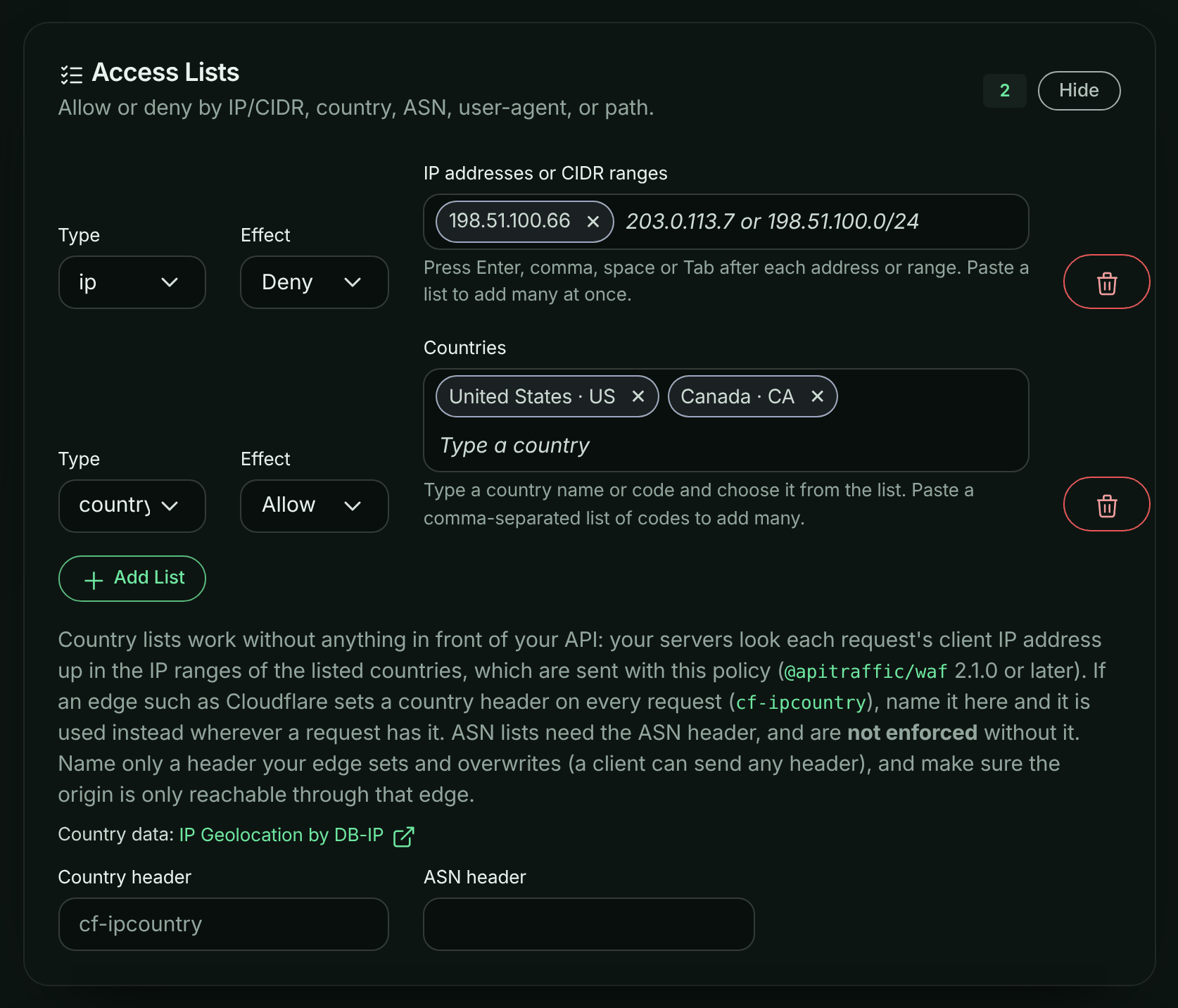
- In Countries, type a country’s name or code and choose it from the list (use the arrow keys and Enter, or select it). Other names work too: USA, UK, South Korea, Czech Republic, Ivory Coast. Each country is added as a tag showing its name and code, such as “United States · US”, and the policy stores the two-letter code (ISO 3166-1 alpha-2). To remove one, select its × button, or press Backspace in the empty field. You can also paste a comma-separated list of codes, such as
US, CA.T1(Tor exit nodes) is listed too, but only an edge header such as Cloudflare’scf-ipcountrysends it. - Select Update (or Create). Your servers receive the policy, with the country data, within seconds.
In Monitor mode a country list blocks nothing: the requests it would block are recorded as would block. Start there, check the firewall’s matches, then switch to Enforcing.
A country allow-list in Access Lists, with the country data’s credit.
How the country is decided
For each request that reaches a country list, the firewall finds the country in this order:
- Your edge’s header, if the policy names one in Country header and the request has it. Name a header only if your edge sets it on every request and overwrites any value the client sent (Cloudflare’s
cf-ipcountrydoes), and make sure your origin is reachable only through that edge: anyone else can send any header they like. - The client IP address. ApiTraffic sends the IP address ranges of the countries your policy names with the policy, and your servers look the address up in them. IPv4 and IPv6 are both covered, and an IPv4 address in IPv6 form (
::ffff:203.0.113.7, as dual-stack servers report it) counts as the IPv4 address.
A public address in none of the listed countries is on no allow list: a “US only” list blocks it, and a deny-list lets it through.
Some requests have no country at all. Country lists skip them, so neither an allow-list nor a deny-list blocks them:
- requests without a client address;
- private and reserved addresses, such as
10.0.0.0/8,192.168.0.0/16,127.0.0.1,fd00::/8andfe80::/10. Health checks from your load balancer come from these.
Your servers log a warning (without the address) the first time this happens after each policy load. If every request comes from a private address, your servers are seeing the proxy’s address instead of the client’s. See Before you begin.
Clients cannot choose to be skipped: the address is the one your framework reports, not something the request sends.
ASN lists have no lookup: they need the header your edge sets, in ASN header, and are not enforced without it.
Criteria rules on country
Over the API, a custom rule with a criteria operator can use country with the other request fields, for example to block sign-ins from outside one country:
{
  "id": "signin-us-only",
  "category": "geo",
  "targets": ["args"],
  "score": 5,
  "action": "block",
  "negate": true,
  "operator": { "type": "criteria", "query": "url_path == \"/v1/auth/login\" AND country == \"US\"" }
}
- Compare
countrywith an upper-case two-letter code, with==or!=only. country != "US"matches every other country, including public addresses in none of the policy’s countries’ ranges. A request with no country (no client address, or a private or reserved one) matches no condition.- The country is decided as for lists: your edge’s header first, then the client IP.
- The API accepts
countryin a criteria rule while country data is available. If it is not (for example, right after ApiTraffic restarts), the API refuses the rule, and a stored rule is sent to your servers turned off with acriteria-rule-sent-disabledwarning. Try again a minute later. - Servers before
@apitraffic/waf2.1.0 receive these rules turned off.
Size limits
Only the countries a policy names are sent, in a compact form, and countries that all your rules treat the same way (all the countries of one list) are sent as one. A policy can carry about 2 MB of country data:
| Countries | Size |
|---|---|
| China | about 0.1 MB |
| Germany | about 0.3 MB |
| China, Russia, North Korea and Iran (one list) | about 0.25 MB |
| United States (the largest) | about 0.8 MB |
| United States and Canada (one list) | about 0.65 MB |
| The 27 EU countries (one list) | about 1.3 MB |
Over the limit, the policy is sent without country data, and it says so: its country lists then work only with a Country header, and its criteria rules on country are sent turned off. Put the countries in fewer lists (the countries of one list share their data), list fewer countries (an allow-list of a few countries is often a deny-list of many), or name your edge’s country header.
What the dashboard tells you
The policy editor shows what applies to the policy under Access Lists:
| Message | Meaning |
|---|---|
| Country lookups by IP address need @apitraffic/waf 2.1.0 or later | Servers on older versions enforce the policy’s country lists only with a country header, and run no criteria rules on country. Upgrade them, or name a header. |
| The IP address ranges of this policy’s countries take … KB, more than a policy can carry | See Size limits. |
| Country IP ranges are not available right now | ApiTraffic is loading the country data (for example, just after a restart). The policy is sent again with it as soon as it loads; until then its country lists are enforced only with a country header. |
The API returns the same as the policy’s warnings (codes country-older-sdks, country-ranges-too-large, country-ranges-unavailable), and countryLookup says whose data it is. See WAF policies.
Where the country data comes from
The IP address ranges come from DB-IP’s IP to Country Lite database: IP Geolocation by DB-IP, licensed under Creative Commons Attribution 4.0. ApiTraffic checks for a new release every six hours (DB-IP publishes one a month) and sends updated ranges to your servers with a policy reload, so a running server picks them up without a restart. Like any IP geolocation data it is not exact: addresses move between countries, and VPNs, proxies and mobile networks can place a client elsewhere. Treat country rules as one layer of protection, not as proof of where a client is.
Report countries (Reports, the request log) are located separately, when ApiTraffic receives a request, and can differ from what the firewall decided.
Troubleshooting
Every request is blocked by a country allow-list
Check the client IP your servers see: behind a proxy or load balancer that is not your framework’s trusted proxy, it is the proxy’s public address, which is in no listed country. See Before you begin.
Servers log "country lists were skipped"
Some requests reached a country list with no client address, or with a private or reserved one, so the list did not apply to them. A few are normal (health checks). If it is every request, your framework is reporting the proxy’s private address: configure its trusted proxies (Express trust proxy, Fastify trustProxy, Koa proxy), or name your edge’s Country header.
A country list does nothing
Check that your servers run @apitraffic/waf 2.1.0 or later, and that the policy shows no “more than a policy can carry” message. Older versions log “country list(s) … are NOT enforced” at every policy load.
The firewall and a report disagree about a request’s country
Your edge’s header, when the policy names one, decides for the firewall. Without it, the firewall and reports use different country databases.
Related
- Firewall policies: every list type and how lists behave.
- Set up the firewall: install
@apitraffic/wafin your app. - WAF policies API:
lists,geo,warningsandcountryLookup.