
Create and manage firewall policies
Create, edit, test and assign ApiTraffic firewall policies: managed rules, lists, rate limits, custom rules, block responses, outbound and behavioral layers.
A firewall policy decides what the firewall inspects in a bucket’s traffic and what it does with a match. This page covers every setting of a policy, how to scope it to buckets and environments, how to test it against real traffic before it goes live, and how to review its matches and handle false positives. To turn the firewall on for the first time, start with Set up the firewall.
Before you begin
- Your plan includes the Web application firewall. Without it, you cannot create or edit policies, and none are delivered to your servers.
- To create, edit, test, delete a policy, or add a request to one, you must be an account owner or admin. Members see the policy list, each policy’s Summary and all firewall analytics.
- Your app has the firewall in place. See Step 1.
Where policies live
Policies belong to the account and are scoped to buckets and environments. Open the account area and select Firewall (WAF) under Security & Compliance. The page has three tabs:
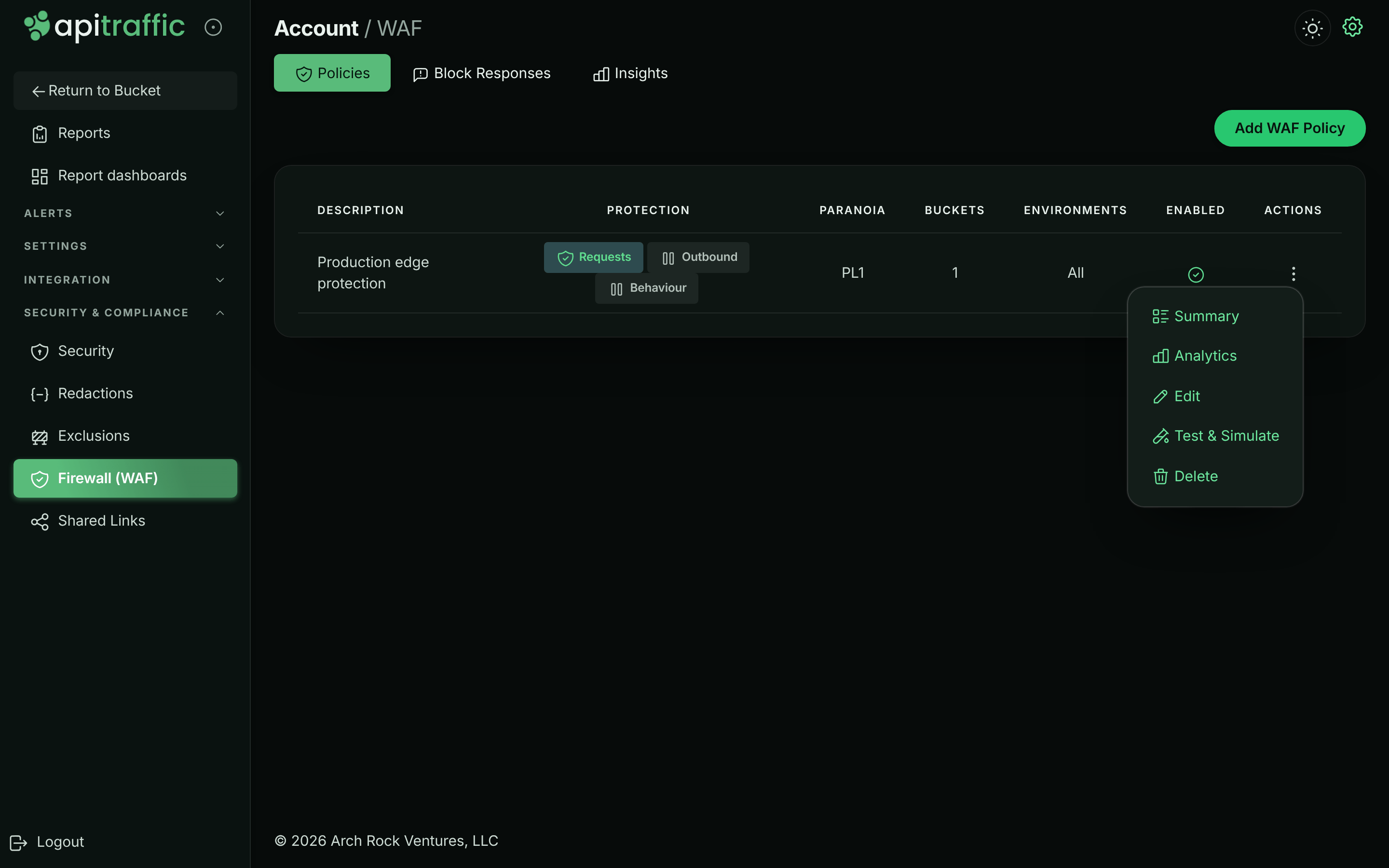
- Policies: every policy with its Description, Protection (a badge per layer: Requests, Outbound, Behaviour, each Not monitored, Monitor or Enforcing), Paranoia, Buckets, Environments and Enabled. The menu (⋮) of each policy offers Summary, Analytics, Edit, Test & Simulate and Delete.
- Block Responses: the responses blocked requests receive, shared by the policies that pick them. See Block responses.
- Insights: matches and blocks across the account. See Review matches.
Each bucket also has a WAF page (Protect → WAF in the bucket’s left navigation) with the same analysis for that bucket.
The policy list with a policy’s actions menu open.
Create or edit a policy
Select Add WAF Policy to create a policy, or Edit in a policy’s menu. The editor has eight steps; move between them with Next and Back or by selecting a step on the left. Each step shows a badge summarizing it (for example the mode, or how many controls are configured). The Enabled switch at the top mirrors Policy enabled on the Basics step.
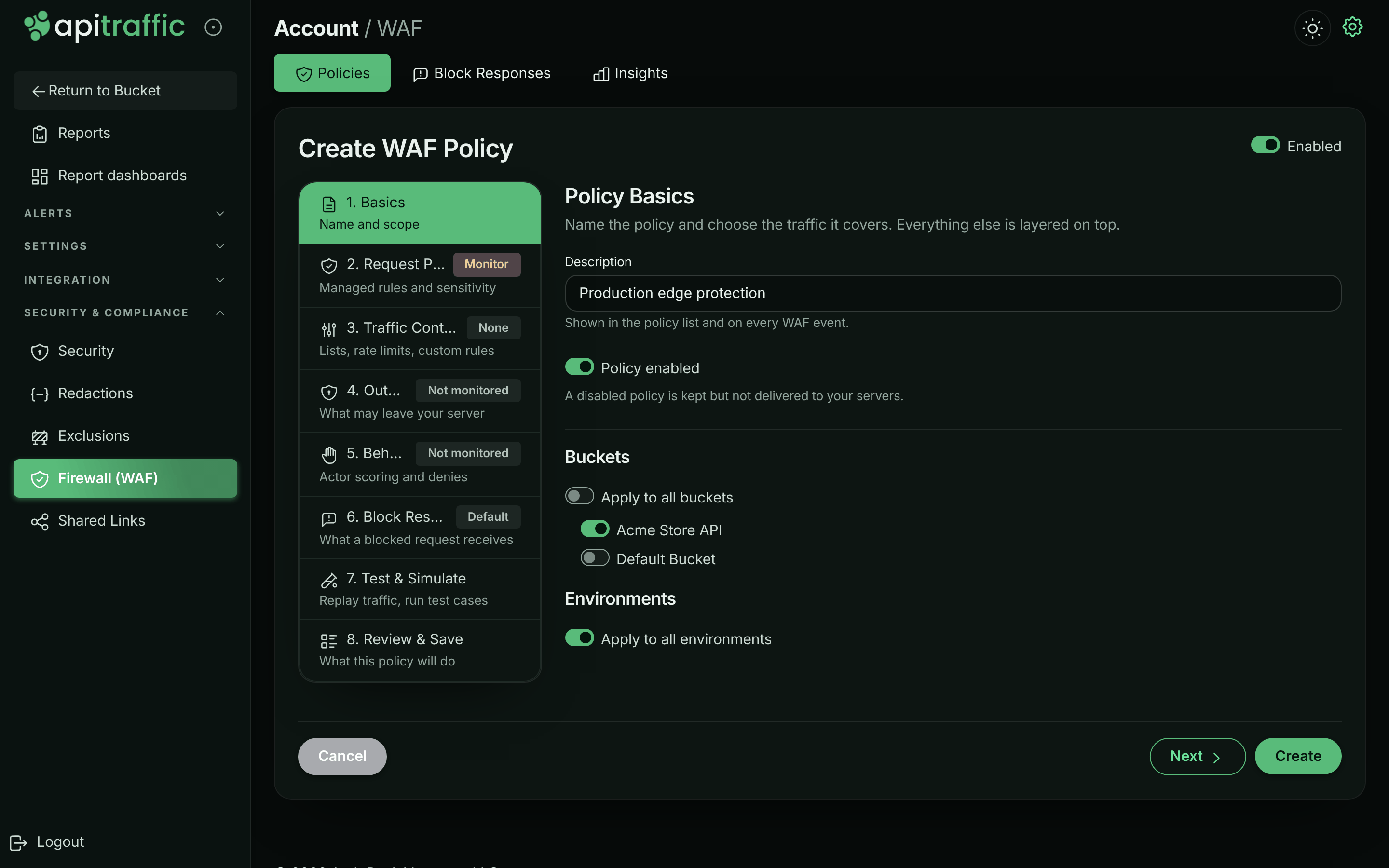
1. Basics
Name the policy and choose the buckets and environments it covers. See Basics.
Basics: description, enabled switch and targeting.
2. Request Protection
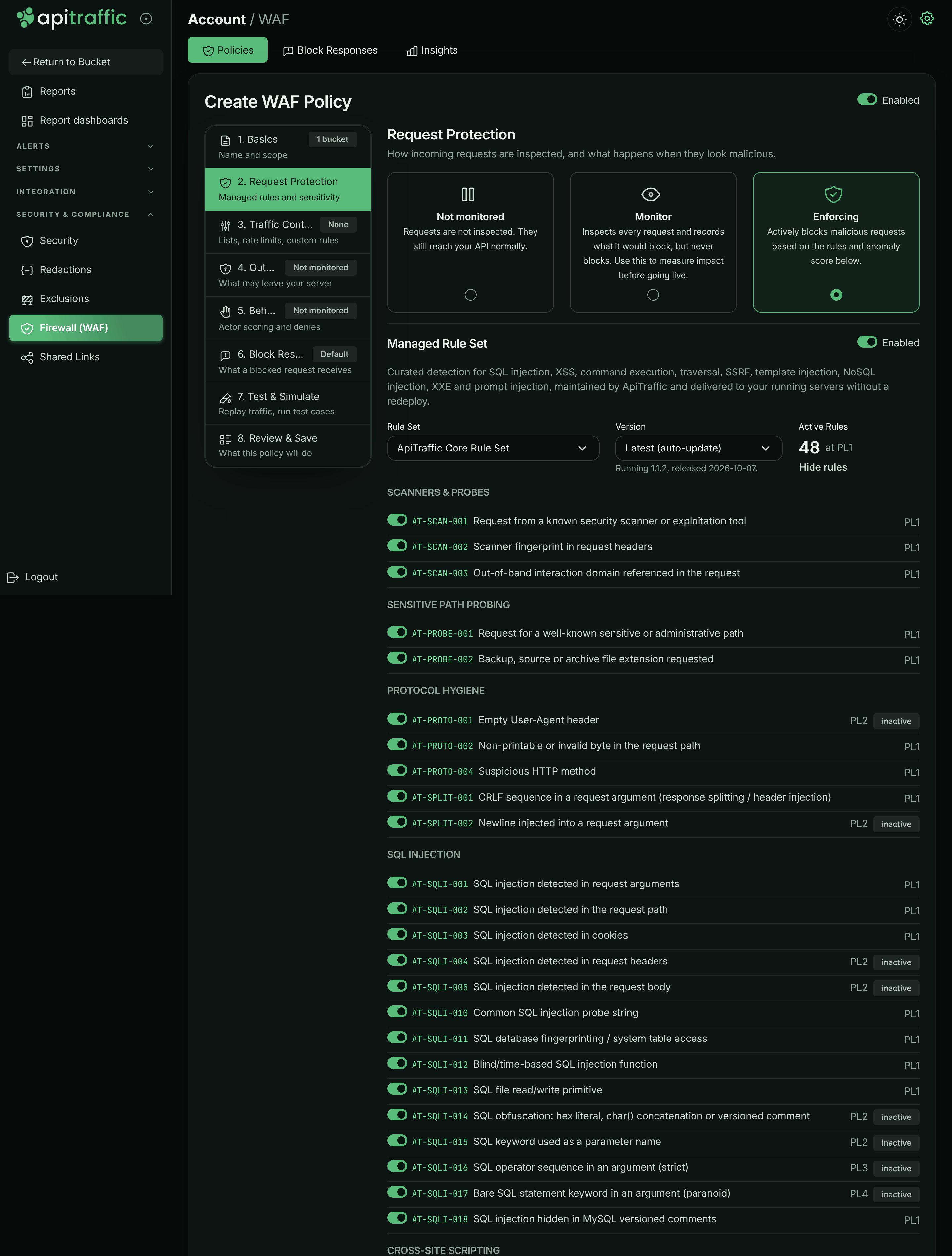
Choose the mode, the managed rule set, sensitivity, the fail mode and any false positive exclusions. See Request protection.
Request Protection: the mode and the managed rule set, with its rules open for tuning.
3. Traffic Controls
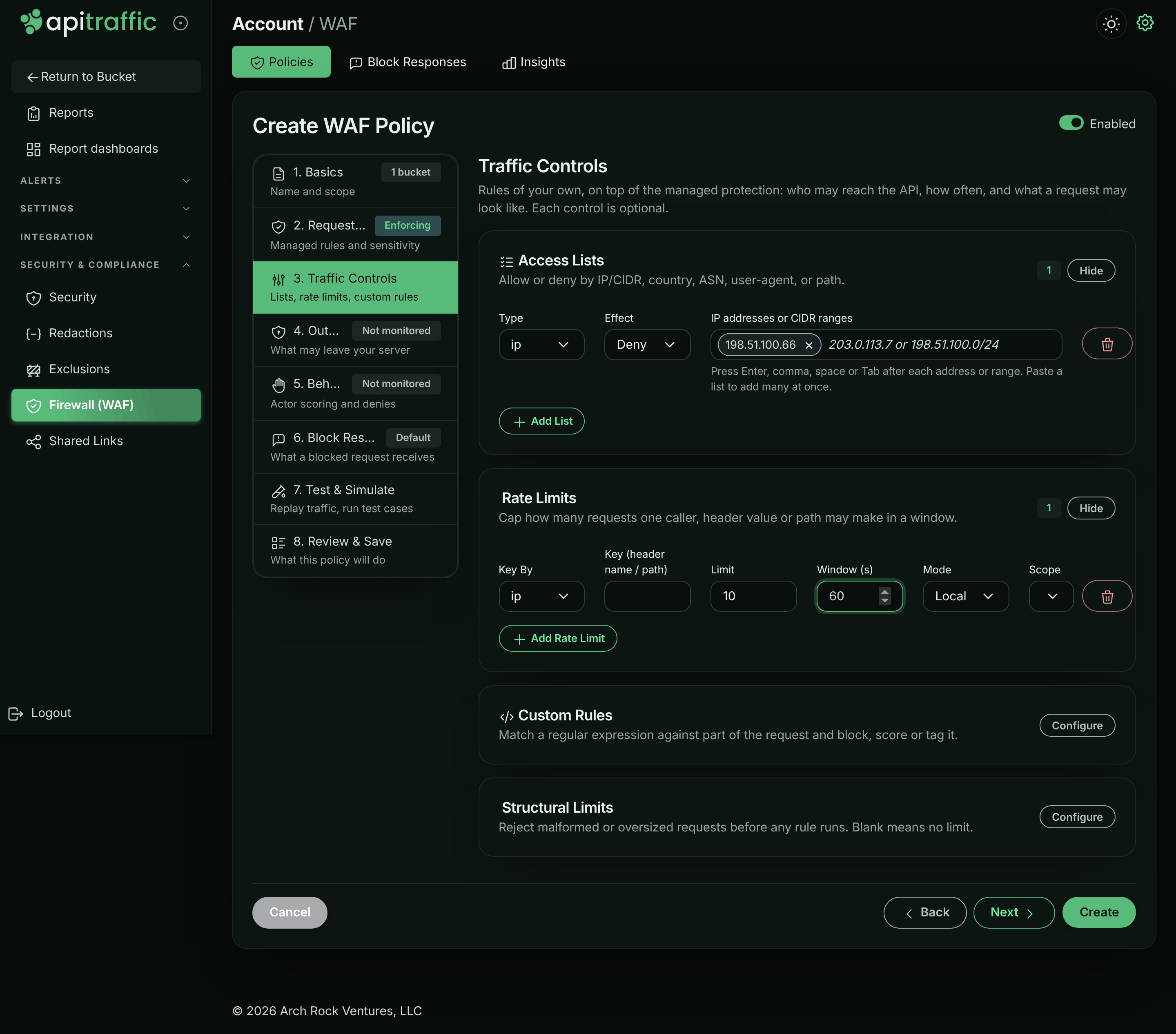
Add access lists, rate limits, custom rules and structural limits. See Traffic controls.
Traffic Controls with a deny list and a rate limit.
4. Outbound Protection
Optionally inspect the calls your app makes. See Outbound protection.
5. Behavioral Protection
Optionally score callers over time and deny abusive ones. See Behavioral protection.
6. Block Response
Pick the block response blocked requests receive, or create one, and preview exactly what a blocked client gets. Without one, the policy answers 403 Forbidden.
7. Test & Simulate
Replay recent traffic through the policy as edited, and run its test cases. See Test a policy.
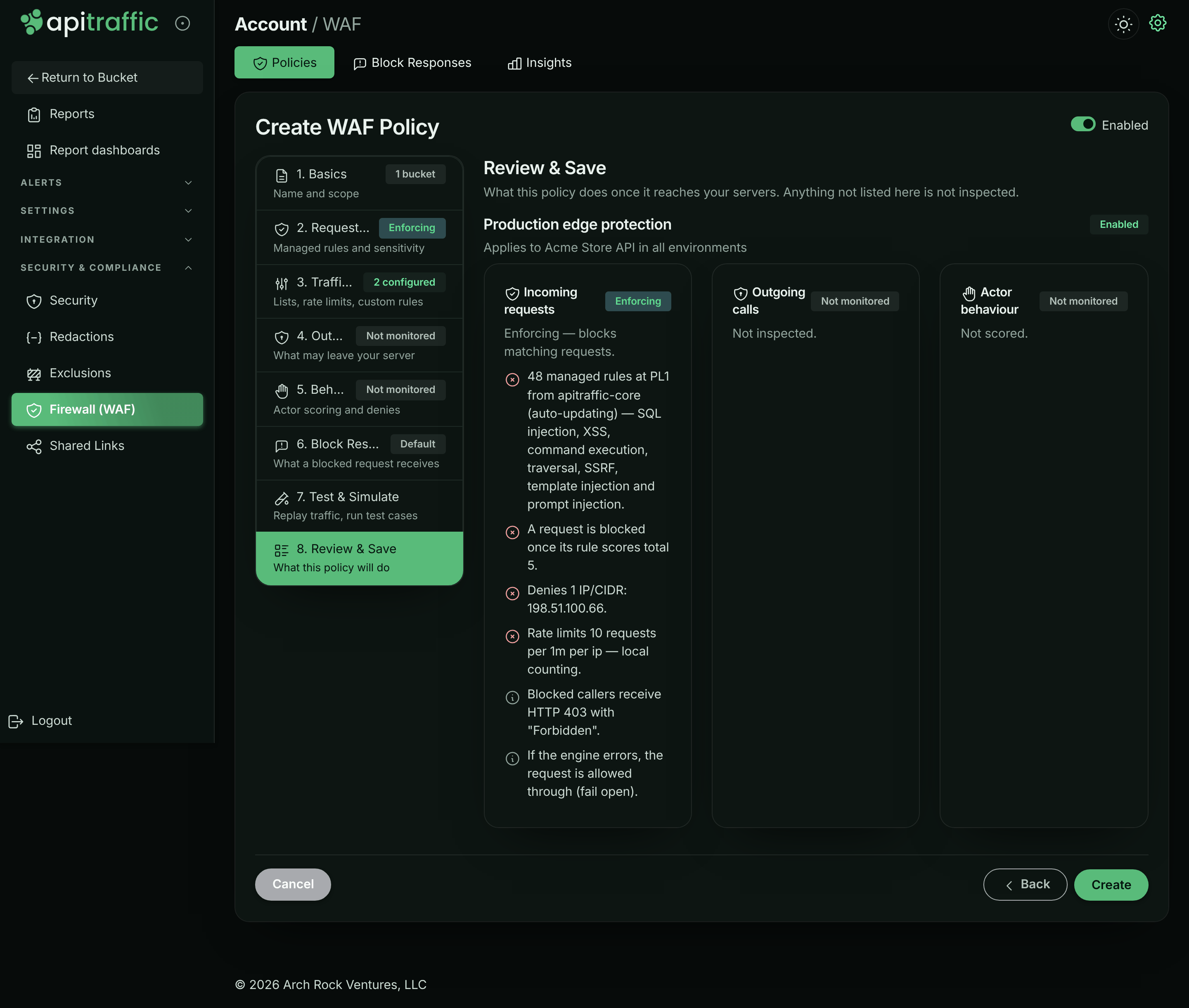
8. Review & Save
Read a plain-language summary of what the policy does once it reaches your servers - anything not listed is not inspected - then select Create (or Update). Connected servers receive the change without a deploy.
Review & Save describes what the policy will do.
Warning: If you leave Buckets or Environments with nothing selected, the editor returns you to Basics and the policy is not saved. Select at least one, or apply the policy to all of them.
Basics
| Field | What it does |
|---|---|
| Description | Shown in the policy list and on every firewall event. |
| Policy enabled | A disabled policy is kept but not delivered to your servers. |
| Buckets | Apply to all buckets, or switch on specific buckets. |
| Environments | Apply to all environments, or switch on specific environments. |
Which policy applies to a server
A server runs one policy at a time. Of the enabled policies covering its bucket and environment, the most specific wins:
- a policy that names both the environment and the bucket,
- then one that names the environment (all buckets),
- then one that names the bucket (all environments),
- then one for all buckets and environments.
Among equally specific policies, the most recently saved wins. Policies are not combined. A policy whose Request Protection is Not monitored is not delivered at all, so its outbound and behavioral layers do not run either.
Request protection
Mode
Not monitored (requests are not inspected), Monitor (inspects every request and records what it would block, but never blocks) or Enforcing (blocks malicious requests based on the rules and the anomaly score). The other Request Protection settings appear once the mode is not Not monitored.
Managed rule set
Curated detection maintained by ApiTraffic and delivered to your running servers without a redeploy. Turn the Enabled switch off to run only your own controls.
| Field | What it does |
|---|---|
| Rule Set | The managed rule set to run, for example ApiTraffic Core Rule Set. |
| Version | Latest (auto-update) follows new revisions as they are published. Pinned to a version keeps detection exactly as you tuned it until you move the pin; published revisions never change. The note underneath shows the version running and its release date. |
| Active Rules | How many managed rules run at the selected paranoia level, after the ones you turned off. |
Select Review & tune rules to list every managed rule by category - SQL Injection, Cross-Site Scripting, Command Execution & Deserialization, Path Traversal, Local and Remote File Inclusion, Server-Side Request Forgery, Template Injection, NoSQL Injection, XML External Entities, LDAP Injection, Protocol Hygiene, Scanners & Probes, Open Redirect, Response Splitting, Sensitive Path Probing, Prompt Injection & AI Abuse, and Agent & Tool Abuse - with its id, message and paranoia level. Switch a rule off to stop it everywhere; rules above the selected paranoia level are marked inactive.
Sensitivity
| Field | Default | What it does |
|---|---|---|
| Paranoia Level | PL1 | PL1 - Minimal false positives, PL2 - Balanced, PL3 - Aggressive, PL4 - Maximum (highest false positives). Higher levels activate more rules, and catch more legitimate traffic with them. |
| Anomaly Threshold | 5 | Block when the summed rule score reaches this value. At least 1. |
Fail mode
| Field | Default | What it does |
|---|---|---|
| Fail Mode | Fail open | Fail open (allow on engine error) or Fail closed (block on engine error). Fail closed only applies in Enforcing mode. |
What a blocked request receives (status code, content type, body and headers) is the policy’s block response, chosen on the Block Response step.
False positive exclusions
Select Configure to silence a rule only where it misfires - on one endpoint or one field - instead of turning protection off everywhere. Select Add Exclusion and fill in:
| Field | Example | What it does |
|---|---|---|
| Rule ID | AT-SQLI-001 |
The managed rule to silence. |
| or Category | sqli |
Silence every rule in a category instead. One of the two is required. |
| Targets | body, args |
Only for these parts of the request. Blank means every part. |
| Field Names | query, filter |
Only for these argument, header or cookie names (case-insensitive). For arguments, a name also covers what is nested under it: filter covers filter.where and filter[0]. |
| Path Pattern | ^/v1/search |
Only on paths matching this regular expression. |
Traffic controls
Rules of your own, on top of managed protection. Each control is optional; select Configure on a panel to open it.
Access lists
Allow or deny by IP or CIDR, country, ASN, user agent or path. Select Add List and choose:
- Type:
ip,country,asn,userAgentorpath. - Effect: Allow or Deny.
- Values, each added as a tag you can remove with its × button (or Backspace in the empty field):
country: type a country’s name or code and choose it from the list. Other names work too (USA, UK, South Korea, Czech Republic, Ivory Coast), with or without accents. Each tag shows the name and code (“United States · US”); the policy stores the code.ip: an address or CIDR range (203.0.113.7,198.51.100.0/24,2001:db8::/32), added with Enter, a comma, a space or Tab.asn: a network number,13335orAS13335, added the same way.userAgent: a user agent, or a regular expression matching one. It can contain spaces, so only Enter or a comma adds it (a comma inside brackets is part of it).path: a path, or a regular expression matching one, starting with/(or^/to anchor it).
Paste a list to add many at once: comma- or line-separated for ip, country and asn, one per line for userAgent and path. An entry that isn’t valid stays in the field with the reason under it, and a value that’s already in the list isn’t added twice. A stored value that isn’t valid, such as an unknown country code, shows as a tag marked invalid with its reason, so you can remove it.
How lists behave:
- An IP allow list is trusted: a matching request skips every other check. An IP deny list blocks before any rule runs. Rate limits count IPv6 clients per /64.
- Path patterns are matched case-insensitively against the decoded path (write
^/files/my report, not^/files/my%20report). A deny list matches if either the path as sent or its normalized form matches; an allow list admits only when every form of the path matches. - Country lists work without anything in front of your API: your servers look each request’s client IP address up in the IP ranges of the listed countries, which ApiTraffic sends with the policy (
@apitraffic/waf2.1.0 or later; country data: IP Geolocation by DB-IP). If your edge sets a country header on every request (for example Cloudflare’scf-ipcountry), name it in Country header, which appears once a geo list exists, and it is used instead wherever a request has it. A public address in none of the listed countries is not on any allow list, so a “US only” list refuses it; requests from private addresses (health checks) are skipped. See Block or allow countries. - ASN lists read a header your edge sets and are not enforced until you name it in ASN header. No header is trusted by default, because a client can send any of them: name only a header your edge sets and overwrites, and make sure your origin is reachable only through that edge.
The sample data’s policy has an ip Deny list naming one known attacker address, 198.51.100.66, so requests from it are blocked with reason ip-deny.
Rate limits
Cap how many requests one caller, header value or path may make in a window. Select Add Rate Limit:
| Field | Default | What it does |
|---|---|---|
| Key By | ip |
Count per client IP (ip), per value of a header (header), or per path (path). |
| Key (header name / path) | none | For header, the header to count by, for example x-api-key. Header values are hashed, never kept. |
| Limit | 100 | Requests allowed per key in the window. |
| Window (s) | 60 | Window length in seconds. |
| Mode | Distributed | Distributed, Strict or Local. |
| Scope | Per server | Per server: each server enforces the limit on the requests it receives, so a limit of 5 per minute across 4 servers admits up to 20 per minute in total. Fleet (approx.): each server enforces the limit divided by the number of live servers running the firewall (rounded up), assuming load is spread evenly; inaccurate under sticky sessions or skewed routing. |
A request over the limit is refused with 429 and Retry-After, RateLimit-Limit, RateLimit-Remaining and RateLimit-Reset headers, with reason rate-limit. Counting happens in memory on each server, with no network call on the request path.
A limit created in the editor applies to every path. To limit only some paths, or to set the status and message, use the API fields pathPattern (a regular expression), status and message; the editor keeps them when you save. The sample data’s policy limits sign-in to 10 attempts per IP per minute with pathPattern: "^/v1/auth/login$", which the daily credential-stuffing burst runs into.
Custom rules
Match a regular expression against part of the request and block, score or tag it. Select Add Rule:
| Field | What it does |
|---|---|
| Target | args (all arguments: query and body), query, path, uri, headers, userAgent, cookies or body. |
| Regex Pattern | The regular expression, compiled case-insensitively. See Your own patterns. |
| Action | Block blocks as soon as it matches. Score adds its score to the anomaly score. Tag only records the match on the request without scoring it. |
| Score | The amount added to the anomaly score (default 5). |
| Paranoia | The lowest paranoia level at which the rule is active (PL1–PL4). |
Rules created over the API with another operator (such as phrase lists or criteria rules) are shown read-only and kept as they are when you save. A criteria rule uses the search syntax, with conditions joined with AND only, and can only use request fields (see Operators for the list), and country (see Criteria rules on country): your SDK runs the rule before your API responds, and before ApiTraffic works out values such as the AI summary. The API refuses a criteria rule your SDK can’t evaluate as written, such as one that uses another field, doesn’t parse, has a like pattern that isn’t a valid regular expression, or that older SDK versions read differently (for example a bare value that starts with AND or OR: quote it). A rule saved before these checks is sent to your servers turned off: its row under Custom Rules says why, and the API returns the policy with a criteria-rule-sent-disabled warning for it. A criteria rule saved with OR before OR was refused keeps running as AND (every condition must match): its row says so, and the policy carries a criteria-or-runs-as-and warning for it. Change such a rule’s criteria over the API, or remove it. Custom rules support only the i and m regex flags; a rule stored with another flag shows a warning and a Remove flag button.
Structural limits
Reject malformed or oversized requests before any rule runs. Blank means no limit.
| Field | What it does |
|---|---|
| Max URL Length, Max Header Count, Max Header Value Length, Max Body Bytes | Requests over these are blocked. |
| Body Bytes Inspected | How much of the body is inspected: 8192 to 1048576; blank is 131072. |
| Inspection Limit Score | Score added when part of a request was too large to inspect: 0 to 1000; blank is 0 (reported, never blocking). |
| Pattern Time Budget (ms) | Time your own patterns may take per request: 5 to 500; blank is 25. See Inspection limits. |
| Allowed Methods | Comma-separated, for example GET, POST, PUT, DELETE. Blank allows all. |
Outbound protection
Inspects the calls your app makes - a prompt on its way to a model, the arguments of a tool call, any third-party API request - and refuses the ones that carry credentials or more data than they should. It has its own mode (Not monitored, Monitor, Enforcing).
| Field | Default | What it does |
|---|---|---|
| Inspect Payloads For | AI providers and vector stores | Or Every outbound call. Model, embedding and agent-tool destinations are recognized automatically. |
| Maximum Payload Bytes | 5242880 | Refuse outbound payloads larger than this. 0 disables the cap. |
| Also Inspect | none | Hosts to inspect regardless of the scope above. |
| Credentials and keys | on | Refuse payloads carrying secrets. |
| Bulk personal data | off | Refuse payloads with personal data for many people. |
| Bulk Data Threshold | 25 | Distinct people in one payload before it counts as bulk. |
| Scan model and tool responses | off | Finds instructions hidden in retrieved content. It reports only: a response has already arrived when it can be read. |
| Fail Mode | Fail open | Allow or refuse the call on engine error. |
| Allowed Destinations | empty | Leave empty to allow any destination. Hostnames, *.suffix wildcards or IP addresses. |
| Blocked Destinations | empty | Destinations that are always refused. |
| Allow List Applies To | AI destinations only | Or Every outbound call. |
A destination is judged before the call is made, so a refused host costs no DNS lookup or connection. A refused call fails the way an unreachable host does: http emits an error with code APITRAFFIC_EGRESS_BLOCKED, and fetch rejects with that error. While an outbound policy is loaded, the SDK follows fetch redirects itself, one hop at a time, so every destination in the chain is judged; a 307 or 308 that must resend a stream body is rejected rather than followed.
Behavioral protection
Catches attacks that are invisible one request at a time: a caller walking object ids, collecting authorization failures, probing for endpoints, or moving through your API at machine speed. Scoring runs in ApiTraffic on ingested traffic, so it costs your servers nothing. In Enforcing mode, an actor that crosses the score gets a temporary deny pushed to every server running your app; in Monitor mode it is only recorded.
An actor is a client IP address: for traffic from an SDK, the address your app sees (the request’s ip as your framework reports it), which is also the address a pushed deny matches; for traffic through the relay, the address our edge saw, never one a caller wrote into X-Forwarded-For (see Client IP addresses). If your framework takes the client IP from X-Forwarded-For (Express trust proxy, for example), trust only the proxies in front of your app: trusting every hop lets a caller write any address there, to escape scoring or to get someone else’s address denied.
| Field | Default | What it does |
|---|---|---|
| Score Threshold | 70 | Score at which an actor is denied. No single signal reaches 70 on its own; two corroborating signals do. |
| Observation Window (seconds) | 300 | The window each actor is scored over. |
| Deny Duration (seconds) | 900 | How long a pushed deny stays in force. |
| Object Ids Per Endpoint | 30 | Distinct ids one actor may address on a single endpoint. |
| Authorization Failures | 15 | 401 and 403 responses in the window. |
| Not Found Responses | 40 | 404 responses in the window. |
| Distinct Endpoints | 40 | Distinct endpoints in the window. |
| Requests In Window | 600 | Requests in the window. |
| Sensitive Requests In Window | 30 | Requests to sensitive paths in the window. |
| Sensitive Paths | none | Path prefixes worth a lower tolerance, such as administrative, export and credential surfaces (for example /v1/admin). |
Your own patterns
Several fields are regular expressions you write, and they run inside every server the policy reaches:
| Field | Compiled as |
|---|---|
| Custom rule Regex Pattern | new RegExp(pattern, flags); flags default to i, only i and m are allowed |
userAgent and path list values |
new RegExp(value, 'i') |
Rate limit pathPattern (API) |
Matched against the decoded path, case-insensitively |
| False positive exclusion Path Pattern | Matched against the decoded path, case-insensitively |
A pattern whose matching time explodes on some inputs would stall every server, so each is checked when you save. The save is refused with 400 if a pattern does not compile, is empty or longer than 512 characters, or can backtrack catastrophically - nested repetition such as (a+)+, overlapping alternatives under repetition such as (a|a)*, adjacent overlapping repetitions such as \d+\.?\d*, or an unanchored scan such as .*foo or [a-z]+@. The message names the field and how to rewrite it. The check is deliberately conservative; anchoring (^/admin rather than .*admin), bounding a repetition ({1,64} rather than +) or dropping a leading .* usually fixes it.
A pattern saved before this check existed keeps working; the editor shows a warning above the policy naming it, so you can rewrite it or upgrade older SDKs.
Inspection limits
The firewall caps the work it does per request, whatever the request carries. What is not inspected is reported as an AT-LIMIT-* finding, never silently skipped.
| Limit | Value | What happens past it | Finding |
|---|---|---|---|
| One value (argument, header, cookie) | 64 KB | The first and last 32 KB are inspected | AT-LIMIT-001 |
| The whole body (Body Bytes Inspected) | 128 KB (8 KB–1 MB) | The first and last halves are inspected | AT-LIMIT-002 |
| Values per source (query, body, headers) | 512 | The rest are not inspected | AT-LIMIT-003 |
| Body nesting | 12 levels | Deeper values are not inspected | AT-LIMIT-004 |
| Inspected text per target | 256 KB | The rest is not inspected | AT-LIMIT-005 |
| Time on your own patterns (Pattern Time Budget) | 25 ms (5–500) | The remaining patterns are not evaluated | AT-LIMIT-006 |
By default these findings score 0: they are recorded but never block, so large legitimate uploads are unaffected. Set Inspection Limit Score to enforce them through the anomaly score. A pattern skipped by the time budget never decides in an attacker’s favor: a skipped custom rule does not match, a skipped deny entry does not block, and a skipped allow entry does not admit. Managed rules always run.
Test a policy
Test & Simulate evaluates the policy exactly as you have edited it, unsaved changes included, with the same engine your servers run. Nothing is blocked or saved. Open it as step 7 of the editor, or select Test & Simulate in a policy’s menu.
Replay recent traffic
Choose the traffic
Pick a Bucket and Environment the policy covers, a Window (Last 15 minutes, Last hour, Last 6 hours or Last 24 hours) and how many Requests (Up to 100 or Up to 250).
Run it
Select Run. The summary shows Requests replayed, how many Would be blocked, how many Matched, below threshold, and, for a saved policy, the Change vs. saved policy: requests newly blocked and no longer blocked.
Read the results
Filter the list by Blocked or matched, Changed or All. Select Why? on a request to see which rules matched, where and with what score. Select the test-case icon to keep the request as a test case.
Replaying recent traffic through an edited policy.
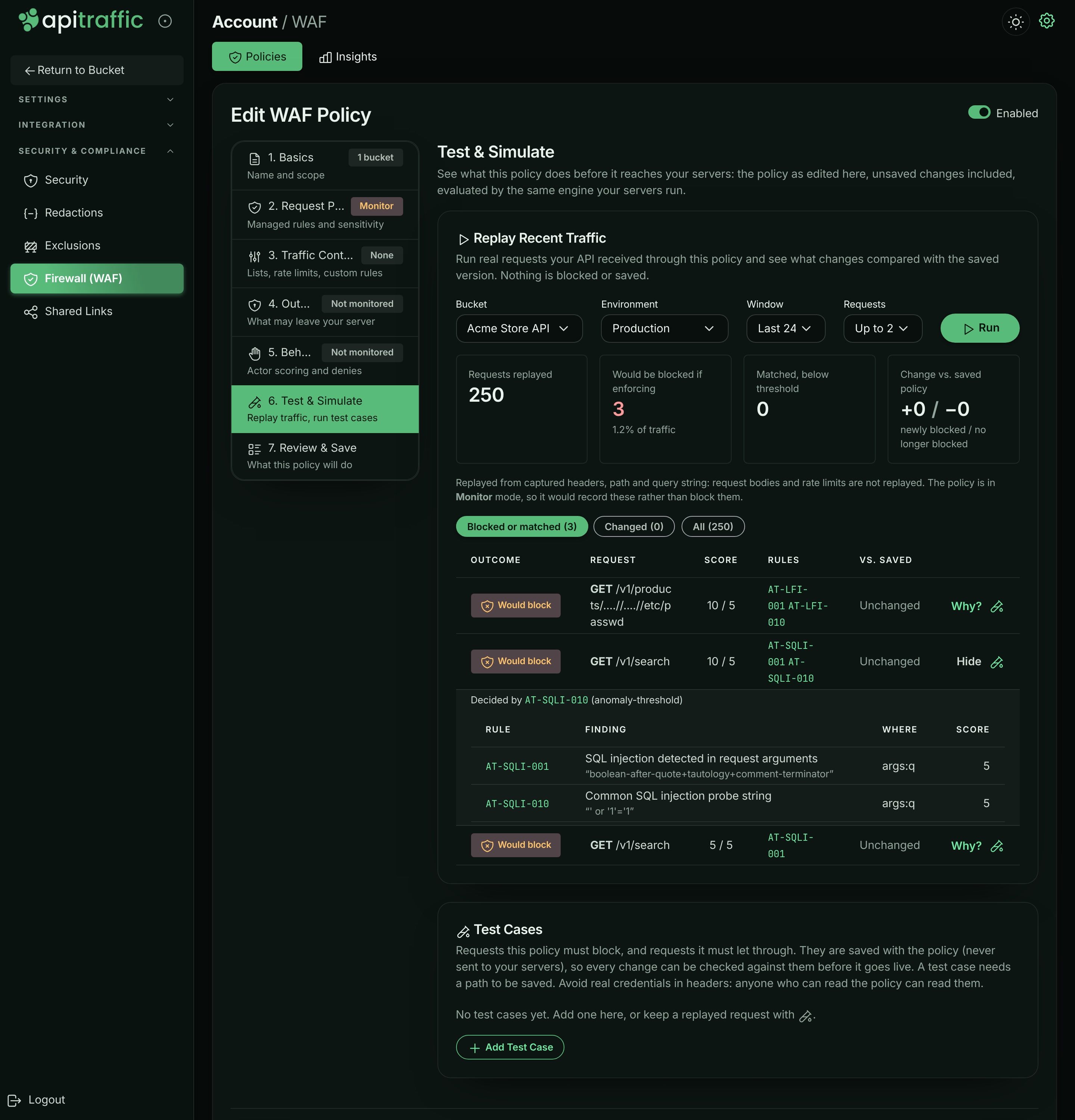
Requests are replayed from their captured headers, path and query string: request bodies and rate limits are not replayed.
Test cases
Test cases are example requests the policy must block or let through. They are saved with the policy (never sent to your servers), so you can check every change against them. A policy keeps up to 50.
- Select Add Test Case, give it a Name, and set Expect to Should be blocked or Should be allowed.
- Fill in the Method, Path and query (required), and optionally Client IP, Headers (one per line) and Body.
- Select Run Tests. Each case shows Pass or Fail.
Warning: Avoid real credentials in test case headers: anyone who can read the policy can read them. Test cases kept from a replayed request leave credential headers out.
Add a request to a policy
From a request in the traffic log you can block it, or stop a rule from flagging it, without opening the editor. This is available to owners and admins for inbound requests in your own buckets (not the sample bucket).
Open Add to WAF
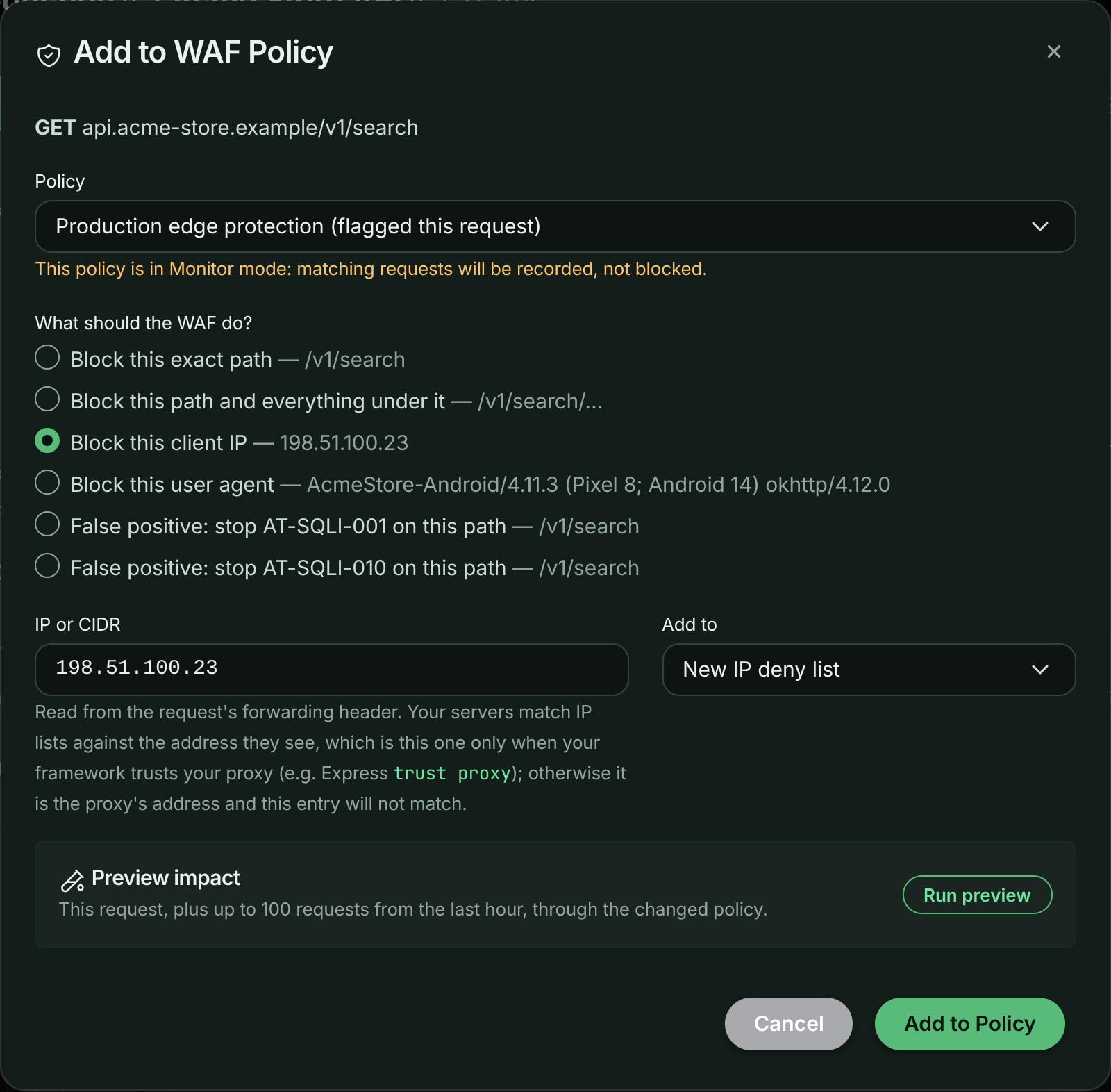
In the request log, open the request’s actions menu (⋮) and select Add to WAF.
Choose the policy and the change
Pick the Policy (the one that flagged the request is marked (flagged this request)). Under What should the WAF do?, choose Block this exact path, Block this path and everything under it, Block this client IP, Block this user agent, or, for a request a rule flagged, False positive: stop the rule on this path. Adjust the pattern if needed and choose which existing deny list to Add to, or a new one.
Adding a request’s client IP to a deny list.
Preview the impact
Select Run preview to run this request, plus up to 100 requests from the last hour, through the changed policy. It shows the request’s verdict before and after, and how many other requests become blocked or no longer blocked.
Save
Select Add to Policy. Connected servers receive the change.
Note: The client IP is the one your framework reports. Behind a proxy or load balancer, that is the real client only when your framework trusts the proxy (for example Express
trust proxy).
Review matches
The bucket’s WAF page and the account’s Insights tab show what your policies matched. On Insights, filter by Policy, Bucket and Timeframe (Last hour, Last 24 hours, Last 7 days, Last 30 days); Analytics in a policy’s menu opens Insights on that policy.
- A banner sums up the stance: how many requests were blocked (review for false positives), or, for a Monitor policy, how many would have been blocked.
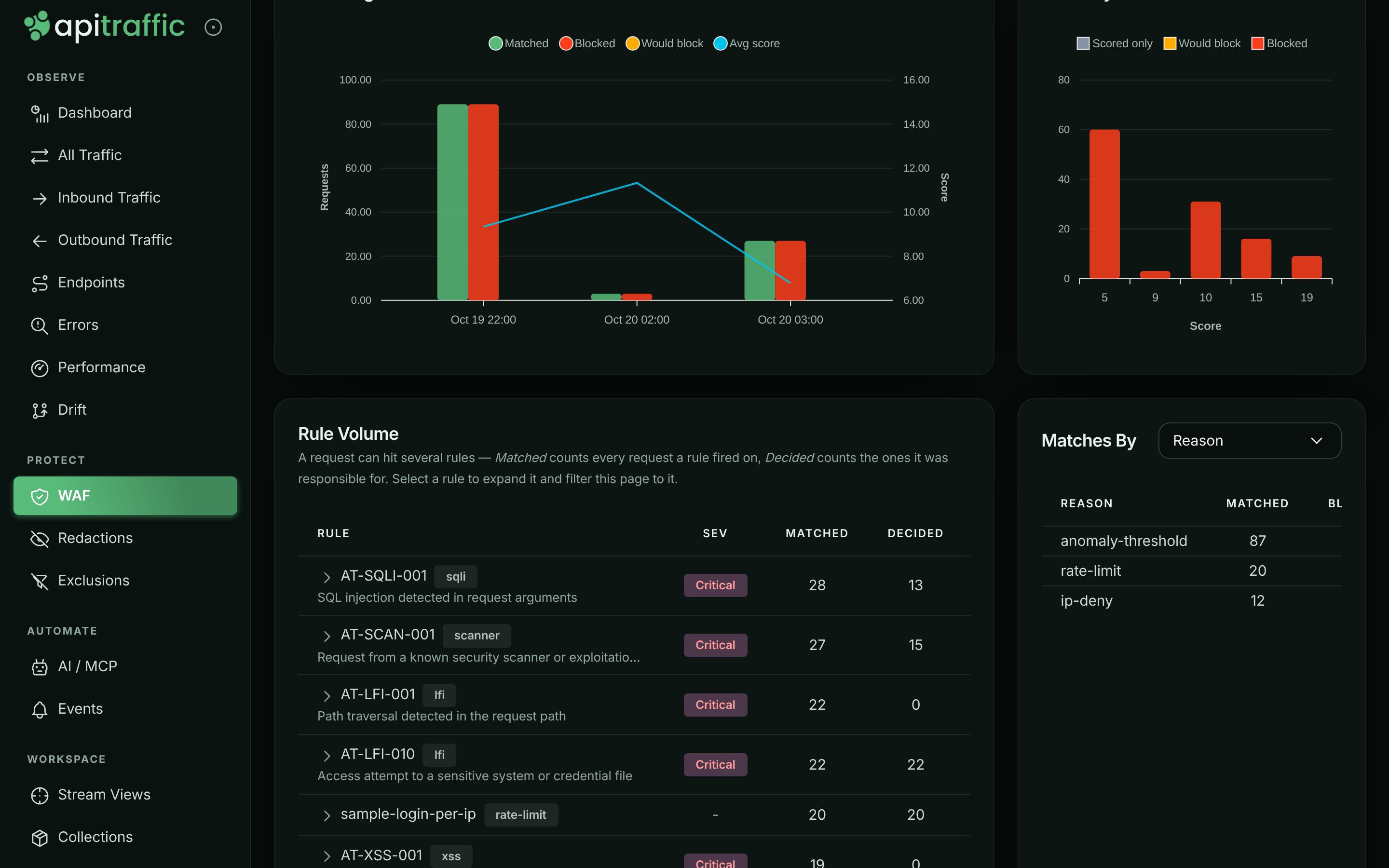
- Cards: Matched requests, Blocked, Would block, Scored only (matched below the threshold), Rule hits, Categories, Avg / max score and Last match.
- Matching & Enforcement Over Time and Anomaly Score Distribution (with the threshold marked).
- Matches By a dimension: Attack category, Decision, Reason, Severity, Endpoint, Method, Response status, Policy, Bucket or Environment.
- Rule Volume: each rule with severity, Matched (every request it fired on), Decided (requests it decided), Blocked and score. Select a rule for its details and to filter the matched requests to it.
- Matched Requests: each with its decision (Blocked, Would block or Scored) and deciding rule. Select one to open it in place, or open it in the traffic log.
Matches by reason in the sample data: the managed rules, the login rate limit and the deny list.
Each request also carries its verdict: open it in the request log and select the WAF tab for the outcome, decisive rule, reason, anomaly score, the policy and its mode, and every matched rule with its evidence.
Handle false positives
A false positive is a legitimate request a rule flags. Fix it as narrowly as you can, so the rule keeps protecting everything else:
- Find the rule. In Rule Volume or the request’s WAF tab, note the rule id (for example
AT-SQLI-001) and where it matched (target and field name). - Silence it only there. Add a False Positive Exclusion with the rule id and the narrowest scope that covers the request: a Path Pattern, a Target, a Field Name. Or use Add to WAF → False positive: stop the rule on this path from the request.
- Test. Keep the request as a test case that Should be allowed, and run Replay Recent Traffic to check nothing else changed.
- Only if a rule is wrong everywhere, switch it off in Review & tune rules, or lower the Paranoia Level.
While you investigate, you can switch the policy back to Monitor; nothing is blocked, and matches are still recorded.
Delete a policy
Select Delete in the policy’s menu, then Delete Policy. Connected servers stop enforcing it immediately. If another policy covers the same bucket and environment, that one applies instead.
Manage policies over the API
Policies are available on the API for automation. Creating, editing and deleting need an owner or admin (or an administrator API token).
| Method | Path | Does |
|---|---|---|
GET |
/v1/accounts/{accountSid}/waf-policies |
List policies |
GET |
/v1/accounts/{accountSid}/waf-policies/{wafSid} |
Get a policy |
POST |
/v1/accounts/{accountSid}/waf-policies |
Create a policy |
PUT |
/v1/accounts/{accountSid}/waf-policies/{wafSid} |
Update a policy |
DELETE |
/v1/accounts/{accountSid}/waf-policies/{wafSid} |
Delete a policy |
POST |
/v1/accounts/{accountSid}/waf-policies/simulate |
Evaluate a policy against up to 250 requests |
GET, POST |
/v1/accounts/{accountSid}/waf-block-responses |
List or create block responses |
GET, PUT, DELETE |
/v1/accounts/{accountSid}/waf-block-responses/{blockResponseSid} |
Get, update or delete a block response |
GET |
/v1/accounts/{accountSid}/waf-rulesets |
List managed rule sets and versions |
GET |
/v1/accounts/{accountSid}/waf-analytics/overview |
Firewall analytics (also /rules, /breakdown, /matches) |
A plan’s limit on the number of firewall policies applies to creating them.
Troubleshooting
Saving is refused with a pattern error
One of your regular expressions is invalid, longer than 512 characters, or could backtrack catastrophically. The message names the field; see Your own patterns.
Saving is refused because of the policy’s own response
A policy set up over the API before block responses can hold a response today’s checks refuse (a body with <, or over 4,096 bytes). The Block Response step says so and keeps it as stored; pick a block response to replace it.
A change does not seem to apply
Check which policy is in force for the bucket and environment: the most specific enabled policy wins, and policies are not combined. Also check that the policy is enabled and its Request Protection is not Not monitored.
A rate limit lets more requests through than expected
With Per server scope, each server counts only its own requests. Use Fleet (approx.), or set the limit with your server count in mind.
Country or ASN lists do nothing
Country lists need @apitraffic/waf 2.1.0 or later on your servers, or the header your edge sets in Country header; see Block or allow countries. ASN lists need the header your edge sets in ASN header, and are not enforced until it is named.
Add to WAF is missing from the request menu
It is shown to owners and admins, for inbound requests, in your own buckets (not the sample bucket), when your plan includes the firewall.
Related
-
Set up the firewall: Monitor first, then enforce.
-
How the firewall works: Evaluation order, modes and verdicts.
-
Block responses: What a blocked request receives, shared across policies.
-
Search and filter requests: Filter on waf_action, waf_rule and other firewall fields.
-
Exclusions: Stop sending traffic you do not need, such as health checks.