
Create endpoint rules
Create, test and manage endpoint rules that name a group of paths as one endpoint, scope them to inbound or outbound traffic, and mark long-lived connections.
An endpoint rule tells ApiTraffic how to group request paths into an endpoint: every path that matches the rule’s pattern is reported under the endpoint name you choose. Rules take precedence over automatic detection, endpoint learning and framework routes, so you can name or correct any endpoint yourself. A rule can also mark matching requests as long-lived connections, so they stay out of response-time metrics.
For how endpoints are resolved in the first place - framework routes, automatic detection and learning - see Endpoint handling.
When to write a rule
- An endpoint is split into many rows because a segment varies in a way detection does not recognize, such as
/v1/stores/acme-west/inventoryand/v1/stores/acme-east/inventory. - You want a specific parameter name, such as
{store_slug}instead of{store_id}. - A vendor’s paths you call (outbound) should be grouped differently, for one host only.
- An endpoint holds connections open on purpose, such as long polling, and should not skew latency.
Before you begin
- Any team member can create and manage endpoint rules.
- Your plan may limit the number of endpoint rules.
- Rules apply to traffic processed after you save. Requests already recorded keep their endpoint.
Create an endpoint rule
Open Endpoint Rules
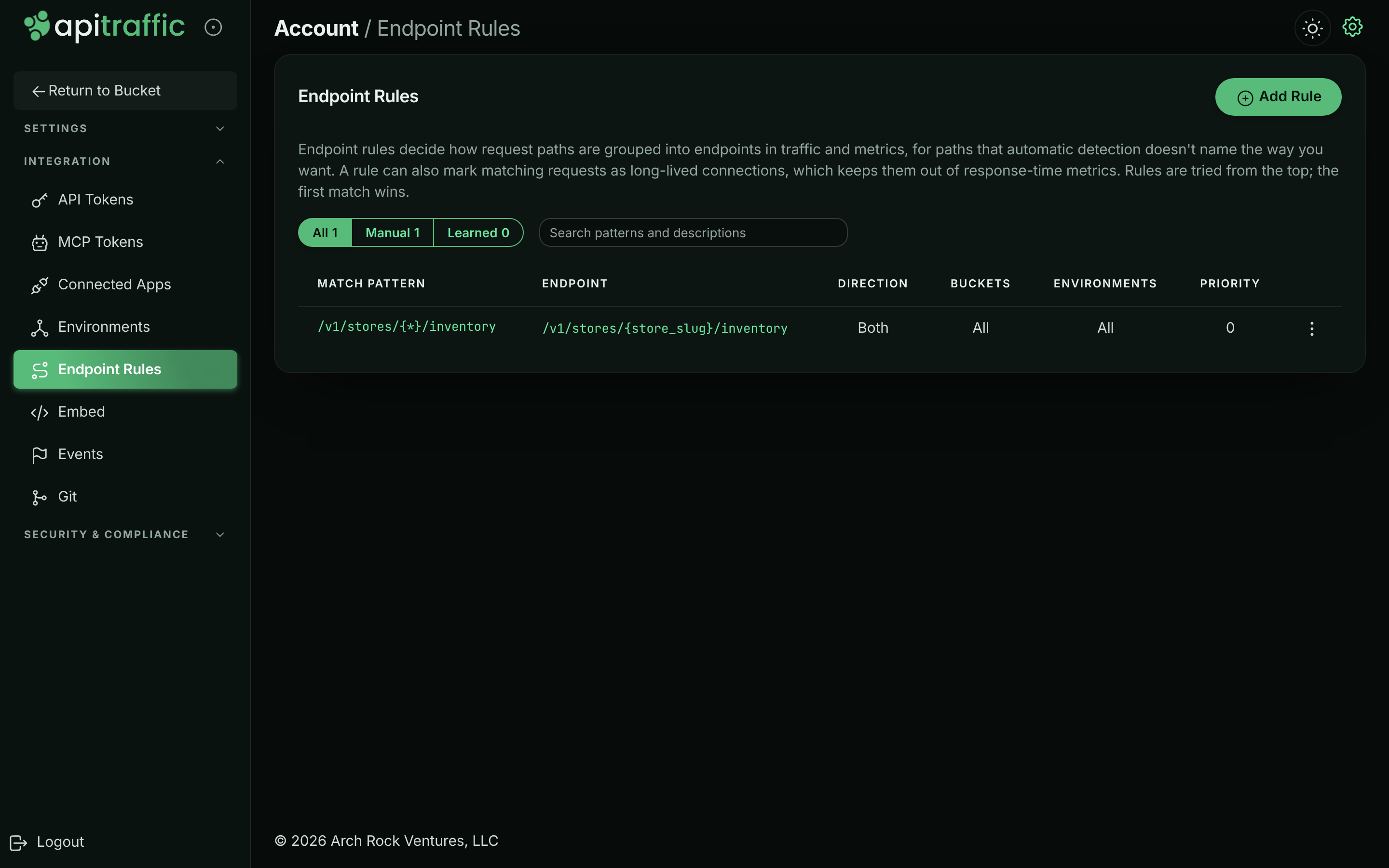
Open the account menu at the top right and select Endpoint Rules (or, in the account area, Integration → Endpoint Rules). Select Add Rule.
Endpoint rules, with your own and learned rules in the order they are tried.
Enter the match pattern and test it
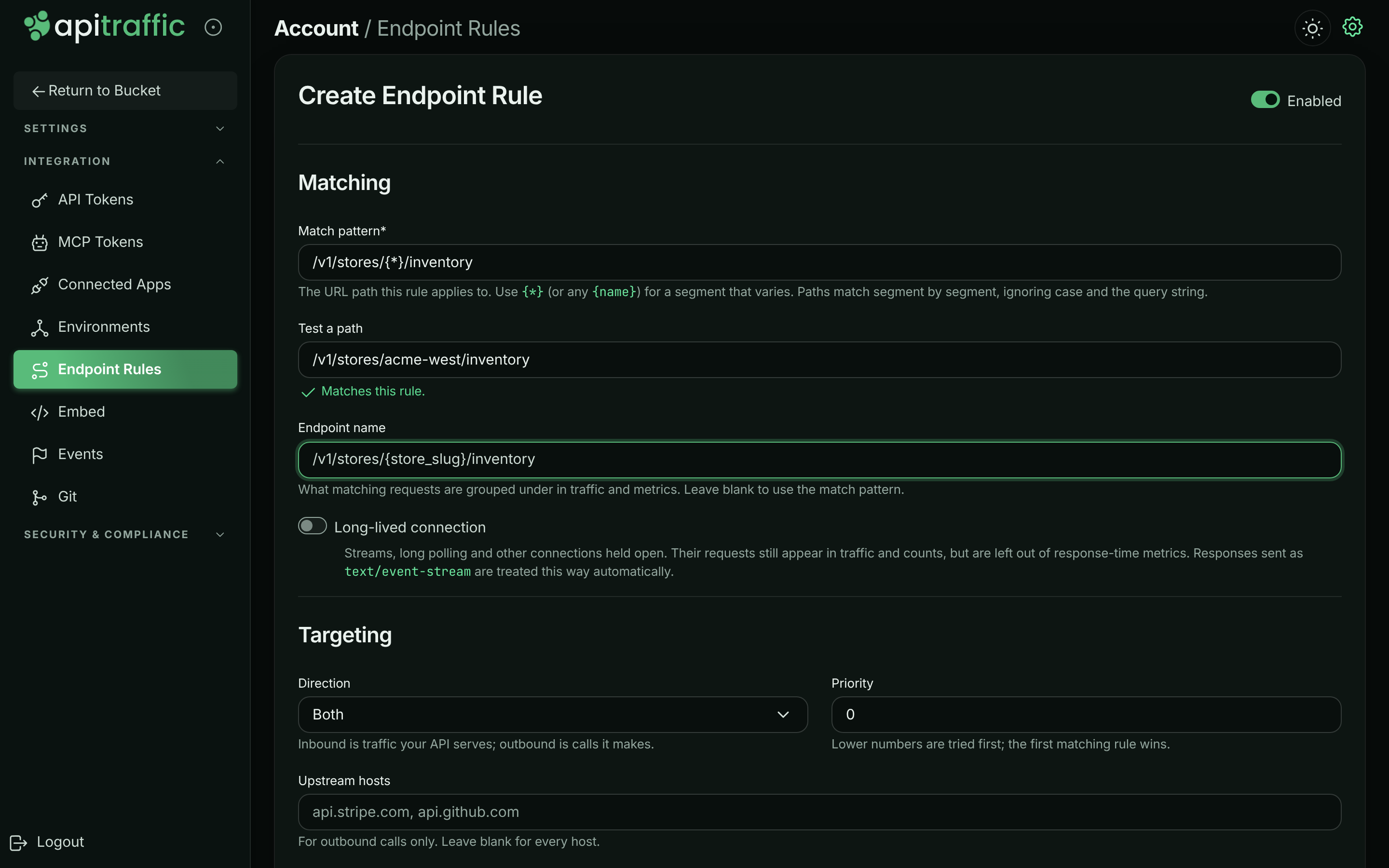
Under Matching, enter the Match pattern*: the URL path the rule applies to, starting with /. Use {*} (or any {name}) for a segment that varies. Paths match segment by segment, ignoring case and the query string. Type a real path in Test a path to check it: the form shows Matches this rule. or Does not match this rule.
Name the endpoint
In Endpoint name, enter what matching requests are grouped under in traffic and metrics, for example /v1/stores/{store_slug}/inventory. Leave it blank to use the match pattern. Turn on Long-lived connection for streams, long polling and other connections held open (see Long-lived connections).
Testing a path against the match pattern.
Set the targeting
Under Targeting, choose:
- Direction: Both, Inbound (traffic your API serves) or Outbound (calls it makes).
- Priority: a whole number, 0 or more (default 0). Lower numbers are tried first; the first matching rule wins.
- Upstream hosts: for outbound calls only, comma-separated, for example
api.acme-freight.example. Leave blank for every host. - Buckets and Environments: Apply to all, or pick specific ones.
Describe and save
Under General, add a Description (what the rule is for). Leave Enabled on and select Create. The message Endpoint rule created. confirms it.
Manage rules
The list shows every rule in the order rules are tried: lower Priority first, and at equal priority your own rules before learned ones. Each row shows the Match pattern, Endpoint, Direction, Buckets, Environments and Priority, with badges for Learned, Long-lived and Disabled rules.
- Filter the list with All, Manual or Learned, or search patterns and descriptions.
- From a rule’s menu, select Edit, Disable (or Enable) or Delete (then Delete Rule).
Learned rules are created by endpoint learning from segments that vary in your traffic. Disable or delete one like any other rule; to stop learning for a bucket, turn off Learn endpoints from traffic in Bucket Settings → Endpoint Handling.
Examples
| Goal | Match pattern | Endpoint name | Direction / hosts |
|---|---|---|---|
| Group store slugs | /v1/stores/{*}/inventory |
/v1/stores/{store_slug}/inventory |
Inbound |
| Name a vendor’s resource ids | /v1/payment_intents/{*}/capture |
/v1/payment_intents/{intent_id}/capture |
Outbound, payments.acme-pay.example |
| Mark long polling | /v1/jobs/{*}/poll |
(blank) with Long-lived connection on | Inbound |
Outbound rules scoped to a host also decide how that vendor’s paths are grouped in Performance → Operations.
Troubleshooting
My rule does not change an endpoint
Check that the rule is enabled, that its direction and buckets cover the traffic, and that no rule with a lower priority number matches first. Matching is segment by segment: /users/{*} matches /users/42 but not /users/42/orders. Only requests processed after the save use the rule.
The form says the path is invalid
The match pattern and the endpoint name must start with /. The priority must be a whole number, 0 or more.
A learned rule merged endpoints I want apart
Disable or delete the learned rule and add your own rule for each endpoint, or raise Minimum distinct values in the bucket’s Endpoint Handling settings. See Endpoint learning.
Related
-
Endpoints: How detection, learning and rules resolve endpoints.
-
Performance analytics: See how endpoints rank by time consumed.
-
Exclusions: Stop sending requests you do not need.
-
Drift detection: Track changes to an endpoint’s shape.