
Endpoints and endpoint handling
Browse your API's endpoints and their metrics, and learn how ApiTraffic groups request paths into endpoints and how to tune it per bucket.
Every request ApiTraffic captures has a raw path such as /v1/users/8412/orders/9931. To make
volume, latency and error rates meaningful, requests are grouped by endpoint: the same path
with its variable parts replaced by parameters, here /v1/users/{user_id}/orders/{order_id}.
Endpoints are what the Endpoints page lists, what you search with the endpoint field, and what
metrics, drift and attention signals are keyed on.
The Endpoints list
Choose Observe → Endpoints in the left navigation. The page lists every endpoint that received traffic in the selected period, with totals across them: Endpoints, Requests, Avg. Response Time and Errors.
Inbound endpoints in the sample bucket.
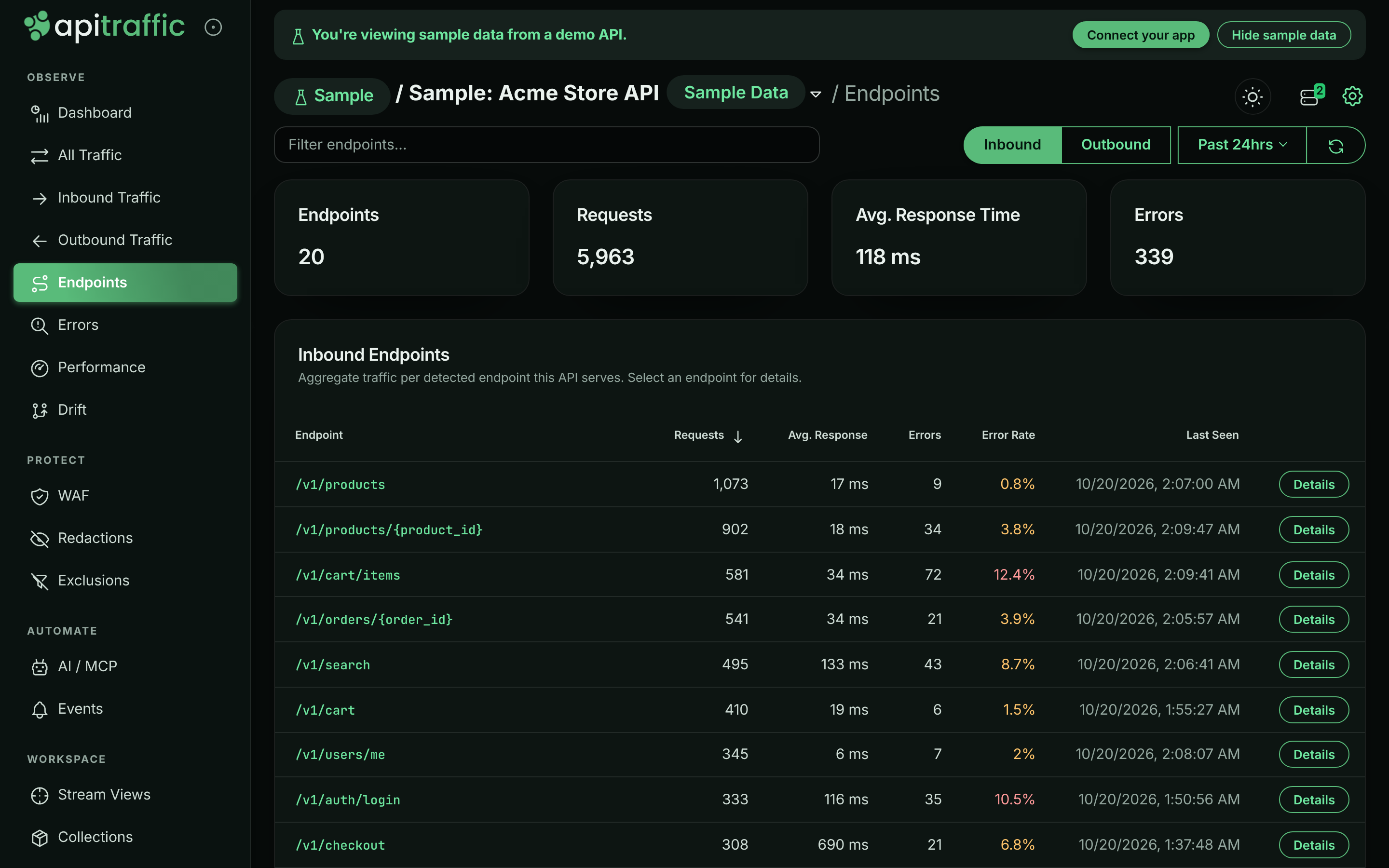
- Inbound and Outbound switch between the endpoints your API serves and the external
endpoints it calls. The two are never mixed. Outbound endpoints are grouped per upstream host,
so
/v1/charges/{id}on two providers is two rows, and the table adds a Host column. - The period picker uses the same periods as the dashboard, from Past 15 min to Past 7 days. The refresh button (Reload endpoints) reloads the list.
- Type in Filter endpoints… (or Filter endpoints or hosts… for outbound) to narrow the list.
- Select a column heading to sort: Endpoint, Host, Requests, Avg. Response, Errors, Error Rate or Last Seen. The error rate turns amber above 0% and red at 10% or more.
The list shows up to 250 endpoints per direction. An endpoint covers every HTTP method on that path; the endpoint name itself has no method.
Endpoint details
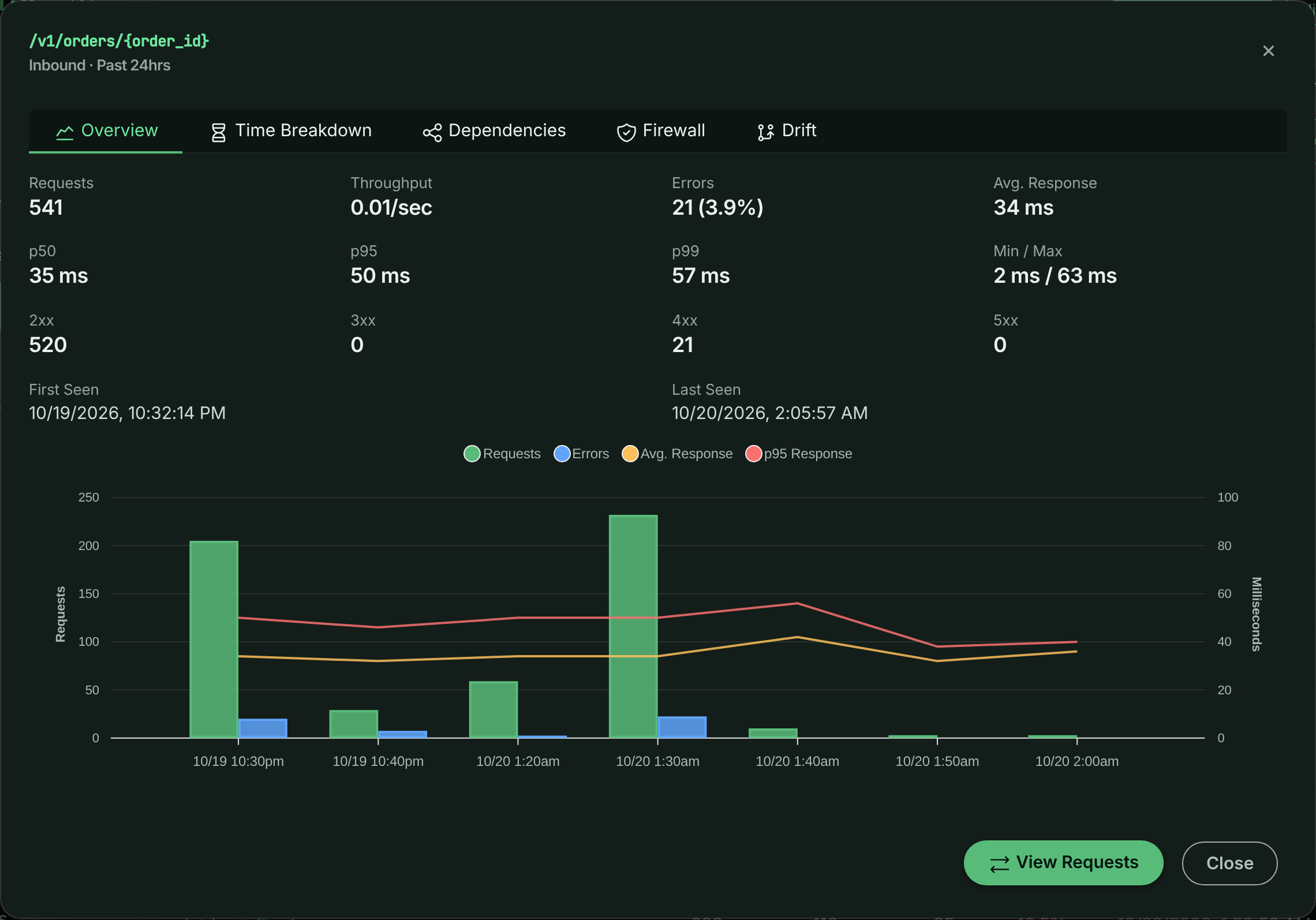
Select an endpoint, or its Details button, to open its details. The title shows the endpoint and whether it is inbound or outbound, over the selected period.
Details for /v1/orders/{order_id}.
| Tab | What it shows | Shown for |
|---|---|---|
| Overview | Requests, Throughput, Errors, Avg. Response, p50, p95, p99, Min / Max, counts per status class (2xx to 5xx), First Seen and Last Seen, and a chart of requests, errors and average response time with event markers. | Inbound and outbound |
| Time Breakdown | Where the endpoint’s time goes (APM): Total Time, Avg / Request, p95, p99, Waiting On Dependencies and Operations, split by area. | Inbound |
| Dependencies | The queries, cache and queue operations and outbound calls the endpoint runs, ranked by total time, with Runs, Per Request, Avg and Total. A dependency that runs many times in one request, the shape of an N+1 query, is flagged. | Inbound and outbound |
| Firewall | What the firewall did on this endpoint: Matched, Blocked, Would Block, Tagged, Match Rate, Inspected, Avg. Score, Max Score and the rules that fired. | Inbound |
| Drift | The endpoint’s drift baselines and alerts, per HTTP method. A method still learning says so. Select an alert to open it on the Drift page. | Inbound |
Select View Requests to open the request log filtered to this endpoint (and, for outbound
endpoints, its host). In the sample bucket, the Dependencies tab for /v1/orders/{order_id}
shows the repeated order_items query behind its N+1.
How endpoints are named
When a request is captured by one of the framework SDKs (Express, Fastify, hapi, Koa, NestJS, Meteor, LoopBack, AdonisJS or Sails) or the Strapi plugin, the SDK reports the route your router matched, and that route is used as the endpoint directly. See Framework routes. For every other request, an endpoint is resolved in three stages:
Automatic detection
The path is inspected on its own and recognizable values are replaced with parameters.
Endpoint learning
Segments that vary across requests are promoted to parameters, catching values that a single path cannot reveal.
Endpoint rules
Rules always win, so you can name or correct any endpoint yourself.
Framework routes
Your router already knows which route served a request, so for inbound requests captured by
@apitraffic/express, @apitraffic/fastify, @apitraffic/hapi, @apitraffic/koa,
@apitraffic/nestjs, @apitraffic/meteor, @apitraffic/loopback, @apitraffic/adonisjs, @apitraffic/sails or the Strapi plugin (@apitraffic/strapi, which is built on
@apitraffic/koa), the SDK sends the matched route
along with the request. ApiTraffic uses it to settle the endpoint’s shape: which segments are
parameters and which are fixed. Endpoint learning is skipped for these requests, because the
router already knows what learning would discover.
The route is converted to ApiTraffic’s {param} style, with regex constraints and optional
markers removed:
| Framework | Route | Converted |
|---|---|---|
| Express | app.get('/orders/:orderId', ...) |
/orders/{orderId} |
| Express | router.get('/:itemId', ...) mounted at /api/v1/items |
/api/v1/items/{itemId} |
| Fastify | '/orders/:id(^\\d+$)' |
/orders/{id} |
| hapi | '/orders/{orderId?}' |
/orders/{orderId} |
Koa (@koa/router) |
'/orders/:id(\\d+)' |
/orders/{id} |
| NestJS | @Get(':id') in @Controller('orders'), global prefix api |
/api/orders/{id} |
| Meteor | WebApp.handlers.get('/orders/:orderId', ...) |
/orders/{orderId} (/app/orders/{orderId} with ROOT_URL_PATH_PREFIX=/app) |
| LoopBack | @get('/orders/{id}'), REST basePath /api |
/api/orders/{id} |
| AdonisJS | router.get('/orders/:id?') in a group with .prefix('/api') |
/api/orders/{id} |
| Sails | 'GET /orders/:id' in config/routes.js |
/orders/{id} |
| Strapi | findOne of the article content type |
/api/articles/{id} |
| Strapi | custom route '/articles/:id/related' |
/api/articles/{id}/related |
Endpoint names stay stable
Turning on framework routes does not rename your existing endpoints. When the endpoint ApiTraffic
already records for a path has the same shape as the route (the same fixed segments, with
parameters in the same positions), that name is kept, so the endpoint’s history, metrics and
alerts carry on unchanged. A learned rule’s name is preferred, then the automatically detected
one. For /orders/8412 served by /orders/:orderId, the endpoint stays /orders/{order_id}.
The router’s own parameter names are used where automatic detection got the shape wrong. For
/v1/git-providers/bitbucket/authorize served by /v1/git-providers/:provider/authorize,
detection would have kept bitbucket, and the endpoint becomes
/v1/git-providers/{provider}/authorize.
When the route is not used
The stages below apply instead, as they do without a framework SDK, when:
- the response is a 404. Some routers still report the route a handler matched after that handler passed the request on to the framework’s own 404, so a 404 does not reliably say which route served it.
- the route is a catch-all or wildcard, such as
*,/files/*splat,/{p*},(.*)or:path(.*), since it does not identify a single endpoint - the route does not fit the request: it has a different number of segments, a fixed segment the
path does not have, or a fixed segment where automatic detection sees a value such as an id.
A route can never add a concrete id to your endpoint list. Words joined by
-or_with no digits, such as Strapi’s/api/blog-postsor/orders/by-status/{status}, are taken as the route’s fixed segments even where detection on its own would have read them as values. - an Express router or sub-app is mounted at a path with parameters, such as
/users/:userId/posts - a Koa app routes without
@koa/router - Strapi serves a file from
public/, or no route matches: both are answered by Strapi’s public-files route, which is a catch-all (/((?!uploads/).+)) - the request is an outbound call your application makes
GraphQL, MCP and JSON-RPC routes are still split by operation, so /graphql is reported as
/graphql#GetUser and /mcp as /mcp#tools/call:get_weather (see
GraphQL, MCP and JSON-RPC).
These requests report an endpoint source of framework. Endpoint rules you create still override
the framework route, so you can rename or merge routes.
Note: Framework routes need a current framework SDK together with
@apitraffic/utilities(for Strapi, a current@apitraffic/koaunder the plugin). Older versions send no route, and their requests keep using detection and learning.
Automatic detection
Detection decides which segments of a path are values, and names each one after the segment
before it: the singular of that segment plus _id. A route therefore has one endpoint whatever
kind of id it is called with:
| Request | Endpoint |
|---|---|
/v1/accounts/23234 |
/v1/accounts/{account_id} |
/v1/accounts/1f0c0b8e-2f9d-4c1a-9f7e-77c0c9e2a1d4 |
/v1/accounts/{account_id} |
/v1/accounts/acct_3B26CXp2ZaevfQesc1oh |
/v1/accounts/{account_id} |
/v1/git-providers/12345/authorize |
/v1/git-providers/{git_provider_id}/authorize |
/v1/invoices/123.pdf |
/v1/invoices/{invoice_id}.pdf |
/v1/nodes/1/nodes/2 |
/v1/nodes/{node_id}/nodes/{node_id_2} |
When there is no usable word before the value (the start of the path, a version, another value,
or an action such as check), the name is {id}. The kind of value detected (number, UUID,
prefixed id, hash, email…) is still recorded with each request; it just does not split the
endpoint.
Values that are not identifiers keep a name of their own: dates (/reports/{date} for
2024-01-31), timezones (/schedules/{timezone} for America/New_York), and country, currency
and language codes ({country}, {currency}, {lang}).
Detection recognizes:
- numbers of any length, so
/orders/42and/orders/1700000000stay one endpoint as ids grow; - UUIDs of every version, prefixed ids of any prefix (
req_,cus_,shr_…), hashes, MongoDB ids, ULIDs, KSUIDs, NanoIDs, Snowflake ids, emails, IP addresses, JWTs, issue keys (ENG-123) and all-caps codes under a collection (/projects/PROJ); - opaque generated tokens, including letters-only ones, told apart from camelCase route names
such as
/rpc/getUserProfileSettings, which stay part of the endpoint; - date-stamped API versions (
/2010-04-01/…,/admin/api/2024-01/…) and numeric versions afterapi(/rest/api/3/…), which stay part of the endpoint.
Query strings, fragments and ;jsessionid=-style path parameters are never part of an endpoint.
Detection deliberately never converts plain words. /v1/git-providers/bitbucket/authorize
keeps bitbucket, because from that one path there is no way to tell a variable value from a
static route. That is what endpoint learning is for.
GraphQL, MCP and JSON-RPC
Some APIs send every call to one URL and put the operation in the request body. ApiTraffic reads
the operation from the body and adds it to the endpoint after a #, so each operation is an
endpoint of its own:
| Request | Endpoint |
|---|---|
POST /graphql with query GetUser { … } |
/graphql#GetUser |
POST /admin/api/2024-01/graphql.json with query ProductsQuery { … } |
/admin/api/2024-01/graphql.json#ProductsQuery |
POST /mcp calling the get_weather tool |
/mcp#tools/call:get_weather |
POST /mcp listing tools |
/mcp#tools/list |
POST /mcp reading any resource |
/mcp#resources/read |
POST / with JSON-RPC method eth_getBalance |
/#eth_getBalance |
Arguments, resource URIs and JSON-RPC request ids are values, so they never split an endpoint.
MCP servers are recognized wherever they are mounted, including the older SSE transport’s
/messages?sessionId=…. A JSON-RPC batch is grouped under its method when every call in it uses
the same one, and as #batch otherwise. Operation names that are oversized or contain unsafe
characters are left out of the endpoint, and bodies over 256 KB are not read.
Endpoint rules and learning apply to the path before the #. The operation is kept, so a rule
for /v1/workspaces/{*}/mcp still reports /v1/workspaces/{workspace_id}/mcp#tools/call:list_files.
Endpoint kind
Every request records which kind of call it was: rest, graphql, mcp or jsonrpc. You can
search and set alerts with endpoint_kind (for example endpoint_kind == "mcp"), and group or
filter metrics by Endpoint Kind. Endpoint rules change the endpoint name, never the kind.
Endpoint learning
Endpoint learning uses the one signal a single path can never carry: whether a segment actually changes across requests. As traffic arrives, ApiTraffic tracks the values seen at each candidate position of an endpoint. Once a position has varied enough, it becomes a parameter, and every later request - including values never seen before - is grouped under it.
For example, after these two requests:
/v1/accounts/{account_id}/git-providers/bitbucket/authorize
/v1/accounts/{account_id}/git-providers/github/authorize
ApiTraffic creates a rule for /v1/accounts/{*}/git-providers/{*}/authorize and reports the
endpoint as:
/v1/accounts/{account_id}/git-providers/{git_provider_id}/authorize
gitlab, azure-devops and anything else that appears in that position is matched immediately,
without waiting to be seen first.
Sibling routes vary in exactly the way a parameter does (/auth/login and /auth/logout,
/settings/2fa and /settings/oauth2, /projects/{id}/kanban and /projects/{id}/gantt), so
learning is careful about how much variation is enough:
- Between a word and a shared route after it, like
bitbucketabove (or the owner in/repos/octocat/{id}/pulls), the surrounding route shows the requests are one endpoint, so the bucket’s Minimum distinct values applies. - At the end of a path, or right after another value, only volume tells a parameter from a
handful of sibling routes, so 25 distinct values are needed. That is how blog slugs
(
/blog/{blog_id}) and two adjacent values such as/repos/{repo_id}/{id}are learned. - A value shaped exactly like the ids already detected at that position (same length and character set, such as an 11-character video id that happens to contain no digit) is grouped with them straight away.
- When two neighboring positions each turn out to vary (an owner and a repository), they are
combined into one endpoint:
/repos/{repo_id}/{id}/issues/{issue_id}. - Common resource, action and query words such as
users,search,exportorstatusnever count as values, sets of plural nouns (widgets,gadgets) are treated as sibling collections, and nothing directly after/api,/adminor a version is ever learned.
Learning never considers the first segment of a path or a version segment such as v1, so
unrelated endpoints like /v1/users/{id} and /v1/orders/{id} can never be merged into one.
A learned rule only fills in the positions detection left as plain text, and names them the same way detection does, so learning a rule never renames an endpoint you are already tracking.
A learned rule appears alongside your own endpoint rules with a source of learned, and you can
disable or delete it like any other rule. Rules you create yourself are evaluated first, so a
learned rule never overrides your own.
Endpoint rules
When detection and learning don’t give you the endpoint you want, write an endpoint rule: a
match pattern such as /users/{*} and the endpoint name matching requests are grouped under.
Rules are managed under Account → Endpoint Rules, can be limited by direction, upstream host,
bucket and environment, and always win over detection, learning and framework routes. Learned
rules appear in the same list with a source of learned, and you can disable or delete them.
Rule changes apply to traffic processed after the rule is saved; requests already recorded keep their endpoint. See Endpoint rules for how to create and order them.
Inbound and outbound traffic
The endpoints your API serves and the external endpoints it calls are learned and reported
separately. Learning tracks each direction on its own, and outbound traffic is tracked per
upstream host, so /v1/charges/{id} on two payment providers is never merged, and a segment that
varies on one vendor’s API says nothing about another’s. A rule learned from outbound traffic is
scoped to the direction and host it was learned from.
Rules you author carry the same scope:
-
direction (string, default *):
inapplies the rule only to requests your API serves,outonly to requests it makes, and*to both. -
hosts (string[], default [“*”]): For outbound traffic, the upstream hosts the rule applies to, for example
["api.stripe.com"]. Ignored for inbound traffic, whose host is your own.
Existing rules keep a direction of * and hosts of ["*"], so they behave exactly as before.
Narrow a rule’s direction when it describes only one side of your traffic.
Long-lived connections
Streaming responses stay open for as long as the client listens: a Server-Sent Events stream
such as MCP’s GET /mcp/sse can be held for minutes. Recording that open time as a response
time would swamp your averages and percentiles, so these requests are marked as streams.
-
Responses sent as
text/event-streamare marked automatically when they are ingested. -
For other connections held open on purpose, such as long polling, turn on Long-lived connection on an endpoint rule that matches them.
-
stream (boolean, default false): Treat the requests this rule matches as long-lived connections. The rule still names the endpoint as usual; in the app, leave Endpoint name blank to keep the match pattern.
Streams still appear in the request list, in request counts and in error rates. They are left out of response-time metrics: averages, percentiles, slow operations and response-time charts. In the request list a stream is labeled Stream, its duration is shown as the time the connection was open, and its time to first byte (when the SDK reports it) shows how quickly it started responding. The flag applies to traffic processed after the rule is saved; requests already recorded are not changed.
Tune endpoint learning per bucket
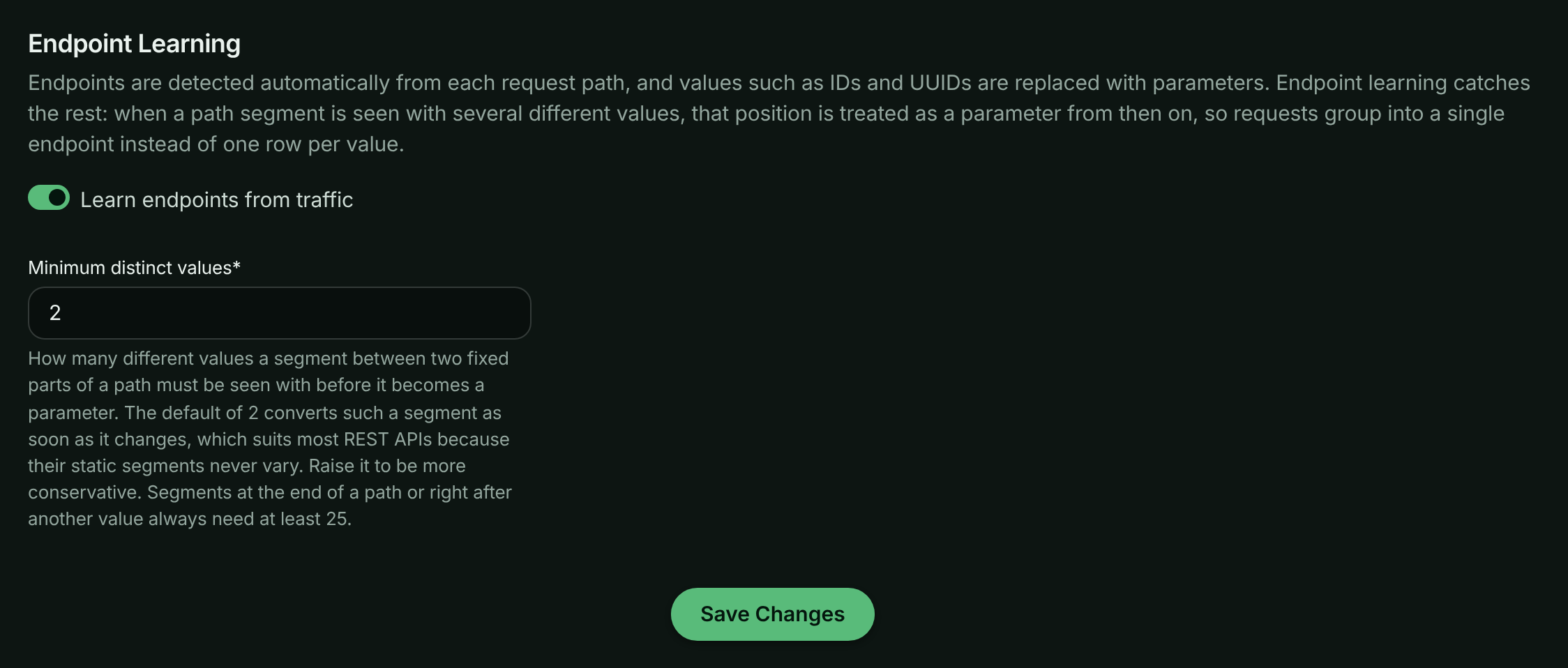
Endpoint learning is configured per bucket, under Workspace → Bucket Settings → Endpoint Handling, in the Endpoint Learning section. Select Save Changes to apply. The sample bucket’s settings can’t be changed.
Endpoint learning settings for a bucket.
-
Learn endpoints from traffic (boolean, default enabled): Whether ApiTraffic may promote varying path segments to parameters for this bucket. When disabled, only automatic detection and the rules you create are used. Existing learned rules are kept and keep applying; delete them if you no longer want them.
-
Minimum distinct values (number, default 2): How many different values a segment between a word and a shared route must be seen with before it becomes a parameter. The default of
2converts such a segment as soon as it changes, which suits most REST APIs because their static segments never vary. Raise it if you would rather see a position broken out until it has clearly proven variable - a value of5, for instance, keeps a five-value enum such as a provider name visible as separate endpoints. Enter a value from 2 to 100. Positions at the end of a path or right after another value always need at least 25.
Note: Settings changes apply to newly processed traffic and can take a few minutes to take effect. Endpoints already recorded on past requests are not rewritten.
These settings are also available on the bucket API as
endpointLearningEnabled and endpointLearningMinValues.
Choosing an approach
-
Leave learning on: Best for most APIs. Ids and enum-like segments collapse on their own and the Endpoints view stays small without any configuration.
-
Raise the threshold: Use when low-cardinality segments, such as a region or provider name, are worth reporting separately until they have varied several times.
-
Turn learning off: Use when you want endpoints to come only from automatic detection and rules you author, for example when your endpoint list feeds a downstream contract.
-
Write a rule: Use when you want a specific pattern or parameter name. Rules take precedence over detection, learning and framework routes.
Troubleshooting
One endpoint shows up as many rows, one per id
Detection didn’t recognize the value and learning hasn’t seen enough variation yet. Check that Learn endpoints from traffic is on and Minimum distinct values isn’t set high, or write an endpoint rule for the path.
Two different routes were merged into one endpoint
Learning saw them vary like a parameter. Disable or delete the learned rule under Account → Endpoint Rules, and add a rule of your own for each route if needed.
An endpoint I renamed still shows the old name on older requests
Rule and setting changes apply to newly processed traffic only. Requests already recorded keep the endpoint they were given.
Related
-
Endpoint rules: Name, merge or split endpoints yourself.
-
Search and filter requests: Filter the request log by endpoint and endpoint kind.
-
Drift detection: Get alerted when an endpoint’s shape changes.
-
Performance analytics: Find your slowest endpoints and why.