
Account history
See everything that happened in your ApiTraffic account and who did it: team changes, sign-ins, tokens, billing, buckets, data rules and support access.
The account history is a record of what happened in your account, who did it, and when: a teammate invited, a token created, a redaction rule changed, a plan switched, or ApiTraffic support signing in under access you granted. Use it to answer “who changed this?” and to review security-sensitive changes.
It records account actions, not your captured API traffic. Everyone on the team can see it.
Open the account history
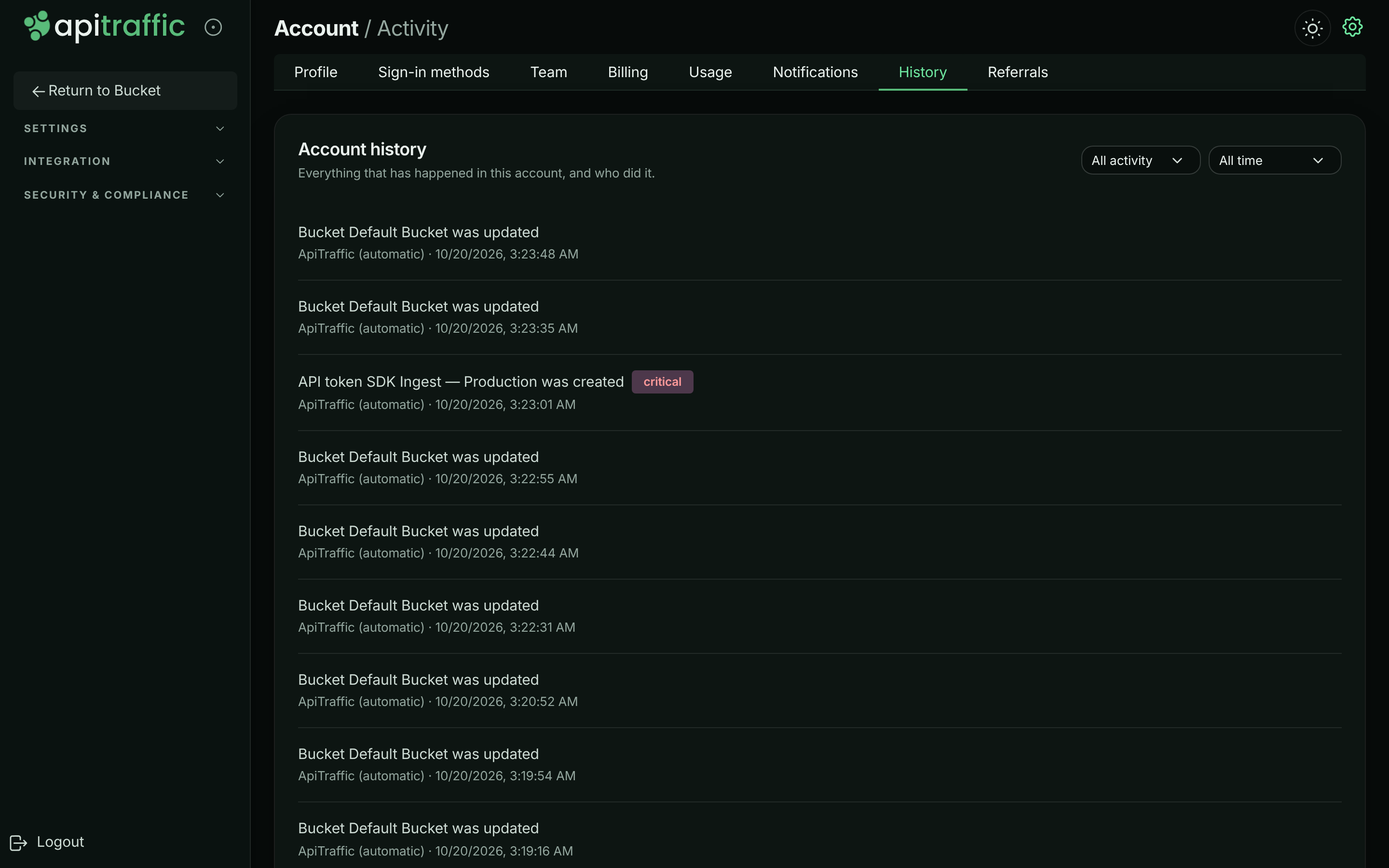
Go to Account → History. The Account history card lists events newest first, 25 at a time. Use Older and Newer to page through them.
Each event shows:
- a summary, such as API token checkout-api production was created,
- a notice or critical badge for events worth a second look (routine events have none),
- who did it, when, and the IP address it came from, for your own team’s actions.
The account history.
Who did it
| Shown as | Meaning |
|---|---|
| A person’s name or email | Someone on your team. |
| API token and its name | A script using an API token. |
| A name with (connected service) | An integration acting on the account. |
| ApiTraffic (scheduled), ApiTraffic (upstream provider) or ApiTraffic (automatic) | ApiTraffic itself, for example a trial ending or a payment provider update. |
| A name with (ApiTraffic support) and a support badge | ApiTraffic support, acting under support access you granted. |
Filter the history
- Category: All activity, or one of Account, Team, Security, Billing, Buckets, Data, Integrations and Support.
- Date: All time, Last 24 hours, Last 7 days, Last 30 days, Last 90 days or Custom range. For a custom range, choose From and To dates and select Apply. Leave either blank for an open end. Dates are in your local time and include the whole day.
What’s recorded
| Category | Events |
|---|---|
| Account | Account created, renamed or settings changed; sample data shown or hidden; database query text storage turned on or off; client IP address setting changed; overage turned on or off; environments created, updated and deleted; data purges started and finished; account close scheduled, cancelled or done. |
| Team | Invitations sent, accepted and revoked; members added and removed; role changes; ownership moving to someone else. |
| Security | Sign-ins and sign-outs; password changes; MFA turned on, off or reset; the account-wide MFA requirement changed; passkeys and verification phone numbers added or removed; consent to text messages; API and MCP tokens created and revoked; apps connected and disconnected. |
| Billing | Trial started and ended; plan changed; subscription cancelled and resumed; payment failed; payment method updated; the included request allowance reached; promotion rewards applied and ended. Shown to the owner only, as is Overage turned on or off. |
| Buckets | Buckets created, updated and deleted. |
| Data | Redaction and exclusion rules changed; share links created and revoked; data retention changed. |
| Integrations | Git providers connected and disconnected; workflows and webhooks changed. |
| Support | Support access granted and revoked; a support session opened. |
Actions taken before the account history was introduced aren’t shown.
Export or stream the history
There’s no download button. To keep a copy, or feed the history into your own security tools, read it from the API: GET /v1/accounts/{accountSid}/activity returns every event in the history as an account activity event, newest first (payloads are in the event reference). Filter with category, action, severity, targetSid, actorUserSid, startTime and endTime (ISO 8601), and page with limit (up to 200) and offset.
curl "https://api.apitraffic.io/v1/accounts/$ACCOUNT_SID/activity?category=security&limit=200" \
  -H "Authorization: Bearer $API_TRAFFIC_TOKEN"
Use a User or Administrator API token. See Create and manage API tokens.
Related
-
Account activity events: Read every event from the API.
-
Event reference: The payload of each event.
-
Grant support access: How support sessions are recorded.
-
Team and roles: Who can make each change.