
Ingest rate limits and sampling
How many records per second each plan records, what happens to traffic over the limit (your API is never slowed down), how sampling keeps a representative picture, and where you see what was not recorded.
Every plan records up to a number of records per second, with a short burst allowance on top. A record is one captured request or outbound call, so an SDK that sends 20 records in one batch uses 20. The limit protects every account’s processing from one very busy client, including yours.
Your API is never slowed down or blocked by this limit. It only decides how much of your traffic ApiTraffic records.
Limits by plan
| Plan | Records per second | Burst | Processing priority |
|---|---|---|---|
| Free | 25 | 10 seconds (250 records at once) | 1 |
| Starter | 100 | 10 seconds (1,000 records at once) | 2 |
| Pro | 500 | 10 seconds (5,000 records at once) | 4 |
| Enterprise | 2,000 by default, or what your contract sets | 10 seconds | 8 |
Your own plan’s limit is on Account → Usage, under Not recorded (rate limited). The pricing page lists each plan’s rate.
Burst lets short spikes through in full: a quiet account builds up to the burst allowance, and a spike within it is recorded whole. The limit only applies once traffic stays above the rate.
Processing priority decides how fast your traffic is processed when the platform is busy. Higher plans are served first and get a bigger share, but every account keeps moving: a lower plan is never stopped behind a higher one, and one very busy account only delays its own traffic. See Is my data delayed?.
What happens over the limit
The SDK samples before anything leaves your server
The ApiTraffic SDK knows your plan’s limit. While your app sends less than the limit, every request is recorded as usual. When it sends more, the SDK records a representative sample of the extra traffic, spread evenly over time and across your endpoints, instead of only the first requests of each second.
Each sampled record says what it stands for
A request recorded as a sample carries its sample rate. A rate of 0.25 means that record stands for four requests. Charts and counts show what was recorded; with the sample rate you can estimate the full total.
What was left out is counted
The SDK reports how many requests it left out, and they are added to Not recorded (rate limited) on the usage page.
Older SDK versions, and anything that posts to the ingest API directly, do not sample. ApiTraffic then accepts records up to the limit and refuses the rest with 429 Too Many Requests, a Retry-After header and Api-Traffic-Reason: rate_limited. Refused records count as not recorded too. Current SDKs never retry them, and wait for Retry-After before sending again.
Traffic you send through the ApiTraffic relay (a relay URL in front of your API) is never refused: the request is always passed on to your API and its response returned. Over the limit, it is just not recorded, and counted as not recorded.
Note: Sampling at the source is in
@apitraffic/utilities2.1 and later (and the framework packages released with it). Update to get a representative sample instead of refusals.
What you see
- Account → Usage shows Not recorded (rate limited) for the current billing period, beside your plan’s rate.
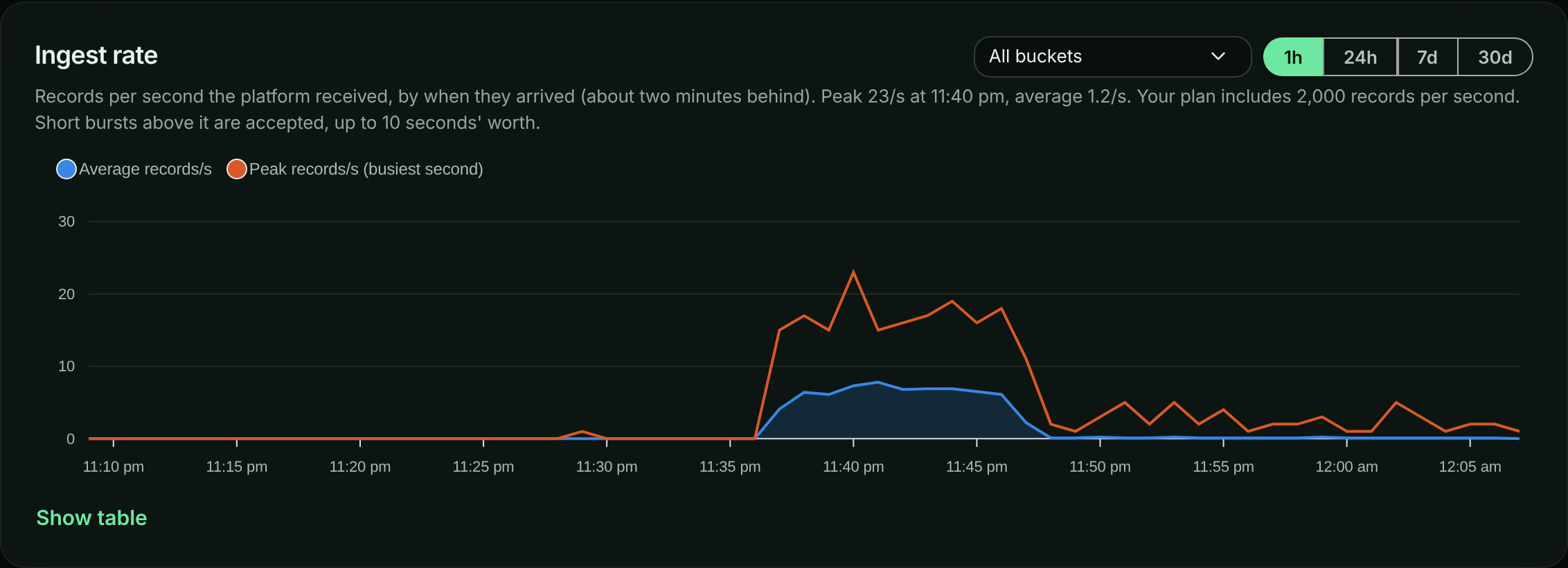
- The Ingest rate chart on the same page shows how many records per second ApiTraffic received from you over the last hour to 30 days, for the whole account or one bucket. The average line is the load; the peak line is the busiest single second. Short bursts above your limit are accepted (see the burst allowance above), so a peak over the limit line does not by itself mean records were refused. The plan limit is drawn on the whole-account chart when your traffic comes near it (the limit applies to all your buckets together). The chart is by when the records arrived (an SDK catching up after a network outage shows as the spike it is), about two minutes behind.
The Ingest rate chart for the last hour: the average (the load) and the peak (the busiest second).
- While your account is over its limit, a banner says how much of your recent traffic was recorded, for example Only about 42% of recent records were recorded, with a link to your plan’s limits for the owner. Buckets that are over show Rate limited next to their name in the bucket list.
- The first time your account goes over its limit in a billing period, the account owner and admins get one email. The owner’s says what the plan’s limit is; an admin’s doesn’t, because only the owner is shown the plan. There is no second email that period; the usage page keeps the running count.
Raise your limit
Choose a higher plan on Account → Billing. The new limit reaches your servers within about a minute, with no restart. For a limit above the Pro plan, contact us about an Enterprise plan.
Related
- Is my data delayed?
- Plan, usage and billing
- Configuration:
requestSampleRate, your own sampling, applies before the rate limit.