
Plan, usage and billing
Choose or change your ApiTraffic plan, track usage against allowances, manage cards, billing address and invoices, and see what happens when a trial ends.
Your plan decides how much traffic the account can capture each period, which features are open, and how many buckets, environments, seats and other resources you can have. This page explains how to choose and change a plan, read your usage, and keep payment details up to date.
Prices and each plan’s allowances are shown live on the pricing page and on Account → Billing.
Who can do what
- The owner is the only person who sees what the account is on and what it costs: the plan, prices, invoices, payment methods, the billing address, the billing email, Allow overage, referrals and promotions. The owner chooses and changes the plan, cancels and resumes, and turns overage on or off.
- Admins and members don’t see any of that. Billing, Plan and Referrals aren’t in their menus, and opening the Billing page shows Billing for this account is handled by the account owner. On Account → Usage they see how much of each usage allowance is used, as a percentage, and for counted things like tokens and workflows whether there is room for more, but not the allowances themselves or the monthly history. Where a feature isn’t on the account, they’re told to ask the account owner rather than shown plans.
A support session can’t buy or change a plan, turn overage on or off, or open the billing portal.
Free trial
Every new account starts with a free trial, with no card needed. The trial’s length is shown on the pricing page. During the trial:
- The Current plan card on Billing shows Free trial - ends … and No plan selected yet.
- Usage is counted per calendar month, against the allowances set for trial accounts.
- Trial usage is never billed, including the part of the month after you subscribe that was counted before your plan started. Once you subscribe, usage is counted per billing period, starting the day the subscription starts, and only usage from then on can be billed.
- From three days before the end, a banner on every page says how many days are left, with Choose a plan.
- In the last five days, you get at most one email about the trial ending. If you’ve been using ApiTraffic it’s a reminder to choose a plan; if you haven’t got going yet, it offers help or more time. It follows the Check-ins setting in notification preferences. If a promotion extends the trial, the email comes nearer the new end date instead.
Choose a plan before the trial ends to keep capturing: when it ends, capture stops.
A plan’s own free trial (when the pricing page shows one) is offered only to an account that has never had a subscription. Cancelling and subscribing again doesn’t start another trial. Usage during a plan’s free trial is never billed either, even past the plan’s allowances: your first paid period starts when the trial ends.
Choose a plan
Open Billing
Go to Account → Billing (or Plan in the account sidebar). The Plans card lists the plans you can buy, with their prices. A plan marked Your plan was made available to your account specifically.
Pick a plan
Select Choose plan on the plan you want. Subscribe to … opens with the price.
Add a promotion code (optional)
If you have a promotion code, enter it under Promotion code and select Apply (or press Enter). The dialog shows the discount, how long it lasts and what’s Due today, before tax, before anything is charged. Select Remove to take the code off.
If the code can’t be used, the dialog says why under the field: it doesn’t exist, it has expired or been used up, it’s for another plan, it’s for a first purchase only, or it needs a larger purchase. A code changes the price only, never what the plan includes. After 10 code checks in an hour you’re asked to wait before trying another; you can still subscribe without one.
Add a billing address
If the account has no billing address yet, enter it. Tax is calculated from it, and it appears on every invoice. Select Continue to payment.
Pay
Choose a saved card or enter a new one, and confirm with Pay …. The button shows what the first invoice asks for, after any promotion code and with tax. You’re charged today, then every period until you cancel.
You see You’re subscribed to …. Thank you! and the Current plan card shows the plan and its renewal date. If your bank asks you to confirm the payment, follow its prompt; nothing is charged until you do.
If you close the payment form without paying, nothing changes: a trial carries on as before, and you can choose a plan again whenever you like.
A link to a specific plan, from the pricing page or an offer, brings you to Billing with that plan ready to buy. If you aren’t the owner, you’re told to ask them.
Change your plan
Pick the new plan
On Account → Billing, under Change plan, select Switch to this plan on the plan you want.
Review the change
Change to … shows what the change costs and when it happens. For an upgrade, time already paid for on the old plan is credited, and the dialog shows the amount Due today, followed by what you’ll pay from the next invoice on. For a downgrade, it says when the new plan starts, shows Due today $0.00, and what the new plan costs from then.
Confirm
For an upgrade, select Confirm change. You see Your plan has been changed to …. For a downgrade, select Schedule change. You see Your plan changes to … on ….
- Upgrading with an amount due today is charged to the card on file. The new plan applies once the payment goes through. If the payment is declined or your bank needs to confirm it, you stay on your current plan until it’s paid, and the dialog asks you to confirm or use another card.
- Downgrading takes effect at the end of your current billing period. Until then nothing changes: you keep your current plan, its allowances and its features, and nothing is charged or credited. From that date the new plan applies and you pay its price. A move to a cheaper plan is a downgrade, and so is a move to a plan at the same price that includes less of something. A move from yearly to monthly billing is a downgrade too, so it takes effect when the paid year ends.
- A scheduled change shows on Billing. The Current plan card says Changes to … on …, and the plan you’re moving to is marked Starts …. To keep your current plan, select Cancel scheduled change, or choose your current plan again. Choosing a different plan replaces the scheduled change, and cancelling your subscription drops it. If your subscription is already set to cancel, resume it before you move to a smaller plan.
- A move from monthly to yearly billing applies straight away, like an upgrade: it’s charged now, with the unused part of the month credited, and starts your year from that day. If the payment doesn’t go through, nothing changes. If your bank needs to confirm the payment, the dialog asks you to; you stay on your monthly plan until it’s confirmed. Once you confirm, the page says Confirmed - your plan switches to … in a moment, and then that your plan has changed, usually within a few seconds. If it takes longer than half a minute, the page says so: refresh in a minute. The yearly plan starts and the unused part of the month is credited.
- While a downgrade is scheduled, you can’t add more of something than the new plan includes: for example, if the new plan includes 2 buckets, a third can’t be created, and the message says which plan allows how many from which date. To keep your current plan’s limits, cancel the scheduled change.
- Allowances are monthly on every plan. On a monthly plan they reset when the plan renews. On a yearly plan they reset every month, on the same day of the month your year started (or the last day of a shorter month). A plan change doesn’t restart the month, except when you move between monthly and yearly billing.
- Plans billed yearly are paid for once a year. Overage on a yearly plan is billed monthly, for the month before, on a separate monthly invoice that carries only the overage (so a month without overage has no invoice). It’s charged to the same card as the plan and taxed the same way. If an overage invoice can’t be paid after its retries, or is written off, overage is paused: capture stops at the allowance until every overage invoice is paid, and your plan itself isn’t affected. The pause stays if you change plan or subscribe again, and lifts as soon as the invoice is paid.
- No add-ons. Seats, buckets, environments, retention and every other limit come with the plan. To get more, change to a plan that includes more, or ask support.
- Over the new plan’s limits? If the account uses more of something than the new plan includes (buckets, environments, seats, API tokens, collections, stream views, rules, firewall policies, MCP tokens, linked repositories or workflows), the change is refused. The dialog lists what to remove, for example Remove 2 buckets (5 in use, … includes 3). Remove them, then change plan.
Cancel or resume
- On Account → Billing, in Current plan, select Cancel subscription.
- In Cancel subscription, select Cancel at period end.
The subscription stays active, and capture continues, until the end of the period you’ve paid for. No refund is issued for the rest of the period. A banner says Your subscription is set to cancel. Overage from the last part of the period is still billed, on the final invoice. On a yearly plan, the final month’s overage is billed when the year ends.
To change your mind, select Resume subscription any time before the period ends.
To close the account and have its data deleted, see Purge data or close your account.
Usage and allowances
Account → Usage shows how much of the plan’s allowances the account has used. The owner sees the counts, the allowances and the monthly history described here. Admins and members see the share of each usage allowance used, as a percentage, whether there is room for more of each counted thing, and when a limit is reached.
Usage this period, and requests by month.
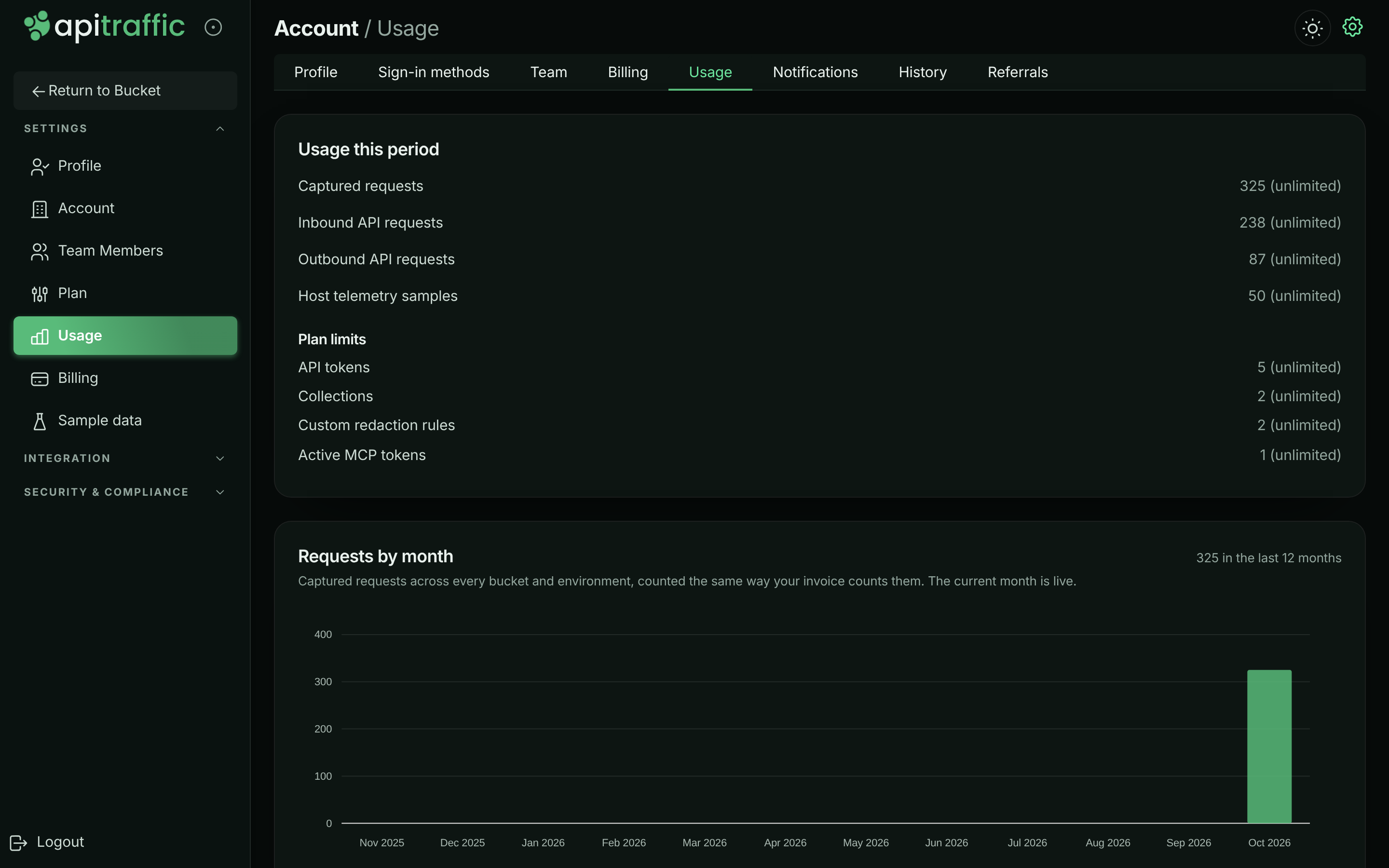
Usage this period
| Row | Counts |
|---|---|
| Captured requests | Every captured request, inbound and outbound, across the account. Request overage is billed on this row. |
| Inbound API requests | Requests to your API captured by the SDK or proxy. |
| Outbound API requests | Calls your application makes to other services, captured by the SDK. |
| Host telemetry samples | Server health samples accepted. |
| AI diagnoses | Fix prompts, request Ask AI answers and drift diagnoses generated. |
| MCP tool calls | Calls made through the MCP server. |
| Workflow deliveries | Webhook deliveries made by workflows. |
A row appears when the plan limits it or it has been used. A request counts toward Captured requests and toward its own inbound or outbound row, and either can stop it. Overage is only ever billed on Captured requests, so a request is never billed twice (see How overage is billed).
Under Plan limits, the card lists count limits such as API tokens, Collections, Saved stream views, Exclusion rules, Custom redaction rules, Endpoint rules, WAF policies, Active MCP tokens, Linked repositories and Workflows, as 3 of 5, and at the plan limit when full.
Requests by month
Requests by month charts the last 12 months, counted the same way your invoice counts them; the current month is live. Select a month to split it by bucket and by environment. Requests from buckets that were deleted are marked Deleted. Requests from before a data purge can’t be split by bucket and show as Not attributed; the total doesn’t change.
What happens at an allowance
Each allowance either bills overage or is hard capped, depending on the plan. See pricing.
- At 80%, the row turns amber and says how much you’ve used, and you get a warning email. You get another at 100%. On an overage plan the email also says where to turn Allow overage off, or, while it’s off, that capture stops at the allowance and how to turn it back on.
- Overage plans: only use past the allowance is billed, at the plan’s overage rate: on your next invoice for a monthly plan, and on the month’s overage invoice for a yearly plan. The row shows how much is billed as overage this period. To stop at the allowance instead, turn off Allow overage.
- Hard-capped plans: once the allowance is used up, new traffic for that kind of usage is refused until the period resets. The SDK’s requests to ApiTraffic are answered with
429. Your own application keeps working; only capture stops. Upgrade to keep capturing.
Usage warning emails can be turned off in notification preferences, though we recommend keeping them.
How overage is billed
Only usage above the allowance is billed at the overage rate. The usage included with your plan is covered by the plan price and is never billed again as overage.
For example, with an allowance of 1,000,000 captured requests:
| Used this period | Billed as overage |
|---|---|
| 900,000 | Nothing |
| 1,000,000 | Nothing |
| 1,200,000 | 200,000 requests, at the overage rate |
- Billed per unit, and rounded to the cent on the invoice. A rate such as $5 per 1,000,000 requests is charged for each request past the allowance, so 200,000 requests over cost $1.00. The overage line on the invoice is rounded to the nearest cent (half a cent rounds up): at $5 per 1,000 requests, a single request over is half a cent and shows as $0.01.
- Request overage is billed on Captured requests only. Every request also counts toward its inbound or outbound row, so those rows are never billed separately, even when they have their own allowance. Their allowances still stop capture when they’re hard capped.
- Reported as you go. Overage is reported to billing about once an hour, and Next invoice shows it as it builds up. Overage from the last hour of a period is dated inside that period, so it belongs to that period’s invoice, not the next one.
- Only usage inside your paid subscription. Usage from your free trial (ours or a plan’s), or from before your current subscription started, is never billed.
- Your allowance for a period is the highest you had at any time in it. When an allowance goes up (an upgrade, a reward, an allowance our team sets), nothing more is billed until usage passes it; overage already billed this period isn’t taken back. When an allowance goes down during a period (a reward ends, or an allowance our team set is lowered), the higher one still applies until the period resets, for billing and for when capture stops: you’re never billed for usage the higher allowance covered, and capture doesn’t stop mid-period because a reward ended. Usage says so on the row: This period keeps the highest allowance you had in it … From the next period it is ….
- Promotions and rewards that raise an allowance raise the point overage starts from, for the rest of that period.
Allow overage
Allow overage is a spending control for plans that bill overage. It’s on by default.
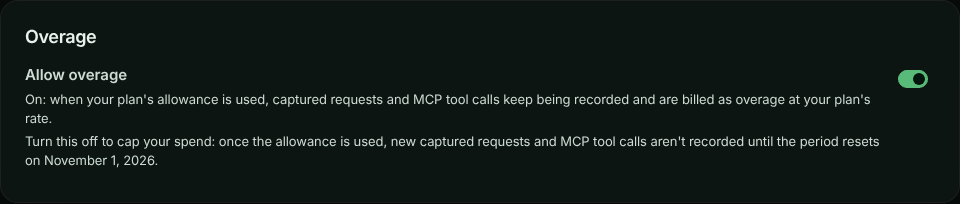
- On: when an allowance is used, new requests (and other metered usage) keep being recorded, and what’s past the allowance is billed as overage at the plan’s rate.
- Off: once an allowance is used, new requests aren’t recorded until the period resets. Nothing past the allowance is billed. Your own application keeps working; only capture stops, exactly as on a hard-capped plan.
The setting appears on Account → Usage and Account → Billing only when your plan bills overage on at least one kind of usage. A hard-capped plan already stops at its allowances, so it isn’t shown there.
Allow overage, on.
Turn overage off
Open Usage
Go to Account → Usage. The Overage card is below Usage this period.
Turn off Allow overage
Select the Allow overage switch. Turn off overage? says what happens and when the period resets.
Confirm
Select Turn off overage. The card confirms Overage is off. and says when capture resumes.
To turn it back on, select the switch again. There’s no confirmation: capture resumes within about a minute.
When capture is paused
With overage off, Account → Usage shows Capture paused - overage turned off once an allowance is used, with the kinds of usage that stopped and the date the period resets. The owner can select Turn overage back on right there. Admins and members see Capture paused, with what stopped and when it resets, and are asked to talk to the account owner. The usage row says overage is turned off rather than hard capped.
The SDK’s requests to ApiTraffic are answered with 429, and the message says overage is turned off for the account.
What you’re billed when you change it mid-period
- Usage recorded while overage was allowed is billed, including overage that built up before you turned it off.
- While overage is off, nothing past the allowance is billed. The change takes up to a minute to reach every server, so a few requests can be recorded past the allowance; they’re never billed.
- After you turn it back on, usage past the allowance is billed again from that moment. What was recorded past the allowance while it was off is still not billed.
- If your allowance changes while overage is off (for example after an upgrade), capture and billing both follow the period’s allowance: the highest you had in the period.
Every change is recorded in the account history as Overage turned on or off, with who made it.
Change it over the API
Send allowOverage (true or false) to the account settings endpoint. It needs the session token of the signed-in owner; admins, API tokens and connected apps are refused. See Account settings API.
curl -X PATCH "https://api.apitraffic.io/v1/account/settings" \
  -H "Authorization: Bearer your-session-token" \
  -H "Content-Type: application/json" \
  -d '{ "allowOverage": false }'
The answer includes allowOverage and, while it’s off, overageDisabledAt.
What doesn’t count
- Sample data never counts. Reading the sample bucket, and AI diagnoses run on it, use none of your allowances. See Sample data.
- Purging or deleting doesn’t refund usage. Requests already captured count for the period even if you later purge them or delete their bucket or environment.
Payment methods
On Account → Billing, Payment methods lists your cards. The Default card is charged for renewals and overage. Cards close to expiring are flagged.
- Add card opens Add a payment method.
- Make default moves renewals to another card.
- Remove deletes a card. If it’s the default, set another one as the default first, or the next renewal has nothing to charge.
Billing address
The Billing address card shows the address tax is calculated from. It appears on every invoice. Select Edit (or Add address), update it, and select Save address. You need an address before you can subscribe. Keep it current: a wrong country means the wrong tax on every invoice.
Invoices and the next invoice
- Next invoice shows what you’ll be charged next, when, and the lines that make it up, including overage (only the usage past your allowance).
- Invoices lists past invoices with their Date, Number, Amount and Status. Select View to open one.
- For a tax ID, a receipt for an older invoice, or to dispute a charge, select Open the Stripe billing portal. Plan changes are made in the app, not in the portal.
When a trial ends or a payment fails
| Situation | What you see | Capture |
|---|---|---|
| Trial ends without a plan | Banner Your trial has ended. The app takes you to Billing; only Billing and signing out are available until you choose a plan. | Stops. Your existing data is kept and is available again once you choose a plan. |
| A payment fails | Banner Your last payment did not go through. with Update payment method. Past due on the current plan. You get an email when the payment first fails, and another if the last automatic retry fails too. | Continues while the payment is retried. |
| An upgrade’s payment is declined | The change-plan dialog says so and offers another card. You stay on your current plan, which isn’t affected, and no payment-failed email is sent. | Continues on your current plan. |
| Payments keep failing | Banner Your subscription is unpaid. | Stops until you update your payment method. |
| Subscription cancelled and the period ended | Current plan shows Cancelled and the date it ended. The app takes you to Billing. | Stops. Choose a plan to start again. |
| Payment never completed | The plan never started and your card wasn’t charged. Nothing else changes: a trial carries on, and an account without a plan stays as it was. | Unchanged. Choose a plan to try again. |
While the account has no plan, the Danger zone appears at the bottom of Billing, so the owner can still delete the data or close the account.
When a plan’s trial is ending
Some plans start with a trial of their own, when you buy them from the pricing page or an offer link: you choose the plan and add a card, and the first payment is taken when the trial ends. Three days before it ends, the owner gets one email with the date. It says the subscription then carries on and the card on file is charged, or, if there’s no payment method on file, asks you to add one. To change plan or cancel before you’re charged, use Billing. The email follows the Check-ins setting in notification preferences, and you get it once per trial.
Referrals and promotions
Account → Referrals has your referral link. When someone signs up through it, you both may get a reward, depending on the promotion that’s running. Rewards are plan features or allowances for a set time, not money, and they’re applied automatically.
- Copy your link to share it. Get a new link issues another; the old one keeps working but stops crediting you.
- When a promotion for posting about ApiTraffic is running, paste the link to your public post (on LinkedIn, X, Bluesky, Mastodon, Reddit and a few others) and claim the reward. The post must be public and mention apitraffic.io.
- What you have earned lists your rewards and how long each lasts. People you have referred lists sign-ups and whether each has earned a reward. Names are shown only if the person chose to share them.
Rewards only ever improve on your plan; they never take away something it includes.
- A reward sets a value, it doesn’t add to the plan’s. A reward of 5,000,000 captured requests gives you an allowance of 5,000,000 while it lasts; if your plan already includes more, it changes nothing. Rewards from the same promotion add up (up to that promotion’s limit); rewards from different promotions don’t, and the best one applies.
- On an overage plan, a reward that raises an allowance raises the point overage starts from, for usage from then on.
- When a reward ends, its features end straight away, but its allowances keep counting until the end of the period: the period’s allowance is the highest you had in it, for billing and for when capture stops. From the next period your plan’s own allowances apply. Check What you have earned for each reward’s end date.
- A week before a reward ends, the owner gets one email saying when it ends and what changes: the allowance before and after, and whether capture will stop at the new limit (on a hard-capped plan, or with Allow overage off) or usage past it will be billed at the plan’s overage rate, and from when. There’s no email when the reward’s end changes nothing (your plan or another reward already gives as much), for a reward that lasts 8 days or less (its end date is shown when you earn it), or for a closed account. Turn it off with Reward reminders in notification preferences.
- Rewards never change the price you pay. Promotion codes (see Choose a plan) change only the price, never what the plan includes.
- An allowance set for your account by our team takes precedence over both the plan and any reward.
Troubleshooting
Only the account owner can manage billing - ask them to choose a plan.
Billing is owner-only. Ask the owner, or see Transfer ownership.
The plan change is refused because the account uses too much
The new plan includes less of something than you use. Remove what the dialog lists, then try again.
This account already has a subscription. Change the plan instead of starting a new one.
Use Switch to this plan under Change plan instead of starting a new subscription.
My downgrade hasn’t happened yet
Downgrades take effect at the end of the billing period, so you keep what you paid for. Current plan shows Changes to … on …. Select Cancel scheduled change to stay on your current plan.
Overage is paused: an overage invoice could not be paid
On a yearly plan, overage is billed on a monthly invoice. When one can’t be paid, capture stops at the allowance until it is, even if you change plan or subscribe again. On Account → Usage, select Pay overage invoice to pay it on Stripe’s invoice page (it opens in a new tab). Or make a different card the default on Billing: an overage invoice that’s still open is paid with it straight away. Overage resumes as soon as the invoice is paid. The plan itself carries on.
Capture stopped in the middle of the month
Check Account → Usage. A hard-capped allowance that’s used up stops capture until the period resets. Upgrade, or wait for the reset. If it says Capture paused - overage turned off, the owner turned off Allow overage: the owner can select Turn overage back on to keep capturing.
I don’t see Allow overage
It’s shown only when your plan bills overage. On a hard-capped plan, capture already stops at each allowance and nothing past it is billed.
No plans are available to purchase right now
Contact support and we’ll set you up.
Related
-
Pricing: Plans, prices, allowances and overage rates.
-
Notification preferences: Usage warning emails.
-
Team and roles: Only the owner manages billing.
-
Purge data or close your account: Delete data or close the account.