
Outbound requests
How the ApiTraffic SDK captures the API calls your app makes, links them to the inbound request, and the cases where a body or a call is not captured.
ApiTraffic records the calls your application makes out to other APIs - payment providers, shipping and tax services, your own internal services - and links each one to the inbound request that caused it. A request in the dashboard then shows its downstream calls with their own timing, status, headers and bodies, so a slow or failing endpoint points at the dependency responsible.
Outbound capture is on by default in every Node SDK package and the Strapi plugin. It needs no code beyond registering ApiTraffic.
How outbound calls are captured
The SDK hooks the two ways Node.js makes HTTP calls:
| Your code uses | Captured by | What is recorded |
|---|---|---|
http.request, http.get, https.request, https.get, and clients built on them (axios, got, node-fetch, SOAP and SDK clients) |
The http/https hook |
URL, method, headers, request and response bodies, status, timing |
Global fetch, and libraries built on it |
The fetch hook |
The same, including the headers actually sent on the wire |
undici.request, undici.Client or undici.Pool used directly |
APM, when installed | Timing and metadata only, no bodies |
Both hooks produce the same record, so an axios call and a fetch call to the same service look the same in the dashboard.
Capture is read-only. Your call is sent exactly as your code wrote it, and bodies are read from copies. If anything about capture fails, the call still goes through: you lose the record, never the request.
Where outbound calls appear
- Inside a request. A call made while handling an inbound request appears on that request as an
http.outspan in its waterfall, and as an outbound record linked to it. Requests made in parallel keep their own calls, even on shared keep-alive connections. - Outside a request. Calls made by background jobs, timers or startup code have no inbound request. They are still recorded as outbound requests on their own.
- Failed calls. A call that gets no response at all (a DNS failure, a refused or reset connection, a timeout) is shown as a failed
http.outspan on the request that made it.
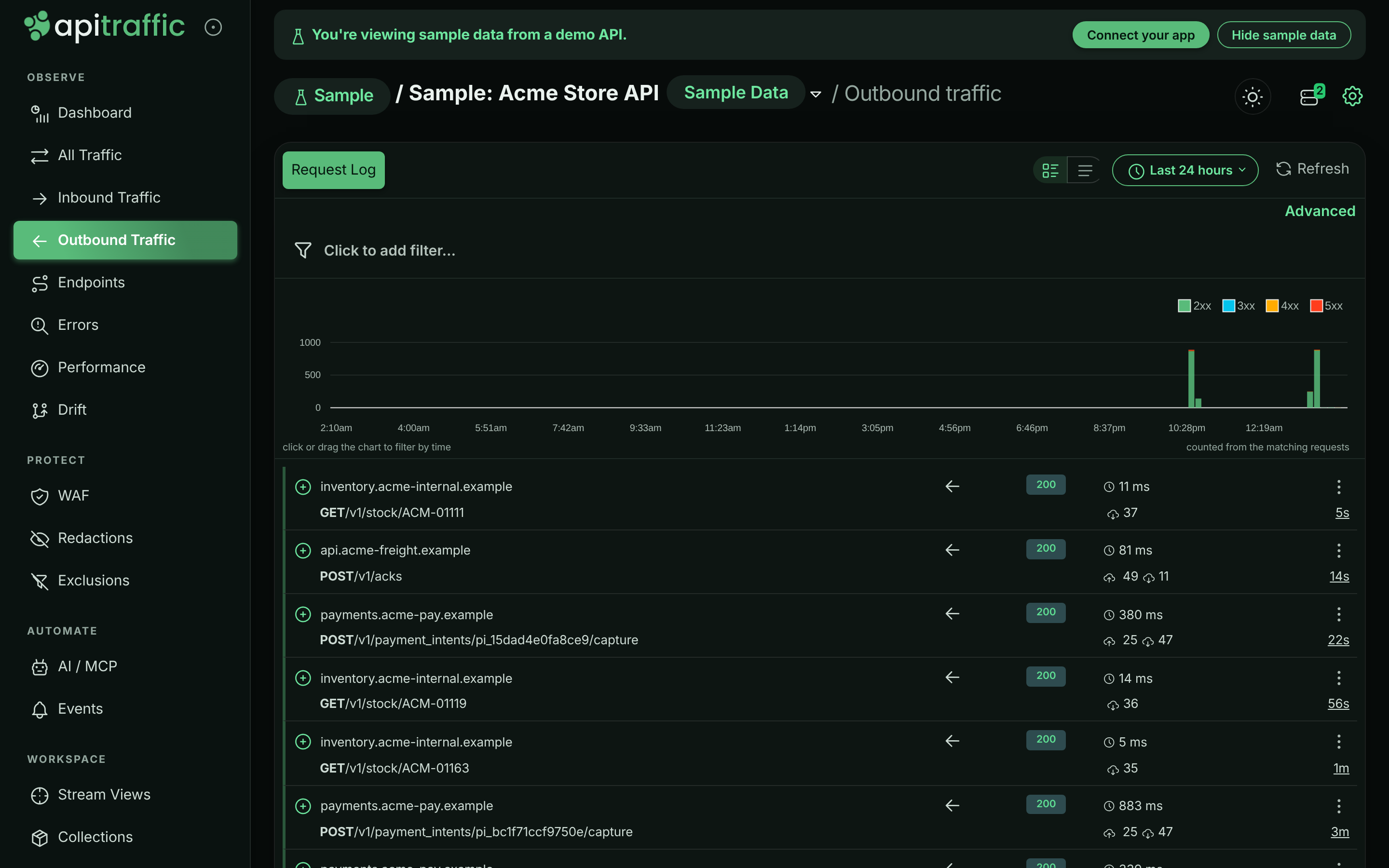
Outbound traffic has its own view in each bucket. In the sample data, for example, calls from the Acme Store API to payments.acme-pay.example and api.acme-freight.example appear under each checkout.
Outbound calls from the sample Acme Store API.
Turn outbound capture off
| To | Set |
|---|---|
| Stop capturing all outbound calls | interceptOutbound: false, or API_TRAFFIC_INTERCEPT_OUTBOUND=false |
Stop capturing only fetch calls |
captureFetch: false, or API_TRAFFIC_CAPTURE_FETCH=false |
| Capture smaller bodies | maxFetchBodyLength (bytes), or API_TRAFFIC_MAX_FETCH_BODY_LENGTH |
With interceptOutbound off, the SDK leaves http, https and fetch untouched. With only captureFetch off, an egress firewall policy still applies to fetch calls. See SDK configuration.
When a body is not captured
A record can arrive with a body shown as not captured. This is deliberate: it happens when reading the body would interfere with your call or hold too much data in memory.
- The body is over the size cap. Outbound bodies are captured up to
maxFetchBodyLength, 512 KB by default. Onhttp/httpsa larger body is cut at the cap. Onfetch, a response body is only read when the response declares aContent-Lengthwithin the cap; a response without one (chunked, or still streaming) is recorded without its body. - The body is not text. Images, archives,
application/octet-streamand other binary types are recorded as[binary body omitted: …]with their size. - The response is compressed (
Content-Encodingsuch as gzip or br) on anhttp/httpscall. It is recorded as[compressed body not captured: …].fetchresponses are decompressed by Node, so their bodies are captured. - It is a stream on
fetch. Server-sent events (text/event-stream), NDJSON and similar streaming responses are recorded with metadata only, so ApiTraffic never keeps a stream open that your code has cancelled. Onhttp/https, server-sent events are captured as your code reads them, up to the cap. - The
fetchrequest body is a stream,FormDataorBlob. Reading it would consume the body your call is about to send, so it is left untouched.
Once captured, outbound bodies go through the same limits as inbound ones, including maxBodyBytes.
When an outbound call is not captured
- Outbound capture is off, through
interceptOutboundor, forfetchonly,captureFetch. - The call was made before ApiTraffic started. The hooks are installed when the SDK sets up, which begins when you call the framework function (
apitraffic.express()and so on). A call made at import time, before that, is not seen. - Something replaced
globalThis.fetchafterwards. Libraries that wrapfetchare fine: ApiTraffic’s hook keeps working underneath, and installing it twice never stacks wrappers. A library that assigns a brand-new function toglobalThis.fetch(some mocking and polyfill packages do) removes the hook. Set up ApiTraffic after any library that replacesfetchwholesale. - The client bypasses both hooks, such as
undici.requestor an undiciPool. With APM installed these still appear, with timing and metadata but no bodies. - The call is to ApiTraffic itself. The SDK’s own traffic to the ingest and settings hosts is never reported.
Redaction and exclusions
Outbound records go through the same redaction rules and exclusions as inbound traffic, in your process, before anything is sent. Credential headers such as Authorization on an outbound call are always masked.
Related
-
SDK configuration: Capture switches and size limits.
-
Request details: See a request’s outbound calls in its waterfall.
-
How APM works: Database, cache and queue work alongside outbound calls.
-
Firewall policies: Inspect and block outbound calls with egress rules.