
Connected apps and OAuth
See and disconnect the applications acting for people on your account, and build a client that signs in to ApiTraffic with OAuth 2.1.
ApiTraffic is an OAuth 2.1 authorization server. An application that wants to act for someone, such as Claude’s MCP connector, an IDE or a partner integration, sends them to ApiTraffic to sign in and approve access, and gets short-lived tokens back. Nobody copies a token, every connection is listed under Connected Apps, and disconnecting one ends its access at once.
If you are connecting an AI assistant to the MCP server, you only need the first part of this page: give the client https://api.apitraffic.io/mcp and it does the rest. The protocol sections are for people building a client.
Approve a connection
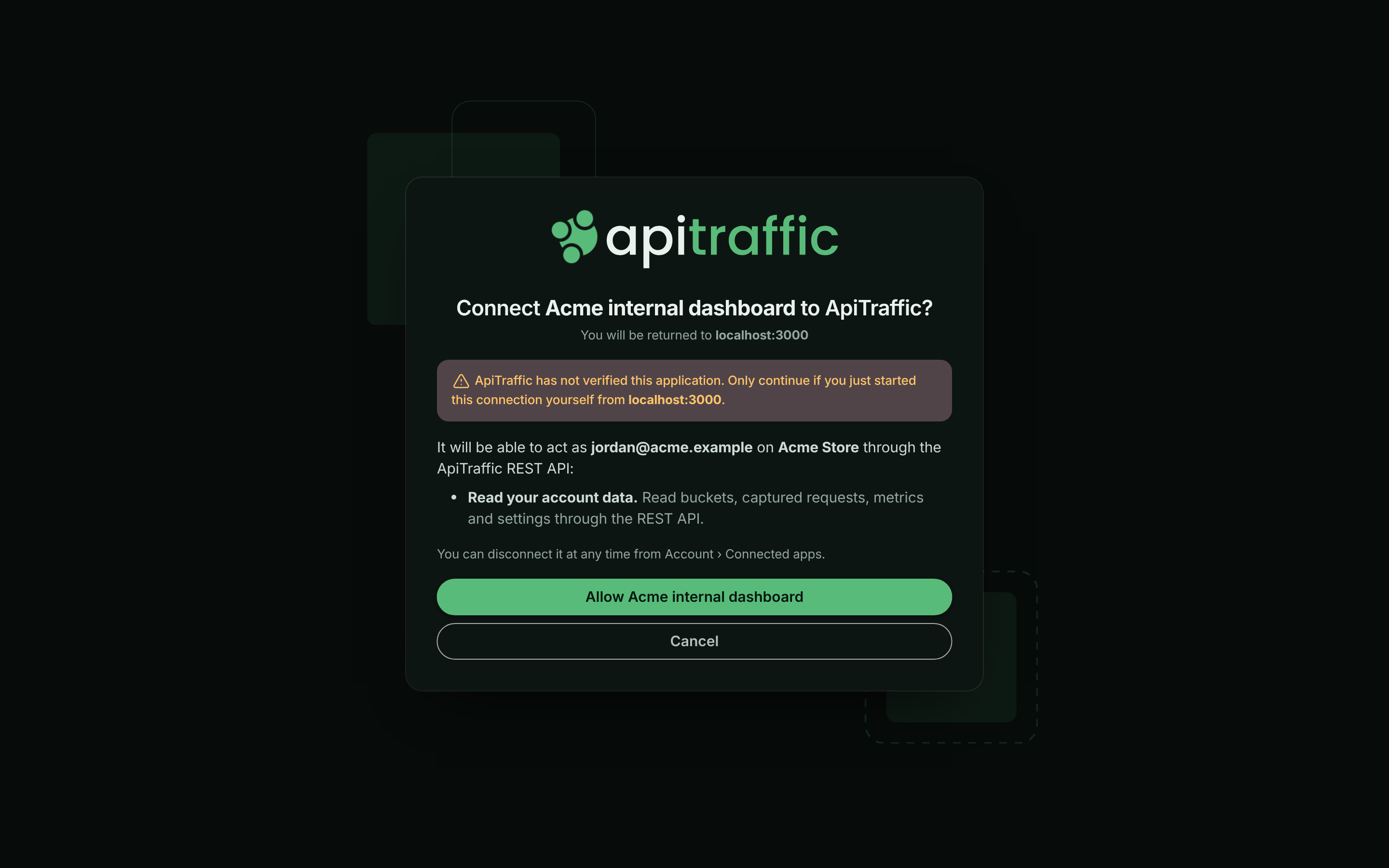
When an application sends you to ApiTraffic, you sign in (including MFA) if you aren’t already, and see an approval screen:
- Connect application to ApiTraffic? with the host you will be returned to. Applications ApiTraffic has checked show Verified by ApiTraffic and their publisher. Others show ApiTraffic has not verified this application; only continue if you started the connection yourself.
- What the application will be able to do, as you, on the account you are signed in to.
- For the MCP server, the Environment and Buckets it may reach.
Select the Allow button (it names the application, such as Allow Claude) to connect, or Cancel to refuse.
The approval screen for an application that ApiTraffic hasn’t verified.
Approving is limited to people signed in as themselves. It can’t be done with an API token, or during an ApiTraffic support session.
Manage connected apps
Open the account menu, choose Account, then select Connected Apps under Integration. The page lists every application that people on the account have connected, with:
| Column | Shows |
|---|---|
| Application | The application’s name, with Verified if ApiTraffic has verified it. |
| Access | For the MCP server, the environment and how many buckets (MCP · Production · all buckets). For the REST API, REST API, read only or REST API, read and write. |
| Connected by | The person who approved it (You for your own). |
| Last used, Connected | When it last made a request, and when it was approved. |
The page also shows the MCP server URL to copy for a new connection.
The applications connected to the account.
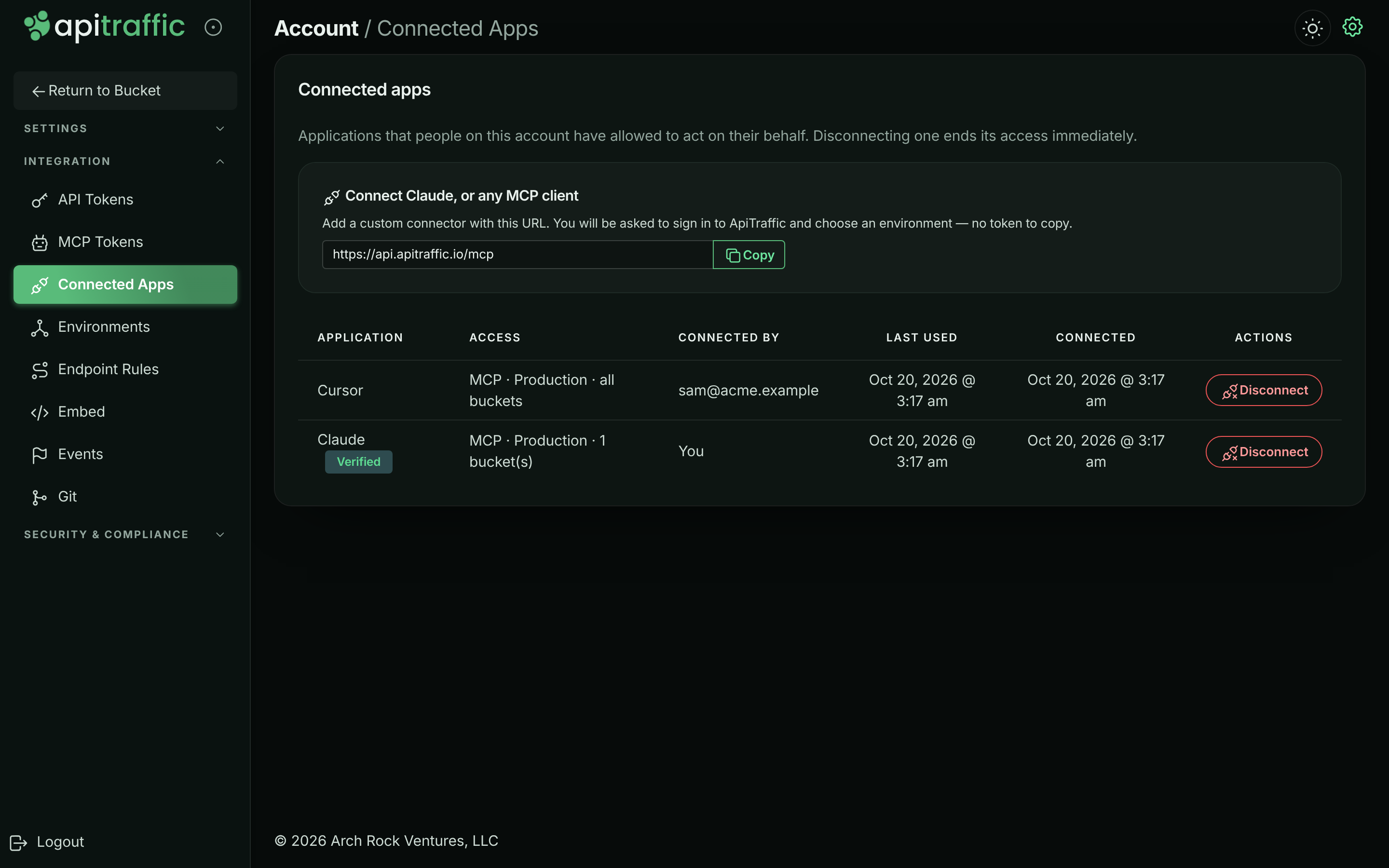
To end a connection, select Disconnect and confirm in the Disconnect application dialog. It loses access immediately, and reconnecting asks for approval again. Members can disconnect the applications they connected; owners and admins can disconnect anyone’s.
At a glance
| Issuer | https://api.apitraffic.io |
| Grant types | authorization_code (with PKCE), refresh_token |
| PKCE | Required for every client, S256 only |
| Client registration | Dynamic (RFC 7591), open |
| Access token lifetime | 1 hour |
| Refresh tokens | Rotated on every use; unused for 30 days, they expire |
Discovery
Everything a client needs is published as metadata, so a client that knows only a resource URL can find the rest.
- Authorization server metadata (RFC 8414):
GET https://api.apitraffic.io/.well-known/oauth-authorization-server - Protected resource metadata (RFC 9728):
- MCP server:
GET https://api.apitraffic.io/.well-known/oauth-protected-resource/mcp - REST API:
GET https://api.apitraffic.io/.well-known/oauth-protected-resource/v1
- MCP server:
The authorization server is always https://api.apitraffic.io.
A request to the MCP server without a valid token is answered 401 with a challenge that names the resource metadata:
HTTP/1.1 401 Unauthorized
WWW-Authenticate: Bearer resource_metadata="https://api.apitraffic.io/.well-known/oauth-protected-resource/mcp", scope="mcp"
Resources and scopes
Every authorization is for exactly one resource, named with the resource parameter (RFC 8707). Tokens are bound to it: a token issued for the MCP server is refused by the REST API, and vice versa.
| Resource | resource value |
Scopes |
|---|---|---|
| MCP server | https://api.apitraffic.io/mcp |
mcp |
| REST API | https://api.apitraffic.io/v1 |
api:read, api:write, or granular scopes such as traffic:read |
| Scope | Grants |
|---|---|
mcp |
The MCP tools, in the environment and buckets the person chooses on the approval screen. |
api:read |
GET requests to the REST API for the person’s account. |
api:write |
Non-administrative changes through the REST API: buckets, views, collections, rules, events. |
| Granular scopes | Only the actions the scope names, such as traffic:read or buckets:write. The full list is in Limit a token to scopes. Applications are never offered credentials:*, or a scope whose every action needs an administrator (privacy:write, waf:write, traffic:sensitive). No application can list your API tokens, MCP tokens or connected apps, or create workflows or open the workflow editor, whatever it was granted. |
Ask for granular scopes to take only what your application needs. Each request is checked against the scope its action needs, so a read that’s a POST, such as running a report, works with traffic:read. A scope that also covers administrative actions, such as buckets:write (deleting a bucket needs an administrator), doesn’t reach those parts. api:read and api:write work as they always have, except that they no longer list your API tokens, MCP tokens or connected apps, or create workflows or open the workflow editor. api:write beside granular scopes is still everything; api:read beside them stands for every read scope, and anything no scope covers is refused.
No scope reaches administrative actions - API and MCP tokens, team members, billing, MFA and security settings stay with people signed in to ApiTraffic, whatever role the approving person holds.
Omit scope and you get the resource’s default (mcp, or api:read). Scopes ApiTraffic does not define are ignored, at registration and authorization alike; the token response’s scope says what was granted. Omit resource and it is inferred from the scopes, defaulting to the MCP server.
Registering a client
POST /oauth/register
Content-Type: application/json

{
  "client_name": "My Integration",
  "redirect_uris": ["https://example.com/oauth/callback"],
  "grant_types": ["authorization_code", "refresh_token"],
  "token_endpoint_auth_method": "none"
}
{
  "client_id": "oac_2mX8…",
  "client_id_issued_at": 1792195200,
  "client_name": "My Integration",
  "redirect_uris": ["https://example.com/oauth/callback"],
  "grant_types": ["authorization_code", "refresh_token"],
  "response_types": ["code"],
  "token_endpoint_auth_method": "none"
}
- Redirect URIs (up to 10) must be
https, a loopbackhttp://127.0.0.1,http://[::1]orhttp://localhost(any port is accepted at authorization time, for native apps), or a private-use scheme such ascom.example.app:/callback. They are matched exactly. - Refresh tokens are issued only to clients that register the
refresh_tokengrant type (the default). - Public clients (
none) authenticate with PKCE alone. Confidential clients register withclient_secret_basicorclient_secret_postand receive aclient_secretonce, in this response. - Registered clients are shown to people as unverified, with the host they will be returned to. Contact us to have an integration verified. We verify either one client, or the host your redirect URIs are on. When we verify a host, every client whose redirect URIs are all
httpson that host shows as verified, under the name and publisher we recorded for it rather than theclient_nameit registered with. This is how MCP clients that register once per person, such as Claude, are verified.
Authorizing
Send the person’s browser to the authorization endpoint:
https://api.apitraffic.io/oauth/authorize
  ?response_type=code
  &client_id=oac_2mX8…
  &redirect_uri=https%3A%2F%2Fexample.com%2Foauth%2Fcallback
  &code_challenge=E9Melhoa2OwvFrEMTJguCHaoeK1t8URWbuGJSstw-cM
  &code_challenge_method=S256
  &state=af0ifjsldkj
  &resource=https%3A%2F%2Fapi.apitraffic.io%2Fmcp
  &scope=mcp
ApiTraffic asks them to sign in (including MFA) if they are not already, shows what you are asking for, and - for the MCP server - lets them choose the environment and buckets. They are returned to your redirect_uri with:
https://example.com/oauth/callback?code=…&state=af0ifjsldkj&iss=https%3A%2F%2Fapi.apitraffic.io
or, if they decline, ?error=access_denied&state=…. Check that state is yours and that iss is https://api.apitraffic.io.
The authorization is made on the account the person is signed in to. Approving is limited to people signed in as themselves: it cannot be done with an API token, or during an ApiTraffic support session.
Getting tokens
Redeem the code within two minutes; it works once. Repeat redirect_uri exactly as you sent it to the authorization endpoint (or leave it out if you left it out there).
POST /oauth/token
Content-Type: application/x-www-form-urlencoded

grant_type=authorization_code
&code=…
&redirect_uri=https%3A%2F%2Fexample.com%2Foauth%2Fcallback
&client_id=oac_2mX8…
&code_verifier=dBjftJeZ4CVP-mB92K27uhbUJU1p1r_wW1gFWFOEjXk
&resource=https%3A%2F%2Fapi.apitraffic.io%2Fmcp
{
  "access_token": "oat_…",
  "token_type": "Bearer",
  "expires_in": 3600,
  "scope": "mcp",
  "refresh_token": "ort_…"
}
Send the access token as Authorization: Bearer oat_…. Tokens are never accepted in a query string.
Refreshing
POST /oauth/token
Content-Type: application/x-www-form-urlencoded

grant_type=refresh_token&refresh_token=ort_…&client_id=oac_2mX8…
Every refresh returns a new refresh token and spends the old one. Store the new one before using the access token. Presenting a refresh token that has already been spent means two parties hold it; ApiTraffic cannot tell which is legitimate, so it revokes the whole connection and the person has to approve it again.
You may pass a narrower scope when refreshing; you cannot widen it.
Revoking
POST /oauth/revoke
Content-Type: application/x-www-form-urlencoded

token=ort_…&client_id=oac_2mX8…
Revoking a refresh token disconnects the application, the same as selecting Disconnect. Revoking an access token ends only that token. The response is 200 whether or not the token existed.
When access ends
A connection ends - and every token issued under it stops working - when:
- the person, or an owner or admin, disconnects it under Connected Apps;
- the person who approved it leaves the account, or is signed out everywhere - a password change or reset, an MFA reset, a role change, or an unlinked sign-in method;
- the environment it was limited to is deleted, or the account is closed;
- the application revokes its refresh token;
- a spent refresh token or authorization code is presented again;
- the same person connects the same self-registered application to the same account again (the new connection replaces the old one);
- it goes unused for 30 days.
Each of these is recorded in the account’s activity history as security.oauth_app_revoked, with the reason.
Access tokens are also refused once the connection has ended, even before their hour is up.
Errors
The token, registration and revocation endpoints answer in the standard OAuth shape, with Cache-Control: no-store:
{ "error": "invalid_grant", "error_description": "The authorization code is invalid, expired or already used." }
error |
Meaning |
|---|---|
invalid_request |
A required parameter is missing or malformed. |
invalid_client |
Unknown client, or client authentication failed (401). |
invalid_grant |
The code or refresh token is invalid, expired, spent, or not yours; or PKCE verification failed. |
unauthorized_client / unsupported_grant_type |
The grant type is not available to this client. |
invalid_scope |
A scope belongs to another resource, or exceeds what was registered or granted. |
invalid_target |
The resource is not one of ours, or not the one the grant is for. |
invalid_redirect_uri / invalid_client_metadata |
Registration was refused. |
Errors at the authorization endpoint are shown to the person on ApiTraffic’s own page rather than redirected - for every client we have not verified, and for an unknown client_id or an unregistered redirect_uri from any client. Registration is open, so redirecting a browser to an unverified client’s address before anyone has seen a page of ours would let ApiTraffic be used as an open redirector. Verified clients receive the standard ?error=…&state=…&iss=… redirect. Either way, once the person has seen the approval screen, declining always returns access_denied to your redirect_uri.
Troubleshooting
The approval screen shows an error instead of returning me to the app
The application sent an unknown client_id or a redirect_uri it didn’t register, or it isn’t verified and something was wrong with the request. Errors for unverified applications are shown on ApiTraffic’s page rather than sent back, so ApiTraffic can’t be used to redirect you somewhere unexpected. Ask the application’s developer to check its registration.
A connection disappeared from Connected Apps
Connections end for the reasons under When access ends. The account history records each one as security.oauth_app_revoked, with the reason.
My client gets invalid_grant when refreshing
The refresh token was already used, expired after 30 days without use, or the connection ended. If a spent refresh token is presented again, the whole connection is revoked; the person has to approve it again.
Related
-
MCP server: Connect an AI assistant with OAuth or a token.
-
API tokens: Credentials for your own scripts and CI.
-
Sign-in and security: Sign-in, MFA and session settings.
-
Account history: Who connected and disconnected what.