
Find sensitive data in your API traffic
See where card numbers, secrets, government ids and personal data flow through your APIs, whether each field is redacted, and which vendors receive it.
Sensitive data discovery looks at a sample of your API traffic and finds the fields that carry card numbers, secrets, government ids, health and student data and personal data: in request and response bodies, headers and query parameters, inbound and outbound. For each field it tells you whether the value reaches ApiTraffic redacted, and which outside APIs it is sent to.
ApiTraffic stores only where each field is and what type of data it holds. The values themselves are never stored, logged or shown.
Before you begin
- Plan: your plan includes Sensitive data discovery. The By endpoint and By destination views need Sensitive data map, and alerts need Sensitive data alerts.
- SDK: any SDK that sends request and response bodies. Fields in bodies are found only where bodies are captured.
- Roles: everyone on the team can see fields and the map. Accepting a field, marking it a false positive and changing the settings are for account owners and admins.
Discovery is on by default. It starts with the next requests your API handles.
What it finds
| Family | Data types |
|---|---|
| Payment | Card numbers (checked with the Luhn checksum and the card’s issuer range), card verification codes next to a card number, IBANs, bank routing and account numbers |
| Secrets | AWS access keys, GitHub, Stripe and Slack tokens, private keys, JSON Web Tokens, and other secrets in fields named like one |
| Government ids | US Social Security numbers, driver’s licence and passport numbers, Aadhaar, Brazil CPF and UK National Insurance numbers |
| Health | Provider identifiers (NPI), medical record numbers, insurance member ids, diagnosis codes, diagnoses and medications |
| Student | Student ids, grades, enrollment, disciplinary records and guardians |
| Personal | Email addresses, phone numbers, dates of birth, postal addresses, precise locations and IP addresses |
Health and student data are indicators: a field name and a value that agree, never certain.
Each detection has a confidence:
| Confidence | Meaning |
|---|---|
| Validated | The value passed a checksum or a strict format. |
| Matched the pattern | The value matched the type’s pattern. |
| Name and value agree | The field’s name and its value agree, or a field next to it confirms it (a card verification code beside a card number). |
| Possible | Only the field’s name suggests it. Possible detections are listed but do not count for alerts or compliance. |
Published test card numbers (4242 4242 4242 4242 and the like) are found as Test card and do not count, unless you turn on Count test card numbers for the bucket.
How it samples
Discovery looks at the first 50 requests of each route every hour, then one in 100. A new endpoint shows up within its first requests; a busy one costs little. Each field is attributed to its endpoint (method and route, with ids replaced by {id}), its direction, its location (request or response, header, query parameter or body path) and, for outbound calls, the host it was sent to.
Protection
For each field, ApiTraffic looks at the last 7 days of samples and says how the value reached it:
| Protection | Meaning |
|---|---|
| Not redacted | The value reached ApiTraffic as it is. Partly redacted says what share of the samples were not. |
| Redacted before storage | A Redact at server rule replaced it before it was stored. |
| Redacted in your API | An SDK rule redacted it before it left your API. |
| Not stored | A body omission rule (Exclusions) keeps the body out of storage. |
| Credential header removed | A credential header ApiTraffic always removes. |
The fix for a field that is not redacted is a Redact at API rule, so the value never leaves your app for ApiTraffic. For an outbound field, the vendor still receives it: decide whether it should, or block it with outbound protection in your firewall.
The Sensitive data page
Select Sensitive data in a bucket’s Security menu. The page shows the totals, then:
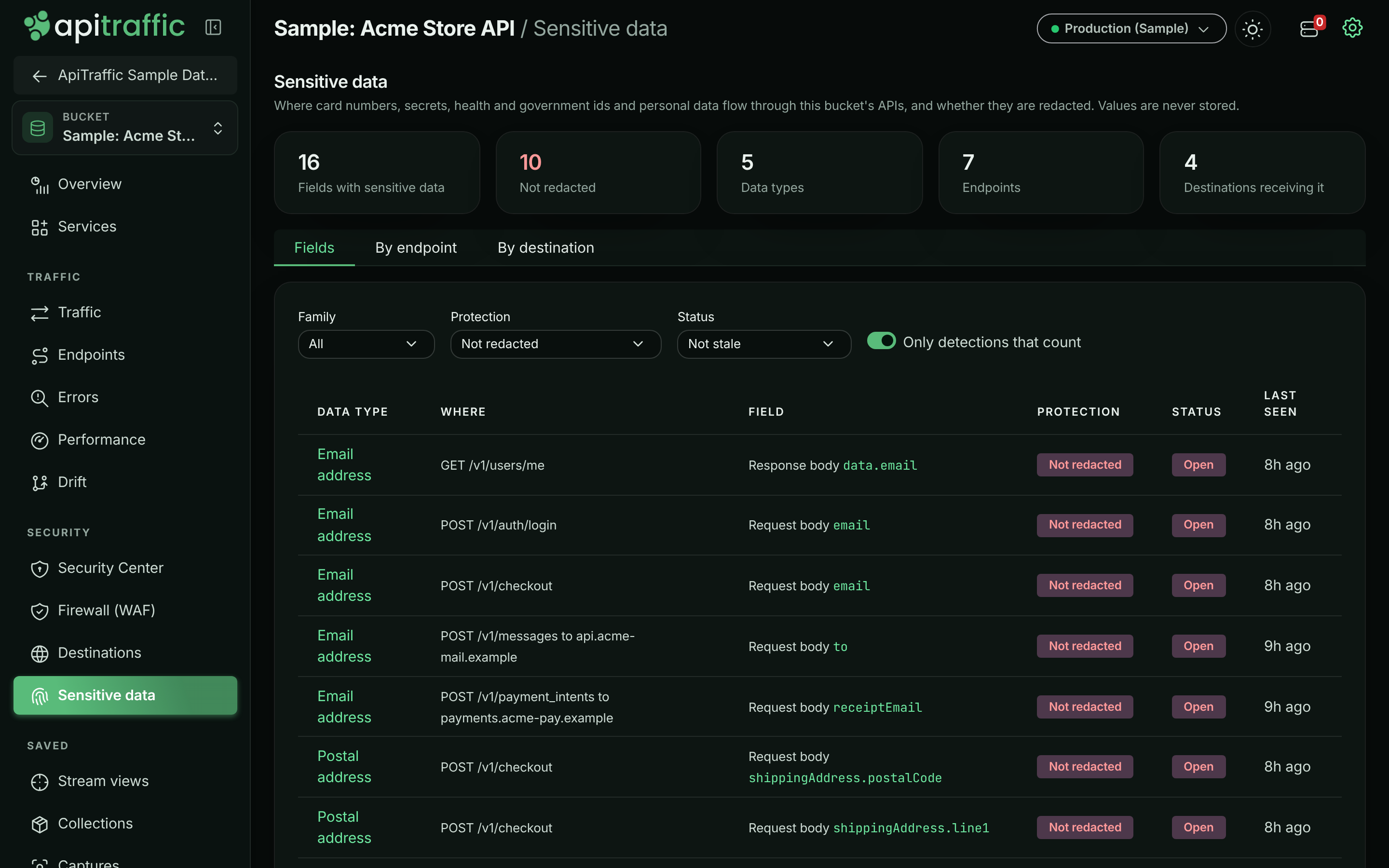
- Fields: every field, filtered by family, protection and status. By default it shows fields that are not redacted and that count. Select a field to see where it is, its samples per day by protection, and any decision on it.
- By endpoint: each endpoint with the data types in its requests and responses, and how many fields are not redacted.
- By destination: each outbound host with the data types sent to it. Secrets sent in credential headers (an API key in an
Authorizationheader) are listed apart: sending a vendor its own credential is expected.
A field’s status is Open (not redacted), Protected, Accepted, False positive or Not seen for 30 days.
Sensitive data in the sample bucket.
Decisions
When a field is meant to be there, an owner or admin can:
- Accept it, with a reason and an end date at most a year away. The field leaves the compliance check and its alert resolves until the date; then it returns to the status its protection gives.
- Select False positive and give a reason, then Mark as false positive. A value later found in the field that passes a checksum takes the decision away.
Decisions are recorded in the account history, and evidence packs list them with who made them and why. Remove the decision returns the field to the status its protection gives.
Create ticket on a field opens a ticket in your tracker with where the field is and the fix (see Work tracking).
Alerts
When a payment, secret, health or government id field is found unredacted in a production environment (as set in the Security Center settings), a data alert fires through your alert routing, once per field. It resolves when the field is redacted, accepted, marked a false positive, or not seen for 30 days. Student data alerts too when Count possible health and student data is on.
Settings
- For the account, in Compliance settings: discovery on or off for every bucket, and whether possible health and student data (field name only) counts as sensitive.
- For a bucket, on its Sensitive data page: discovery on, off, or as the account, and Count test card numbers.
Turning discovery off stops sampling. Fields already found become Not seen for 30 days after 30 days, and are deleted after 90.
Compliance
Three compliance checks read sensitive data: discovery is on, no counted payment, secret, health or government id data (and student data, when Count possible health and student data is on) is unredacted in production, and every destination receiving it in the last 7 days is approved in destination watch. See Compliance.
Purges
Purging captured traffic deletes the fields found in it (a purge bounded by date keeps fields still seen after the date). Purging rules and settings deletes the decisions and settings; fields that had a decision are judged again. See Account data.