
Span reports
Build reports over the operations inside your requests: slowest database queries, outbound time by vendor, failed calls by type and N+1 queries
A report counts requests. A span report counts the operations inside requests that APM records: database queries, Redis and cache calls, outbound HTTP calls, queue, RPC and GraphQL work. It answers the questions requests can’t:
- Which database queries cost us the most time this week?
- How long do we spend calling Stripe, and how often does it fail or not answer?
- Which endpoints run the same query many times per request (N+1)?
Span reports use the same builder, saving, history and dashboards as request reports. Only what you group by, measure and filter on changes.
Note: “Database time per customer” is still a request report: every request carries its database, cache and outbound time, so group requests by your customer tag and add Total of… Database time. Span reports are for per-operation, per-peer and per-code-location detail.
Who can use span reports
Span reports need APM as well as Custom reports in your plan, and an APM-enabled SDK sending spans (Set up APM). Without APM, Spans (APM) is disabled in the builder with the reason, and the span templates are not listed. Span reports you saved stay listed and readable after a downgrade, but don’t run.
Span reports are being rolled out. If they haven’t reached your account yet, Spans (APM) is disabled with Span reports aren’t available on this account yet, whatever your plan.
Building a span report
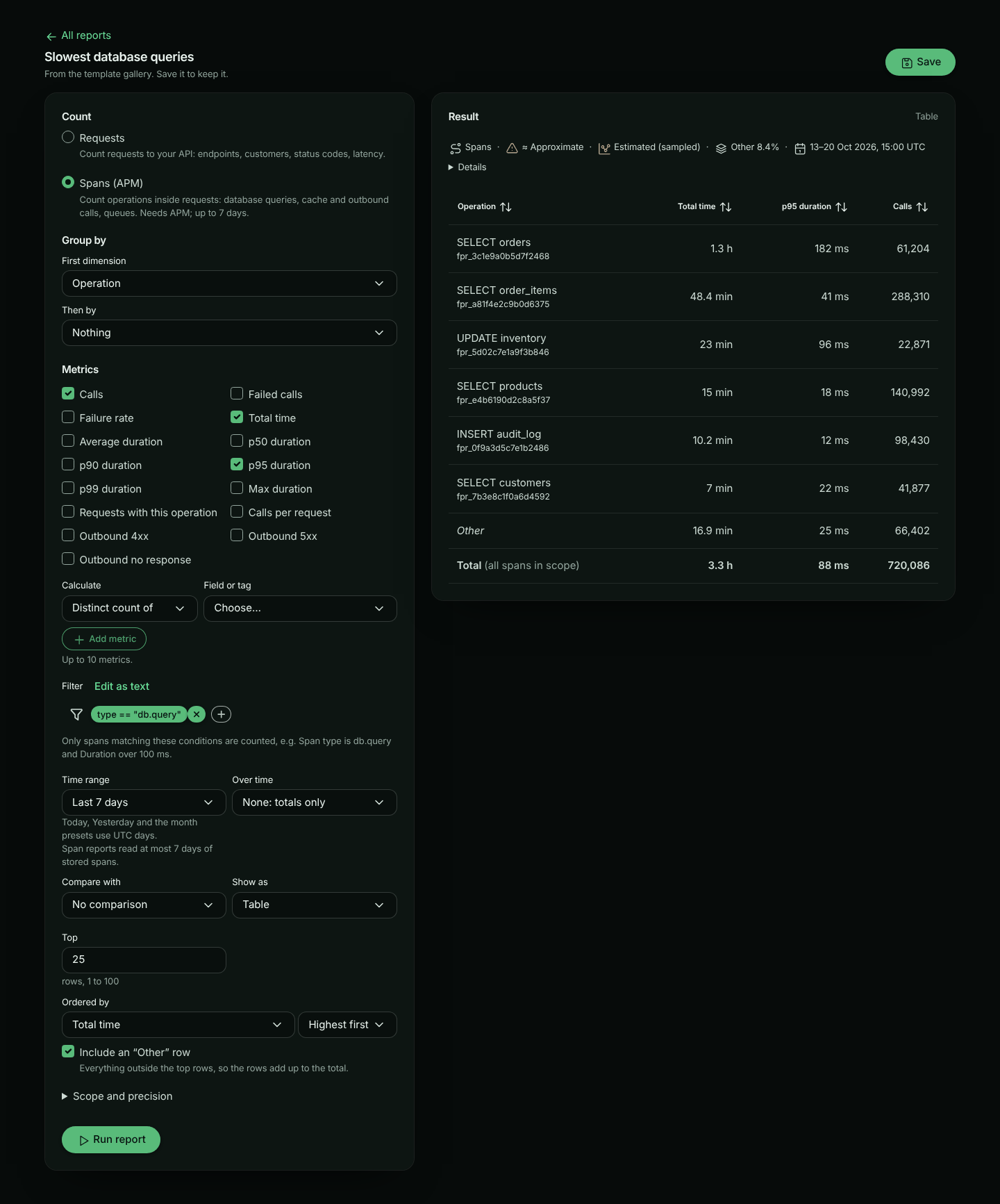
Choose Spans
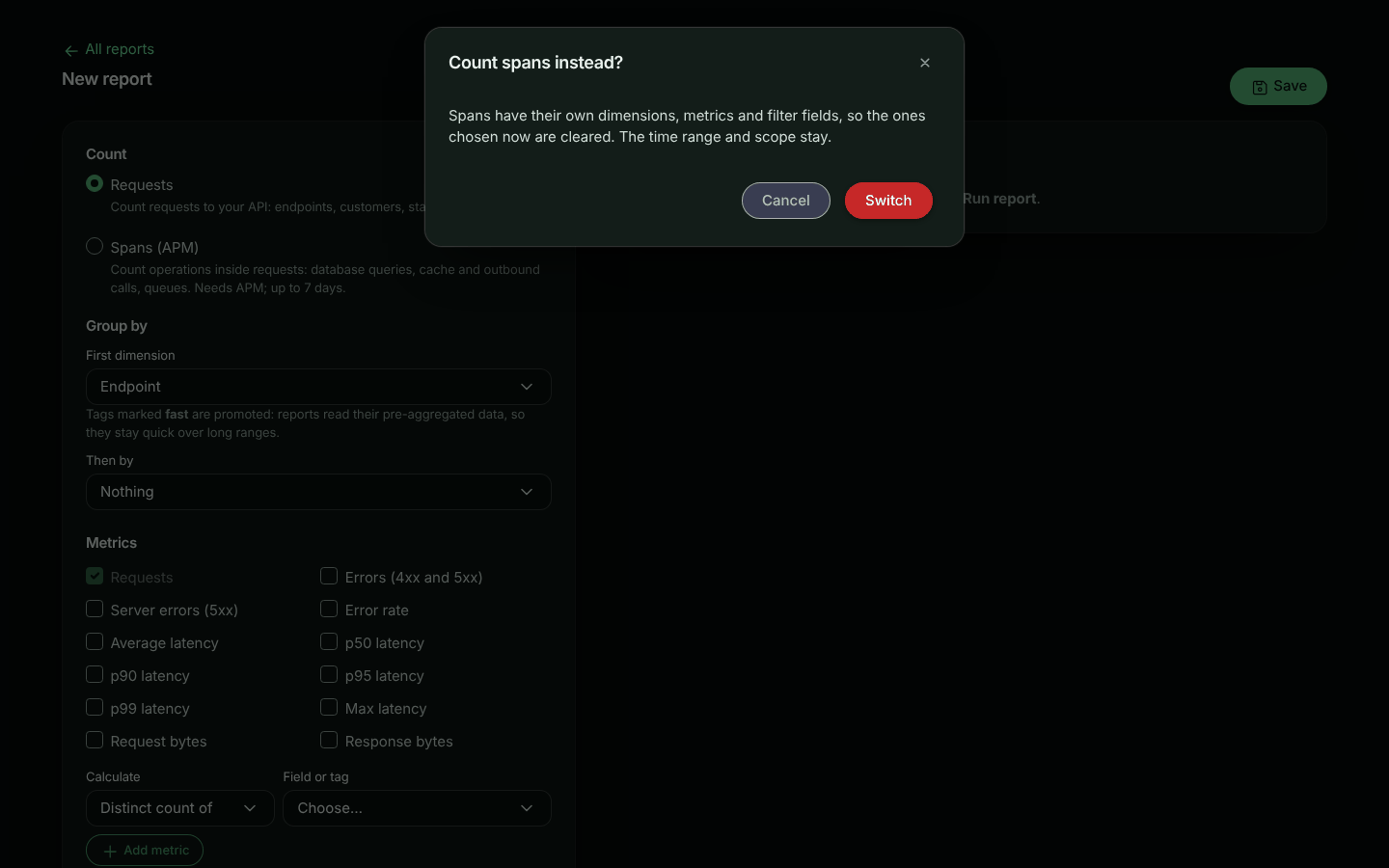
In the builder, under Count, choose Spans (APM). Switching keeps the time range and scope; dimensions, metrics and the filter are cleared (after asking), since spans have their own.
Group and measure
Pick a dimension such as Operation or Peer host, and metrics such as Total time, p95 duration and Calls.
Filter
For example Span type is db.query and Duration (ms) over 100. In text: type == "db.query" AND duration_ms > 100.
Run it
The meta strip shows Spans as the source.
Dimensions
| Group | Dimensions |
|---|---|
| Operation | Span type, Operation (a query or call, named from your operations: SELECT users), Operation name, Verb (SELECT, GET, publish), Target (table, collection or outbound path), System (postgresql, redis, …), Database |
| Peer | Peer host, Outbound endpoint (method, host and path), Outbound outcome (2xx … 5xx, none for no response) |
| Errors | Error class (timeout, conn_refused, http_5xx, exception, …), Exception type |
| Code | Endpoint (calling: your endpoint that ran the operation), Code location, Version, Server |
| Scope | Bucket, Environment |
Statement text is never a dimension or a label. Operations are named from the operation’s name, verb and target.
Tags are not recorded on spans yet, so a span report cannot group or filter by a tag. Tags are listed in the picker, disabled, with that reason.
Metrics
| Metric | What it measures |
|---|---|
| Calls | How many operations ran |
| Failed calls, Failure rate | Operations that failed, and their share |
| Total time | Time spent in the operations: where the time goes |
| Average, p50, p90, p95, p99 and Max duration | How long one operation took |
| Requests with this operation | How many requests ran it (approximate) |
| Calls per request | How many times one request runs the operation: a high number is an N+1 pattern |
| Outbound 4xx, Outbound 5xx, Outbound no response | Outbound HTTP calls by outcome |
| Total of… and Average of… Rows returned | Rows database queries reported |
| Distinct count of… | Different operations, peers, versions… |
Filters
The filter uses the same language as request search, over span fields: every dimension above, plus duration_ms and rows (numbers), out_status_code (a number, outbound calls only) and ok (true or false).
type == "http.out" AND out_status_code >= 500
type == "db.query" AND target == "orders" AND duration_ms > 250
ok == false AND -error_class == "cancelled"
How the numbers are made
- Stored spans, up to 7 days. Span reports read stored spans. Spans are kept for less time than requests (3 to 90 days by plan), so the time range is first shortened to what your plan keeps (the meta strip says so), and a span report reads at most 7 days at a time: in the builder, a longer range asks you to narrow it. On a dashboard, a span tile shows the last 7 days of a longer range instead (see On dashboards).
- Sampling. When your SDK samples spans (
spanSampleRatebelow 1), each stored span stands for several calls, and counts and times are weighted to estimate every call. Sampling keeps or drops a whole request, so Calls per request is counted over the requests that were kept, and Requests with this operation is estimated from them. The meta strip shows Estimated (sampled) only when sampling was in effect for the window. Max is the longest stored span. - Percentiles come from fixed latency buckets and are approximate. Exact (under Scope and precision) computes them from the stored spans instead.
- Dropped operations. Operations past an SDK’s per-request span limit (
maxSpansPerRequest) are not stored, so they are not counted.
Templates
These templates are listed when your plan includes APM:
| Template | Shows |
|---|---|
| Slowest database queries | Total time, p95 and calls per database query, last 7 days |
| Outbound calls by peer | Total time, calls, 5xx and no-response calls per host and outbound endpoint, last 7 days |
| Failed operations by type | Failed calls by span type and error class, last 7 days |
| N+1 queries by endpoint | Calls per request, requests and calls per endpoint and query, last 24 hours |
On dashboards
A dashboard can mix request and span tiles. A span tile shows a Spans badge. Its table works like a request tile’s: the Total row reads Total (all spans in scope), adds including those outside the rows shown when the rows don’t add up to it (no Other row), and says scroll for more rows while rows are hidden under it.
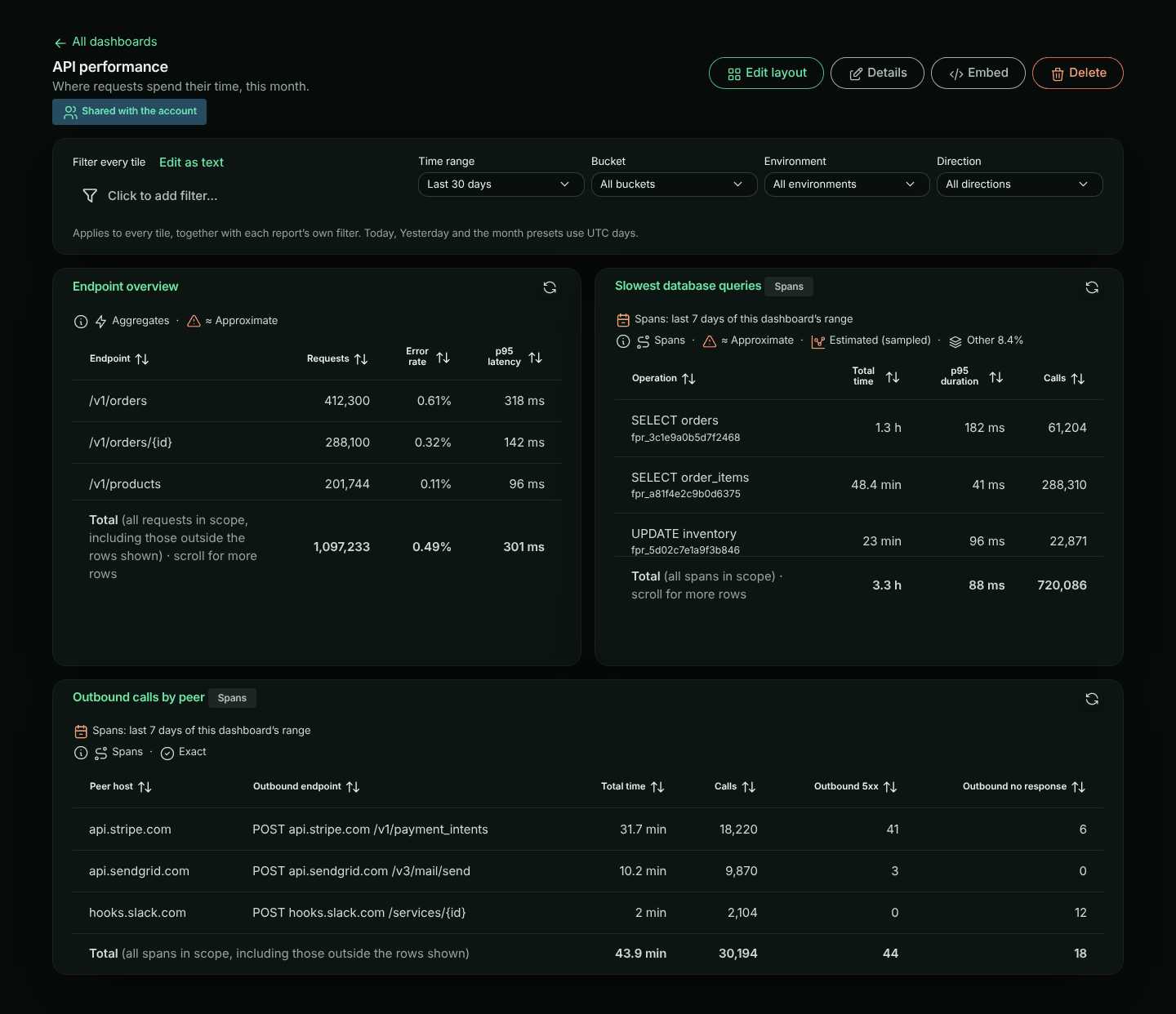
Time range. Span reports read at most 7 days of stored spans. When the dashboard’s range is longer (say Last 30 days), each span tile shows the last 7 days of it, and says so on the tile: Spans: last 7 days of this dashboard’s range. Request tiles keep the whole range. This is the same on every plan. If your plan keeps spans for fewer than 7 days, span tiles show what your plan keeps, and the tile’s meta strip says Shortened to how long your plan keeps spans. A comparison (vs previous period) on a span tile compares the 7 days shown with the 7 days before them.
A dashboard’s filter is written for requests. On a span tile only the parts both share apply: endpoint and instance, and the dashboard’s bucket and environment. If the dashboard filters on anything else, such as status_code, the span tile says This dashboard’s filter uses status_code, which spans don’t have instead of showing unfiltered numbers. A dashboard scoped to outbound traffic doesn’t apply to span tiles either: spans belong to the inbound requests that ran them.
Embedding
Span reports, and dashboards with span tiles, can’t be embedded yet. An embed is locked to one of your customers by a tag, and tags are not recorded on spans yet.
API and MCP
Send "source": "spans" in a report definition: see Span reports in the API reference. The MCP run_report tool takes source too.