# Web application firewall
> How the ApiTraffic firewall inspects requests inside your Node app: Monitor and Enforcing modes, managed and custom rules, verdicts, cost and plans.
Source: https://www.apitraffic.io/docs/waf/overview
The ApiTraffic web application firewall (WAF) runs **inside your application**, in the same SDK that already captures your traffic. It inspects each inbound request before your route handler runs and decides to allow it, record it, or block it. You manage policies in ApiTraffic; connected servers receive changes over the connection the SDK already holds, so you can tighten or relax protection without a deploy.
Because the firewall runs in your process, it sees the request after TLS is terminated and the body is parsed, exactly as your code does, and every verdict lands on the same record as the request's latency and response.
## How a request is evaluated
```mermaid
flowchart TD
A[Request reaches your app] --> B[ApiTraffic middleware]
B --> C{WAF policy loaded
and protection on?}
C -- No --> H[Route handler]
C -- Yes --> D{IP allow list?}
D -- Match --> H
D -- No match --> E[IP deny lists, rate limits,
structural limits]
E -- Hit --> X{Mode}
E -- Clear --> F[Managed rules, custom rules,
user-agent, path and geo lists:
add up the anomaly score]
F --> G{Score reaches the
anomaly threshold, or a
Block rule matched?}
G -- No --> H
G -- Yes --> X
X -- Monitor --> H
X -- Enforcing --> Y[Blocked response
403 by default, 429 for rate limits]
H --> R[Response]
Y --> R
R --> T[Request and WAF verdict
sent to ApiTraffic]
```
The cheapest checks run first and short-circuit: an allow-listed IP skips everything else, and a denied IP is refused before any rule runs. Signature rules then add to an **anomaly score**; a request is blocked when the score reaches the policy's threshold (5 by default) or when a rule whose action is **Block** matches.
## Monitor and Enforcing
Each protection layer of a policy has its own mode:
| Mode | What it does |
| --- | --- |
| **Not monitored** | The layer does not inspect anything. Requests reach your API normally. |
| **Monitor** | Inspects every request and records what it *would* have blocked, without blocking anything. |
| **Enforcing** | Blocks matching requests before your route handler runs. |
Start in **Monitor**. Review what it catches against your real traffic, fix false positives, then switch to **Enforcing**. Both changes take effect without a deploy, so backing out is just as fast. See [Set up the firewall](https://www.apitraffic.io/docs/waf/setup).
## What a policy protects
A policy has four layers, each optional:
- **Request Protection**: the managed rule set - curated detection for SQL injection, XSS, command execution, path traversal, SSRF, template injection, NoSQL injection, XXE, prompt injection and more - with paranoia levels and anomaly scoring.
- **Traffic Controls**: your own rules - allow and deny lists (IP or CIDR, country, ASN, user agent, path), rate limits, custom regular-expression rules, and structural limits such as maximum URL length or allowed methods.
- **Outbound Protection**: inspects the calls your app makes and refuses ones that carry credentials or bulk personal data, or go to destinations you have not allowed.
- **Behavioral Protection**: scores callers over time (walking object ids, collecting authorization failures, probing endpoints, moving at machine speed) and pushes a temporary deny to every server.
See [Firewall policies](https://www.apitraffic.io/docs/waf/policies) for every setting.
## Managed and custom rules
**Managed rules** are maintained by ApiTraffic in the **ApiTraffic Core Rule Set**. They are modeled on the [OWASP Core Rule Set](https://coreruleset.org/): rules are grouped by attack family, activated by paranoia level, and contribute to an anomaly score. Choose **Latest (auto-update)** to receive new revisions as they are published, or pin a version so detection only changes when you move the pin. You can turn off individual managed rules, or silence one only on a path or field where it misfires.
**Custom rules** are yours: a regular expression matched against part of the request (arguments, query, path, URL, headers, user agent, cookies or body) with an action of **Block**, **Score** or **Tag only**. Lists, rate limits and structural limits are custom controls too.
## Where verdicts appear
Every inspected request carries its verdict as `waf.*` tags, so the firewall needs no separate log:
- **Request log**: a shield icon on the request (Blocked, Monitored or Inspected) and a **WAF** tab in the request details with the outcome, the decisive rule, the anomaly score, the policy and its mode, and every matched rule with the evidence.
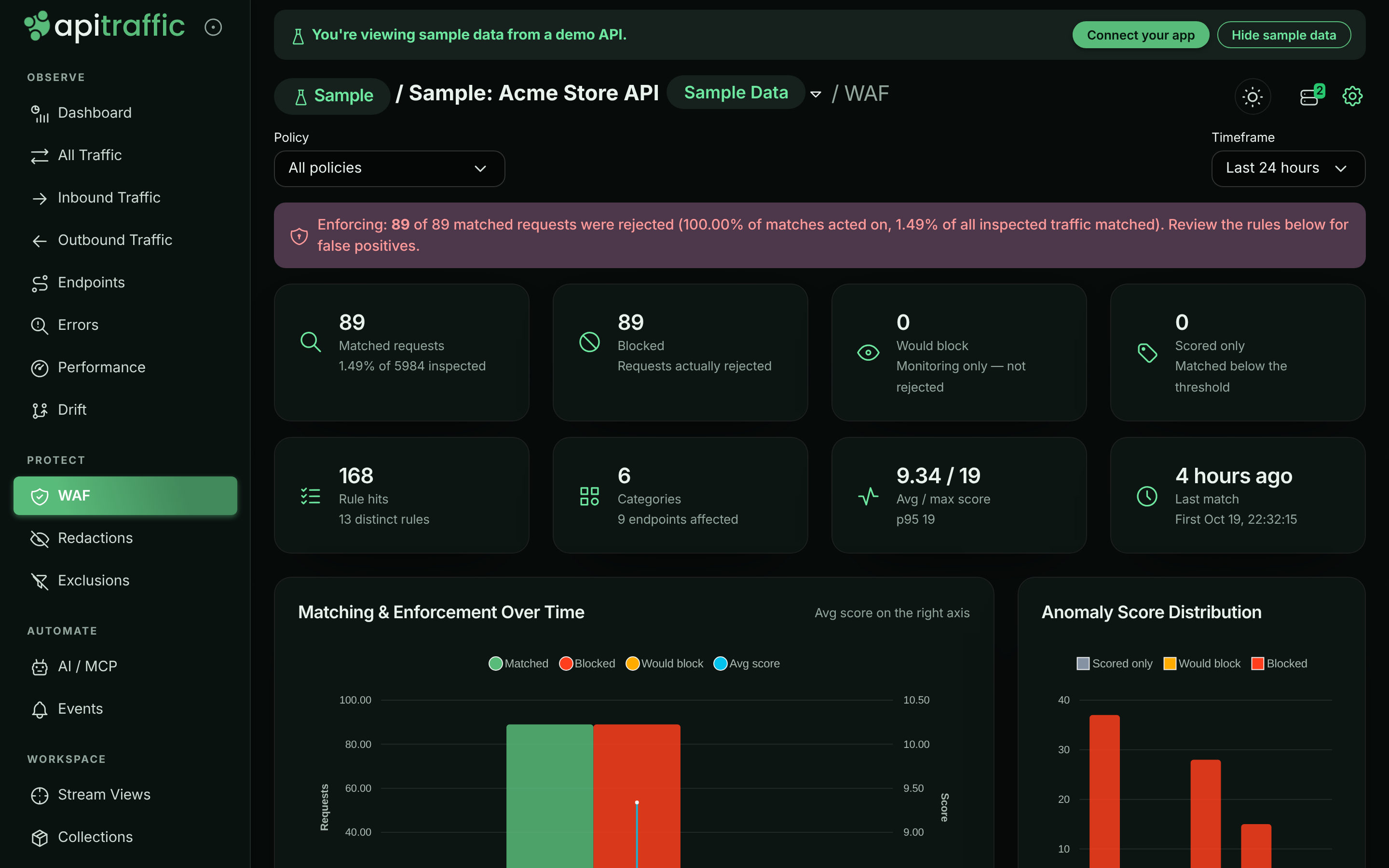
- **WAF page of a bucket** (**Protect** → **WAF** in the bucket's left navigation): matches, blocks and would-blocks over time, the score distribution, matches by category, endpoint, reason and more, rule volume, and the matched requests themselves.
- **Account** → **Firewall (WAF)** → **Insights**: the same analysis across buckets, per policy.
- **Search**: filter on `waf_action == "block"`, `waf_rule`, `waf_reason`, `waf_score` and other `waf_` fields in [request search](https://www.apitraffic.io/docs/traffic/search), or save them as a stream view.
- **MCP**: AI assistants can read firewall activity and policies with the `get_waf_overview`, `list_waf_matches`, `list_waf_policies`, `get_waf_policy` and `get_waf_rule` tools. See [MCP tools](https://www.apitraffic.io/docs/integrations/mcp-tools).
*The bucket's WAF page in the sample data, where the policy is Enforcing.*
## Performance
The firewall is built to stay out of your request path's way:
- **Nothing loads until you need it.** With `@apitraffic/node`, the firewall engine and its rules are loaded only when ApiTraffic first delivers a policy that is switched on. Until then each request costs a single check.
- **Bounded work per request.** Inspection is capped (for example, the first 128 KB of a body by default, 512 values per source), and your own patterns share a per-request time budget (25 ms by default). What is not inspected is reported, never silently skipped. See [Inspection limits](https://www.apitraffic.io/docs/waf/policies#inspection-limits).
- **Rate limits are counted in memory** on each server, with no network call on the request path.
- **Behavioral scoring runs in ApiTraffic** on ingested traffic, so it costs your servers nothing until a deny is pushed.
- **Fail-open by default.** If evaluation throws, the request is allowed and tagged. See [Failure behavior](https://www.apitraffic.io/docs/waf/setup#failure-behavior).
## Plans and roles
The firewall is part of the **Web application firewall** plan feature. Without it, ApiTraffic does not deliver policies to your servers (request capture keeps working), you cannot create or edit policies, and the firewall pages show an upgrade prompt. Existing policies stay listable and deletable, and past firewall analytics stay readable. The sample bucket always shows its firewall activity.
Only account **owners** and **admins** can create, edit, test or delete policies, or add a request to a policy. Members can view policies, their summaries and all firewall analytics.
## Related
- [Set up the firewall](https://www.apitraffic.io/docs/waf/setup):
From an instrumented app to an enforcing policy.
- [Firewall policies](https://www.apitraffic.io/docs/waf/policies):
Every setting, testing a rule, and handling false positives.
- [Redactions](https://www.apitraffic.io/docs/data/redactions):
Keep sensitive values out of what is stored.
- [Sample data](https://www.apitraffic.io/docs/sample-data):
Explore a bucket with real firewall verdicts.