# Offline definitions
> Commit a pinned copy of your redaction rules, exclusions and firewall policy so a server that starts while ApiTraffic is unreachable still applies them.
Source: https://www.apitraffic.io/docs/reference/offline-definitions
Your SDK fetches redaction rules, exclusions and firewall policy from ApiTraffic when your
application starts. If it cannot reach us on boot - our outage, a network partition,
your egress rules - it falls back through a ladder of local sources instead of coming
up with nothing.
The last tier of that ladder is a file you commit to your repository. This page is
about keeping it fresh, which is the part that decides whether it helps you. For everything
else the SDK does while ApiTraffic is down - telemetry, startup, memory - see
[If ApiTraffic is unreachable](https://www.apitraffic.io/docs/reference/unreachable).
## The whole picture
There are two loops. One runs on every server, on every boot: find configuration, apply it, and keep
trying to get back to live. The other is how the file at the bottom of that ladder stays current.
### Loop 1 - every boot
```mermaid
flowchart TB
boot([Your app starts]) --> live{"Reach
ApiTraffic?"}
live -- yes --> apply["Apply live config,
write the disk cache"]
live -- no --> cache{"Disk cache?"}
cache -- yes --> fb["Apply it.
Capture and firewall
work normally."]
cache -- no --> mirror{"CDN mirror?"}
mirror -- yes --> fb
mirror -- no --> pinned{"Pinned file
in the image?"}
pinned -- yes --> fb
pinned -- no --> blind["No config.
Capture off, logged as an error.
Firewall per offlineWafMode."]
fb -. "retries forever, jittered" .-> live
blind -. retries forever .-> live
```
**Live always wins.** A fallback is never stickier than the real thing: the first successful live load
replaces whatever tier the server was on, without a restart.
### Loop 2 - keeping the file current
```mermaid
flowchart TB
edit([You edit a rule in ApiTraffic]) --> hash["The bucket's config hash changes"]
hash --> servers["Connected servers reload
within milliseconds"]
hash --> pr["ApiTraffic opens or updates
a pull request"]
hash --> badge["Servers page flags images
carrying a stale file"]
pr --> merge([You review and merge])
cli(["Or run: definitions pull"]) --> commit
merge --> commit[".apitraffic/definitions/sdk.json
is current again"]
ci{{"CI: definitions check"}} -. "fails a build that would ship
stale fallback rules" .-> cli
commit --> image([Your next image ships the current rules])
```
### The resolution ladder
Every load attempt tries these in order:
| Tier | Source | Works on a brand-new container? |
|---|---|---|
| **Live** | `api.apitraffic.io` | - this is the normal path |
| **Cache** | `node_modules/.cache/apitraffic/` | no - the cache dies with the image |
| **Mirror** | ApiTraffic's CDN mirror, a separate failure domain | yes, once the server has reached us once |
| **Pinned** | `.apitraffic/definitions/sdk.json` in your repo | **yes, always** |
> **Info:** **Live always wins.** The SDK keeps retrying while it runs on a fallback, and the
> moment ApiTraffic answers it switches to live config - no restart, no redeploy. A
> fallback is never stickier than the real thing.
The pinned file is the only tier that covers the case people actually worry about: an
autoscaling group launching fresh containers from a fresh image while we are down.
The disk cache is written on every successful live load and needs nothing from you. On a read-only
filesystem - a deliberate, correct choice in a hardened container - the write simply fails and the tier
is skipped; it is a debug log, never an error. Point it somewhere writable with `API_TRAFFIC_CACHE_DIR`
if you want it back.
### What an outage actually looks like
A server that boots while ApiTraffic is unreachable, and what happens when we come back:
```mermaid
sequenceDiagram
autonumber
participant App as Your app
participant SDK as ApiTraffic SDK
participant File as Pinned file
participant AT as ApiTraffic
App->>SDK: start up
SDK->>AT: GET /sdk
AT--xSDK: unreachable
SDK->>File: read .apitraffic/definitions/sdk.json
File-->>SDK: redactions, exclusions, firewall policy
Note over SDK: Capture resumes.
Firewall enforces your policy.
Reports configSource "pinned".
App->>App: serves traffic normally
loop every ~60s, jittered
SDK->>AT: GET /sdk
end
AT-->>SDK: 200 - live config
Note over SDK: Switches to live.
No restart. No redeploy.
Rewrites the disk cache.
```
> **Note:** The jitter is not decoration. Without it, a five-hundred-server fleet that lost configuration together
> would reconnect as a single burst the moment we returned - which is how a recovering service gets
> knocked back down.
## Create the file
Install nothing - the CLI runs straight from `npx`, and authenticates with the same
ingestion key your SDK already uses.
```bash
export API_TRAFFIC_TOKEN="your-ingestion-key"
export API_TRAFFIC_BUCKET="k3m9p2x"
npx @apitraffic/cli definitions pull
```
That writes `.apitraffic/definitions/sdk.json`. Commit it. Every flag and every failure mode is in the
[CLI reference](https://www.apitraffic.io/docs/reference/cli).
You can also download the same file in ApiTraffic, if you would rather not run anything:
**Open API Tokens**
In your account settings, under **Integration**, select **API Tokens**.
**Open the definitions dialog**
In the section for the environment your servers use, choose **Definitions**. The **Offline Definitions** dialog opens.
**Download the file**
Select the **Bucket**, then choose **Download definitions**. Save the file at the path the dialog shows, `.apitraffic/definitions/sdk.json`, in the repository you deploy.
*Download a bucket's definitions from the API Tokens page.*
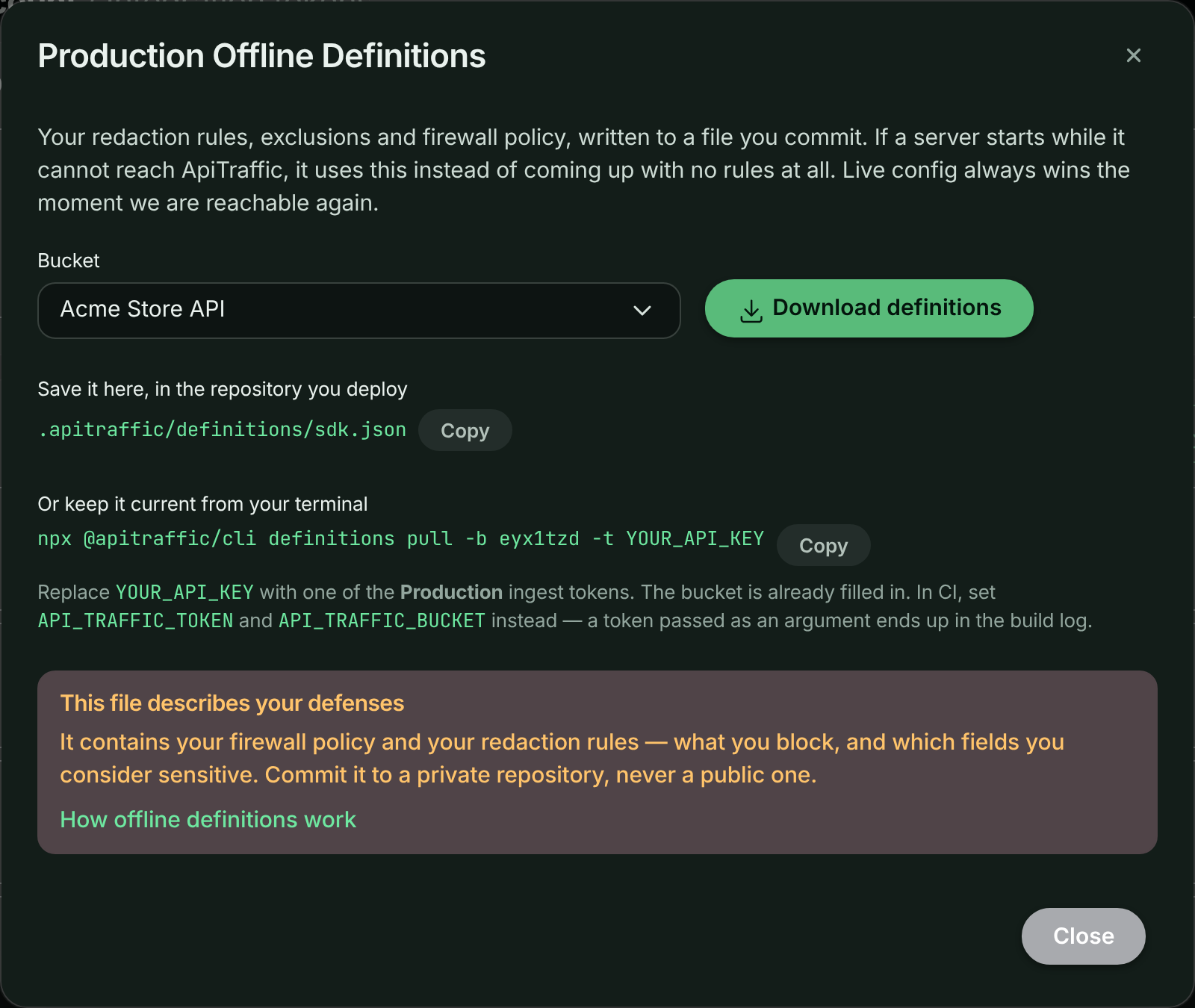
Or call [the endpoint](https://www.apitraffic.io/docs/api-reference/buckets#download-offline-definitions) directly.
> **Warning:** **This file contains your firewall policy and your redaction rules.** A redaction rule can
> name internal fields; a firewall policy describes exactly what you block and how. Both are
> useful to an attacker. Commit it to a private repository - never a public one.
## Keep it fresh
A committed file goes stale the moment somebody edits a rule in the dashboard, and the
person editing rules is usually not the person deploying. A stale file that predates a
newly added redaction rule **will not redact that field** on the fallback path.
That is the one real trade-off this feature makes, and the check below is how you stay
ahead of it.
```bash
npx @apitraffic/cli definitions check
```
| Exit code | Meaning |
|---|---|
| `0` | the committed file matches your live config |
| `1` | it has drifted, was edited by hand, is missing, or is pinned to another bucket |
| `2` | the check could not run - bad token, network failure, or a bad response |
Drift and "could not run" are deliberately different codes, so an ApiTraffic blip does
not have to fail your build. See [Choosing how strict to be](#choosing-how-strict-to-be).
> **Note:** **A drift failure is not an outage.** Servers already running hold live config and are
> completely unaffected. The check is a warning about the *next cold start that cannot
> reach us* - which is exactly why it is worth knowing about while everything is fine.
## CI recipes
### GitHub Actions
```yaml
name: ApiTraffic definitions
on:
pull_request:
push:
branches: [main]
jobs:
definitions:
runs-on: ubuntu-latest
steps:
- uses: actions/checkout@v4
- uses: actions/setup-node@v4
with:
node-version: 20
- name: Check pinned definitions
# --ignore-unreachable: drift still fails the build; an ApiTraffic outage does not.
run: npx @apitraffic/cli definitions check --ignore-unreachable
env:
API_TRAFFIC_TOKEN: ${{ secrets.API_TRAFFIC_TOKEN }}
API_TRAFFIC_BUCKET: ${{ vars.API_TRAFFIC_BUCKET }}
```
Run it on pull requests. That puts the staleness in front of the person doing the
deploy, at the moment of the deploy, which is the only moment anyone can act on it.
> **Note:** **Keep `--ignore-unreachable` in your pipeline.** Without it, `definitions check` exits `2` whenever it
> cannot reach ApiTraffic, and that fails your build - making our availability a dependency of your deploys.
> With it, drift and a rejected token still fail; only "could not reach ApiTraffic" passes. Drop it only if
> the pinned file is a compliance control and you would rather stop a deploy than ship one you could not
> verify. See [Choosing how strict to be](#choosing-how-strict-to-be).
### GitLab CI
```yaml
apitraffic:definitions:
image: node:20
script:
- npx @apitraffic/cli definitions check --ignore-unreachable
variables:
API_TRAFFIC_BUCKET: k3m9p2x
# API_TRAFFIC_TOKEN comes from a masked CI/CD variable
```
### CircleCI
```yaml
jobs:
apitraffic-definitions:
docker:
- image: cimg/node:20.11
steps:
- checkout
- run:
name: Check ApiTraffic definitions
command: npx @apitraffic/cli definitions check --ignore-unreachable
```
### As a pre-commit hook
```bash
npx @apitraffic/cli definitions check --warn-only --quiet || true
```
`--warn-only` prints the drift and still exits 0 - useful locally, where blocking a
commit on someone else's dashboard edit is the wrong trade.
## Choosing how strict to be
The default fails the build on drift and on a failed check. Two flags relax that, and
which you want depends on what the file is protecting.
**Strict (default)**
```bash
npx @apitraffic/cli definitions check
```
Fails on drift **and** when the check cannot run. Right when the pinned file is a
compliance control: you would rather stop a deploy than ship one you could not verify.
**Don't fail on our outage**
```bash
npx @apitraffic/cli definitions check --ignore-unreachable
```
Drift still fails the build; an unreachable ApiTraffic does not. Most teams want this -
our availability should not be a dependency of your deploys.
Note that a rejected token still fails: that is a real misconfiguration, not a blip.
**Advisory only**
```bash
npx @apitraffic/cli definitions check --warn-only
```
Always exits 0, prints the drift. Good for adopting the check without blocking anyone,
as long as somebody is actually reading the log.
## Automating the refresh
The check tells you the file is stale. Refreshing it is one command:
```bash
npx @apitraffic/cli definitions pull
git add .apitraffic/definitions/sdk.json
git commit -m "chore: refresh ApiTraffic definitions"
```
### Let ApiTraffic open the pull request
If you have connected a repository under [Git integrations](https://www.apitraffic.io/docs/git-integrations/overview),
ApiTraffic can do this for you. When a bucket's configuration changes, it commits the new
definitions to a branch in the repository linked to that bucket and opens a pull request - which
turns config drift from an ops chore into a code review, with a diff showing exactly which
redaction rule changed and who changed it.
How it behaves:
- **One branch per bucket**, `apitraffic/definitions/{bucketSid}`. A bucket edited five times in a
morning updates one pull request five times - it does not open five.
- **The file is byte-identical to what the CLI writes**, so running `definitions pull` locally and
receiving these pull requests never produces a formatting-only diff.
- **Changes are debounced.** Adding four redaction rules in a row produces one pull request.
- **Closing it is an opt-out.** It is not reopened for the same configuration.
- **Nothing is merged for you.** ApiTraffic opens the pull request; merging is yours.
```mermaid
sequenceDiagram
autonumber
participant You as You (dashboard)
participant AT as ApiTraffic
participant Repo as Your repository
participant Team as Your team
You->>AT: add a redaction rule
Note over AT: Config hash changes.
Connected servers pick it up
within milliseconds.
AT->>AT: wait ~30s, coalescing further edits
AT->>Repo: commit to apitraffic/definitions/{bucketSid}
AT->>Repo: open (or update) the pull request
Repo-->>Team: review - the diff shows which rule changed
Team->>Repo: merge
Note over Repo: The next image built from main
ships the current rules.
```
> **Note:** The pull request is never urgent. Your running servers already have the configuration in it - they
> fetched it live. Merging keeps the *fallback* honest for the next cold start.
## Several buckets in one repository
Each service pins its own bucket:
```bash
API_TRAFFIC_BUCKET=p4n8w2k npx @apitraffic/cli definitions pull --bucket-qualified
API_TRAFFIC_BUCKET=s7q3m9d npx @apitraffic/cli definitions pull --bucket-qualified
```
That writes `.apitraffic/definitions/sdk.p4n8w2k.json` and
`sdk.s7q3m9d.json`. Each SDK prefers the file matching its own bucket and falls back
to a shared `sdk.json`.
A file whose `bucketSid` does not match the SDK's configured bucket is **refused**, not
best-guessed. Silently applying another service's redaction rules would be a data
protection incident dressed up as a convenience.
## What the dashboard shows
Every server reports which tier it is running on, and the hash of the pinned file in its
image - whichever tier it actually used. The **Servers** page turns that into a per-row
badge:
| Badge | Meaning |
|---|---|
| *(none)* | running on live config, no pinned file |
| **Pinned: current** | the file in this image matches your live config |
| **Pinned: out of date** | this server is fine now; its next cold start would apply stale rules |
| **Running on fallback** | this server could not reach ApiTraffic and is on a local tier now |
| **No config** | it reached nothing and has no file - capture is off |
The file itself is never uploaded. Only the hash travels, so we can tell you whether
it matches without ever holding a copy of your rules.
## Where the file lives
Resolution order, checked by the SDK and by the CLI identically:
1. `API_TRAFFIC_DEFINITIONS_PATH`, if set - an override, and then the only place looked at
2. `.apitraffic/definitions/sdk.{bucketSid}.json`
3. `.apitraffic/definitions/sdk.json`
Both walk up from the working directory, at most six levels, so starting your process from a
subdirectory still finds the file at the repository root. The SDK stops at the first directory that
contains `.git` or a workspace file (`pnpm-workspace.yaml`, `lerna.json`, `nx.json`, `turbo.json`,
`rush.json`), or failing that a `package.json`, so it never reads a file from a shared parent
directory. If you set `projectRoot` (or `API_TRAFFIC_PROJECT_ROOT`), that directory is checked first.
The CLI stops at the first directory containing `.git`, because a file above your checkout is not one
you can commit.
> **Warning:** **The SDK refuses a definitions file that someone else could have written.** On Linux and macOS, a file
> that is group- or world-writable, or owned by a user other than the one running your app (root is
> allowed), is ignored with the console message `ApiTraffic: not reading definitions from …`. The file
> decides what is redacted, so it must not be editable by other users. Keep the default `0644`
> permissions the CLI writes, and if your image build changes ownership, make the file owned by root or
> by the app's user.
Every CLI flag and failure mode is documented in the [CLI reference](https://www.apitraffic.io/docs/reference/cli).
## What the firewall does
On the cache, mirror and pinned tiers the firewall has a real policy, so it behaves exactly as it does on
live configuration - your rules are enforced, in the mode you chose.
The only question is the bottom of the ladder: a server that reached **nothing at all**, so there is no
policy to enforce. `offlineWafMode` decides what happens to traffic in that state, and only in that state:
| Setting | Behavior when no policy has ever loaded |
|---|---|
| `inherit` *(default)* | Allow traffic |
| `open` | Allow traffic |
| `closed` | Refuse every request with `503 Service Unavailable` |
**@apitraffic/node**
```javascript
app.use(apitraffic.express({ waf: { offlineWafMode: 'closed' } }));
```
**@apitraffic/waf**
```javascript
const waf = require('@apitraffic/waf');
waf.configure({ offlineWafMode: 'closed' });
```
**Environment**
```bash
API_TRAFFIC_OFFLINE_WAF_MODE=closed
```
The environment variable **overrides** the code setting, so you can flip this during an incident
without a redeploy - which is exactly when you would want to.
> **Warning:** **The default lets traffic through.** An ApiTraffic outage must not take your site down. A `failMode` of
> `closed` on your policy does **not** cover this case - that setting is about an evaluation failing with a
> policy loaded, and here there is no policy at all. If you need the strict answer, set `offlineWafMode`
> explicitly.
> **Warning:** **`closed` is the one setting with which an ApiTraffic outage can take your application down.** A server
> that boots while we are unreachable, with no cached, mirrored or pinned policy, refuses **every** request
> with `503` until a policy loads. If you set it, commit [the pinned file](#create-the-file) so that a fresh
> container always has a policy to enforce. Removing or disabling the firewall policy for a bucket does not
> trigger it: servers that have loaded settings with no policy allow traffic. Details: [If ApiTraffic is unreachable](https://www.apitraffic.io/docs/reference/unreachable#the-firewall).
The refusal is `503`, not `403`: nothing is wrong with the request, we simply cannot vouch for it, and
that distinction matters to whoever reads the logs afterwards.
Either way the SDK logs at `error` on this tier - it is the one state where it is knowingly running
blind, and it says so.
## Security and privacy
**What exactly is in the file?**
Your redaction rules, exclusions, firewall policy, APM capture switches and host telemetry settings -
the same configuration your SDK downloads on every boot.
It contains **no credentials**. The realtime token in the live payload is minted per client with a
short lifetime, and is excluded from the snapshot by construction, so there is never a secret at rest
in your repository.
**Why does it need to be a private repository?**
A firewall policy describes precisely what you block and how, and a redaction rule can name internal
fields, which reveals schema. Both are genuinely useful to an attacker.
This is the trade-off of the pinned tier: it works during a total outage *because* it is in your
repository, and that is also what makes it readable by everyone with repository access.
**Does the file get uploaded back to ApiTraffic?**
No. Servers report the **hash** of the file in their image - about 80 bytes - never its contents.
That is enough to tell you a file is stale without us ever holding a copy of your rules.
**What if the file is stale and misses a new redaction rule?**
On the fallback path, that field is not redacted. This is the one real correctness trade-off the
feature makes, and it is why the drift check and the automatic pull request exist rather than being
optional extras.
It is still strictly better than the alternatives: without a fallback, an affected server drops all
telemetry; and we will not ship unredacted data to make up for a missing rule.
**Can a file from another bucket be applied by mistake?**
No. An SDK refuses a snapshot whose `bucketSid` is not its own, logs it, and falls through to the next
tier. Silently applying another service's redaction rules would be a data-protection incident dressed
up as a convenience.
## Does the pinned file expire?
No - by design. Availability wins, and a two-year-old redaction rule still redacts.
Past 30 days the SDK logs a warning and `definitions check` says so even when the file
matches, because a file that old usually means nobody owns refreshing it. If you want a
hard limit, set `API_TRAFFIC_FALLBACK_MAX_AGE_DAYS` and the SDK will skip a file older
than that, falling through to the next tier.
## Common questions
**Do I have to commit a file for any of this to work?**
No. The disk cache and the CDN mirror need nothing from you and cover most real outages - our
application being down while object storage is not, or a container restarting on a host that already
has the cache.
The pinned file covers what those structurally cannot: a **brand-new container from a fresh image**,
during an outage, with no prior contact. If that is a scenario you care about - autoscaling during an
incident, or egress locked to a single host - commit the file.
**Does a server on a fallback tier stay there?**
Only until we are reachable. Retries continue for the lifetime of the process - backing off to about
a minute and holding there, jittered - and the first success switches it to live configuration with
no restart.
**Does this cover telemetry delivery too?**
No. This is about **configuration**, not ingest. Telemetry has its own retry queue for blips, but a
long outage of the ingest host means data is not delivered. What this feature guarantees is that your
server starts, serves traffic, applies your firewall policy, and redacts the fields you told it to.
**Will a stale file block my deploy?**
Only if you ask it to. `definitions check` returns a distinct exit code for drift, and you choose
whether your pipeline treats it as a failure, a warning, or nothing at all - see
[Choosing how strict to be](#choosing-how-strict-to-be).
**My server shows an amber badge. Am I unprotected right now?**
Almost certainly not. **Pinned: out of date** means the server is running live configuration and is
completely fine - the warning is about its *next cold start* during an outage.
**Running on fallback** is the badge that means "this server cannot reach us right now". It is still
applying your rules, from a local tier, and will heal itself when we return.
## Related
- [CLI](https://www.apitraffic.io/docs/reference/cli):
Every command, flag and exit code.
- [If ApiTraffic is unreachable](https://www.apitraffic.io/docs/reference/unreachable):
What the SDK does to your application during an outage.
- [Servers](https://www.apitraffic.io/docs/integrations/servers):
See which servers carry a current or stale definitions file.
- [Git integrations](https://www.apitraffic.io/docs/git-integrations/overview):
Connect a repository so ApiTraffic can open the pull requests.